Constructive architecture WordPress Theme


Edit Template Offline
2. Create new page and search for id 18528
Edit Template Online
Create Awesome Websites


Free Nicepage Builder
Keywords
Service Pages, Project Evidence, and Posts Fit the Theme’s Content Mix
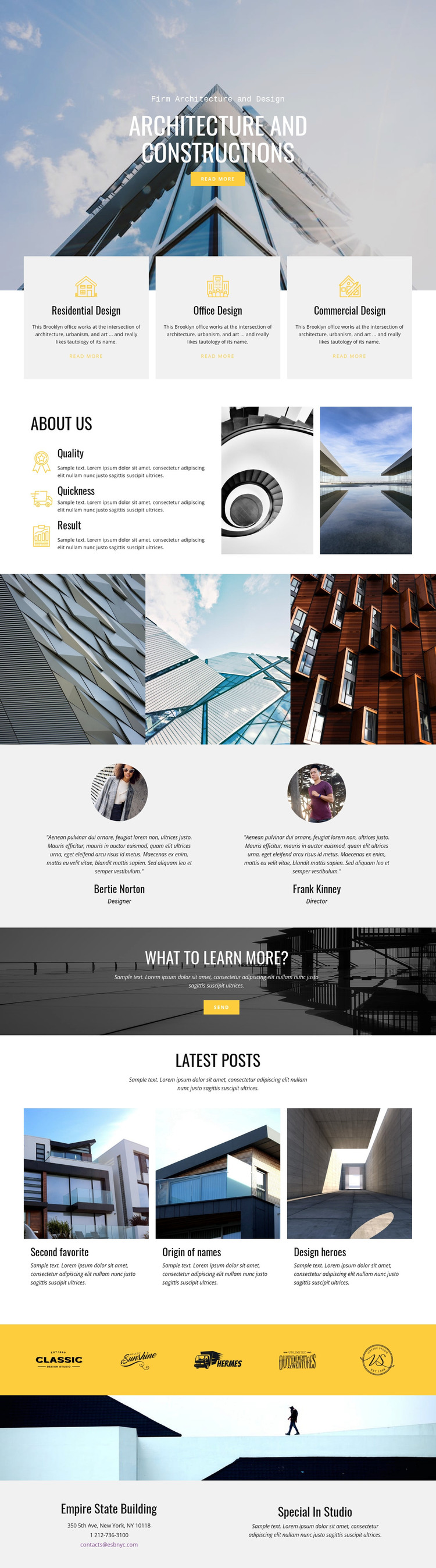
The page separates durable firm information from repeated presentation areas in a way that suits a WordPress-managed content environment. The three service cards provide stable categories for residential, office, and commercial design, while the About section can remain the central company introduction with its two images and Quality, Quickness, and Result attributes. These areas give the theme a page-oriented foundation before visitors reach the more repeatable visual and editorial content.
The three-image architectural gallery and two testimonial entries serve different content relationships: the gallery emphasizes project presentation, while each testimonial combines a portrait, quotation, name, and role. The Latest posts area then introduces three repeated image-and-text previews, making it the clearest place for regularly updated studio or design material if the project later develops that content. Five brand marks on a yellow band and the dark inquiry banner preserve the site’s shared visual character around those content areas. The final contact block keeps location, phone, email, and studio copy together as permanent contact information. This mapping lets WordPress-managed pages and future posts remain within the same architecture-focused design rather than treating the layout as only a static image showcase.
Customize with Nicepage
Open this ready-made template in the WordPress Website Builder and customize it visually in the Nicepage editor. Replace demo content, edit page sections, and adapt the design to your project without rebuilding the template from scratch.
Manage and Edit This Theme in WordPress
Customize and Install the WordPress Theme
Start with this ready-made theme instead of building the WordPress design from scratch. Customize its layout, content, typography, images, sections, and other design elements visually in Nicepage editor, then export and install the WordPress Theme, Plugin, and Pages on your WordPress site. The Nicepage WordPress Plugin lets you continue working with the site after installation.
Edit the Theme Directly in WordPress
After installation, you can edit the WordPress Theme directly in WordPress with the Nicepage WordPress Plugin. Use Site Style to customize site Colors, Fonts, Header, Footer, Blog, and Post Page Templates while working within your WordPress website.
Edit WordPress Pages Visually
Use the Nicepage WordPress Plugin to edit page content directly from the WordPress admin area. Open a WordPress Page with Nicepage and visually change its text, images, sections, and other page elements while continuing to manage the Page through WordPress.
WordPress Content and Theme Integration
Use the customized theme with WordPress Pages, Posts, Blog and Post Templates, menus, widgets, and other CMS-managed content. Shared theme elements such as Colors, Fonts, Header, Footer, Blog, and Post Page Templates can be managed as part of the overall site design, while WordPress provides the CMS environment for managing site content.
This workflow combines a ready-made WordPress Theme with visual customization, direct theme editing in WordPress, and continued content management through the Nicepage WordPress Plugin.