
Useful travel information WordPress Theme


Edit Template Offline
2. Create new page and search for id 1328616
Edit Template Online
Create Awesome Websites


Free Nicepage Builder
Keywords
Page content and recurring travel topics fit a WordPress theme structure
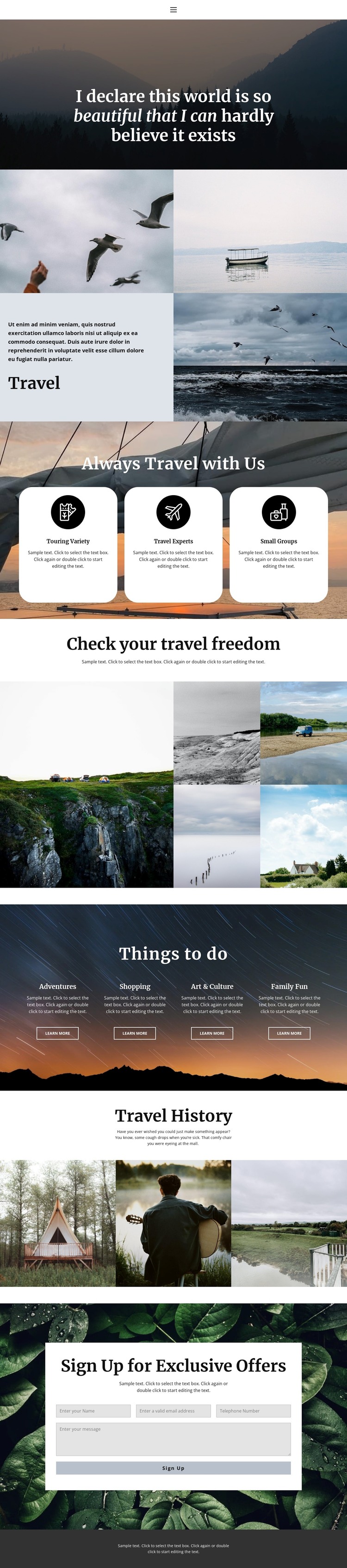
The page separates its content into clear, reusable topics rather than relying on one uninterrupted block of copy. The Travel introduction provides page-oriented subject content, and the three feature cards group Touring Variety, Travel Experts, and Small Groups as recurring informational items. The Things to do section adds four further content categories—Adventures, Shopping, Art & Culture, and Family Fun—each with its own Learn more action, creating natural boundaries for future editorial updates or supporting pages.
The two galleries contribute different kinds of publishable visual content. The five-image showcase can represent destinations or travel experiences, while the three-image Travel History gallery carries a separate historical theme. Keeping those roles distinct helps the visual system accommodate more than one content direction without losing its travel identity. The Home, About, and Contact navigation also gives the design shared site elements around which additional page content could be organized.
The exclusive-offer signup panel supplies a permanent interaction area at the end of the page. In a WordPress-managed project, the design can therefore be interpreted through page content, recurring topic groups, navigation, galleries, and the subscription region rather than through unsupported assumptions about existing posts or categories. The visual character remains consistent while the project’s actual travel copy and regularly updated material are added to the confirmed structure.
Customize with Nicepage
Open this ready-made template in the WordPress Website Builder and customize it visually in the Nicepage editor. Replace demo content, edit page sections, and adapt the design to your project without rebuilding the template from scratch.
Manage and Edit This Theme in WordPress
Customize and Install the WordPress Theme
Start with this ready-made theme instead of building the WordPress design from scratch. Customize its layout, content, typography, images, sections, and other design elements visually in Nicepage editor, then export and install the WordPress Theme, Plugin, and Pages on your WordPress site. The Nicepage WordPress Plugin lets you continue working with the site after installation.
Edit the Theme Directly in WordPress
After installation, you can edit the WordPress Theme directly in WordPress with the Nicepage WordPress Plugin. Use Site Style to customize site Colors, Fonts, Header, Footer, Blog, and Post Page Templates while working within your WordPress website.
Edit WordPress Pages Visually
Use the Nicepage WordPress Plugin to edit page content directly from the WordPress admin area. Open a WordPress Page with Nicepage and visually change its text, images, sections, and other page elements while continuing to manage the Page through WordPress.
WordPress Content and Theme Integration
Use the customized theme with WordPress Pages, Posts, Blog and Post Templates, menus, widgets, and other CMS-managed content. Shared theme elements such as Colors, Fonts, Header, Footer, Blog, and Post Page Templates can be managed as part of the overall site design, while WordPress provides the CMS environment for managing site content.
This workflow combines a ready-made WordPress Theme with visual customization, direct theme editing in WordPress, and continued content management through the Nicepage WordPress Plugin.





















