Making travel easier and wonderful WordPress Theme


Edit Template Offline
2. Create new page and search for id 5389188
Edit Template Online
Create Awesome Websites


Free Nicepage Builder
Keywords
Service content and visual recreation areas suit a WordPress page structure
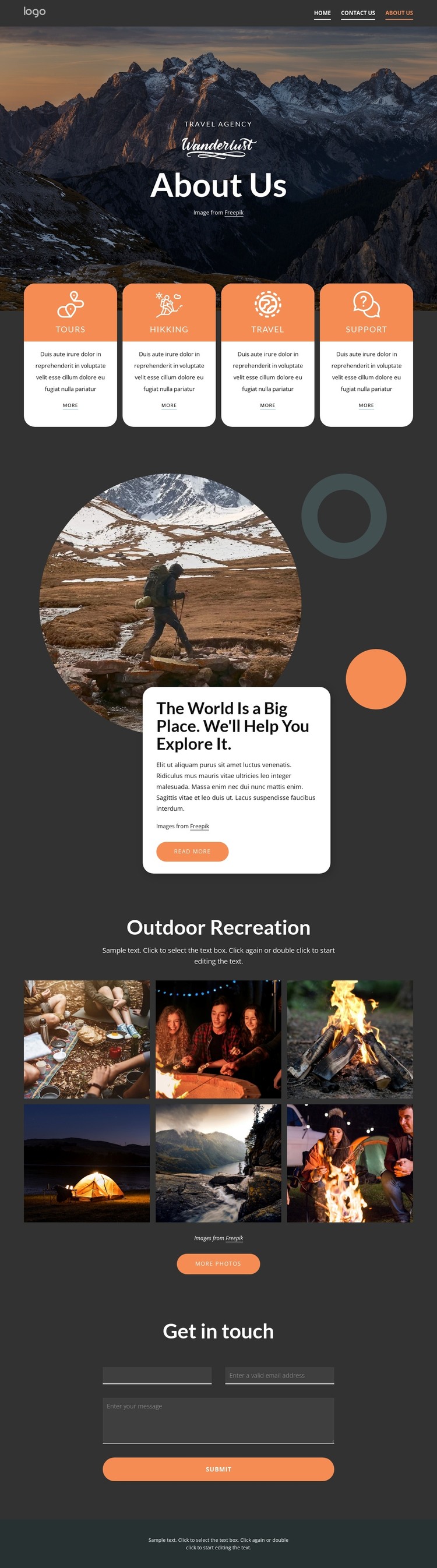
The page-oriented content is divided into areas that can remain permanent parts of a travel site’s visual system. The navigation links provide the surrounding page context, while the About Us hero introduces the agency before the four service cards explain its categories: Tours, Hikking, Travel, and Support. These repeated cards are especially useful as page content because each category has a recognizable place and action link without requiring the design to be rebuilt as a single block of text.
The exploration section adds a more editorial relationship between image and explanation. A circular outdoor photograph sits beside an overlapping white card under the statement “The World Is a Big Place. We’ll Help You Explore It,” allowing the page to combine travel atmosphere with descriptive content. The six-image Outdoor Recreation gallery can then support visual project or activity content, while the More photos action provides a natural continuation point. At the bottom, the Get in touch form gives the page a defined communication area for name, email, and message information. WordPress Pages could organize these permanent content regions, while regularly updated content would need separate verification before being described as posts or a blog. The WordPress environment can therefore support this theme’s page content without changing the confirmed hierarchy of services, imagery, contact, and footer.
Customize with Nicepage
Open this ready-made template in the WordPress Website Builder and customize it visually in the Nicepage editor. Replace demo content, edit page sections, and adapt the design to your project without rebuilding the template from scratch.
Manage and Edit This Theme in WordPress
Customize and Install the WordPress Theme
Start with this ready-made theme instead of building the WordPress design from scratch. Customize its layout, content, typography, images, sections, and other design elements visually in Nicepage editor, then export and install the WordPress Theme, Plugin, and Pages on your WordPress site. The Nicepage WordPress Plugin lets you continue working with the site after installation.
Edit the Theme Directly in WordPress
After installation, you can edit the WordPress Theme directly in WordPress with the Nicepage WordPress Plugin. Use Site Style to customize site Colors, Fonts, Header, Footer, Blog, and Post Page Templates while working within your WordPress website.
Edit WordPress Pages Visually
Use the Nicepage WordPress Plugin to edit page content directly from the WordPress admin area. Open a WordPress Page with Nicepage and visually change its text, images, sections, and other page elements while continuing to manage the Page through WordPress.
WordPress Content and Theme Integration
Use the customized theme with WordPress Pages, Posts, Blog and Post Templates, menus, widgets, and other CMS-managed content. Shared theme elements such as Colors, Fonts, Header, Footer, Blog, and Post Page Templates can be managed as part of the overall site design, while WordPress provides the CMS environment for managing site content.
This workflow combines a ready-made WordPress Theme with visual customization, direct theme editing in WordPress, and continued content management through the Nicepage WordPress Plugin.