Dark Fiction Author Template


Edit Template Offline
2. Create new page and search for id 6661499
Edit Template Online
Create Awesome Websites


Free Nicepage Builder
Keywords
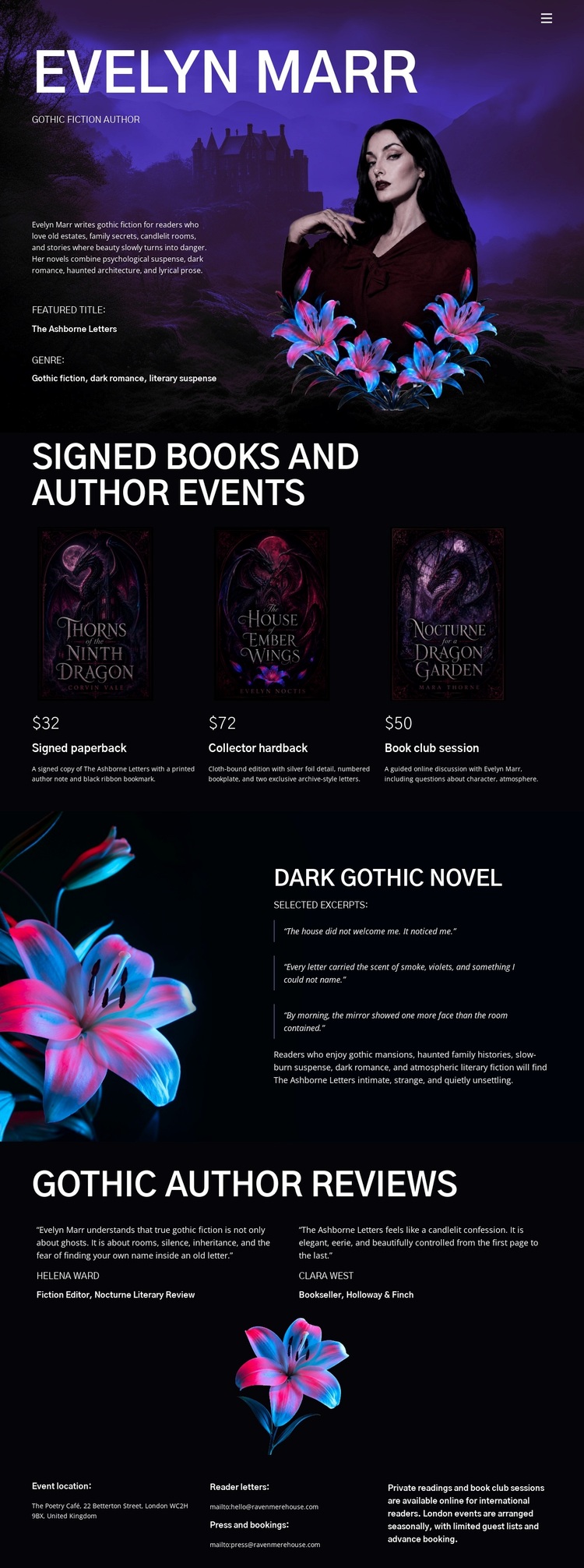
Portrait mood, book choices, and review excerpts define this literary option
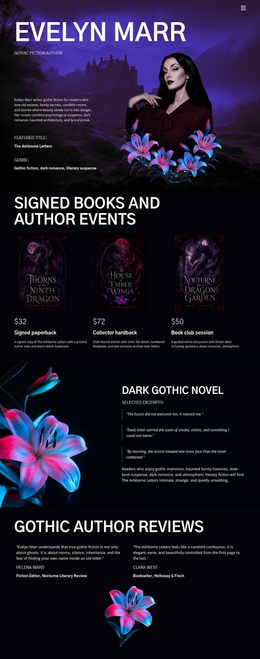
The page begins with a full-width portrait scene that makes atmosphere part of the author introduction rather than treating it as decoration added later. Evelyn Marr’s name, short biography, and featured-title label sit within that dark purple setting, immediately establishing a gothic literary direction. The three adjacent book cards then turn that direction into a clear set of offerings, combining cover images, titles, displayed prices, and short descriptions in a compact comparison area.
The design also gives the featured dark gothic novel a different kind of attention. Its large floral artwork, editorial description, selected excerpts, and highlighted text create a more immersive reading moment than the repeated book-card pattern. Author events extend the page beyond book presentation, while the closing group of three review excerpts adds reader or publication response around a central floral illustration. These relationships give the design more range than a simple author biography or product list.
This option is worth considering when the project needs visual storytelling to carry as much meaning as the written content. The deep black and purple palette, luminous blue and pink floral imagery, condensed uppercase headings, and restrained editorial text create a distinctive direction for gothic fiction promotion. Rather than relying on dense corporate information, the page connects identity, books, event interest, featured prose, and reviews into one recognizable literary experience.
Customize with Nicepage
Open this ready-made template in the Template Builder and customize it visually in the Nicepage editor. Replace demo content, edit page sections, and adapt the design to your project without rebuilding the template from scratch.
Start With a Ready-Made Template
Choose a Design for a New Page
Use a ready-made template as a starting point instead of creating every page from a blank canvas. When adding a new page in Nicepage, browse available designs, compare different layouts, and choose an option that already fits the general purpose and visual direction of your project.
Browse Different Page Designs
Explore Page Designs using search, thematic categories, Design Sets, and full-page previews. The collection includes layouts for different subjects and page purposes, making it easier to compare alternatives before selecting a design to customize.
Customize the Selected Template
After choosing a design, create the page and continue editing it visually in Nicepage. Replace the demo content, adjust images, typography, colors, sections, and other elements, and adapt the ready-made layout to your own content instead of rebuilding the design from the beginning.
Explore More Design Directions
If the first option does not match your project closely enough, return to the design collection and compare other templates before committing to a layout. This makes the template library useful not only for faster page creation, but also for exploring different visual approaches and finding a suitable starting point for a new project.
This workflow gives you access to a broad collection of ready-made designs that can be selected, compared, and customized according to the needs of each new page or project.