Legengs of jazz music Template



Edit Template Offline
2. Create new page and search for id 13021
Edit Template Online
Create Awesome Websites


Free Nicepage Builder
Keywords
Festival Features and Reference Panels Broaden the Jazz Story
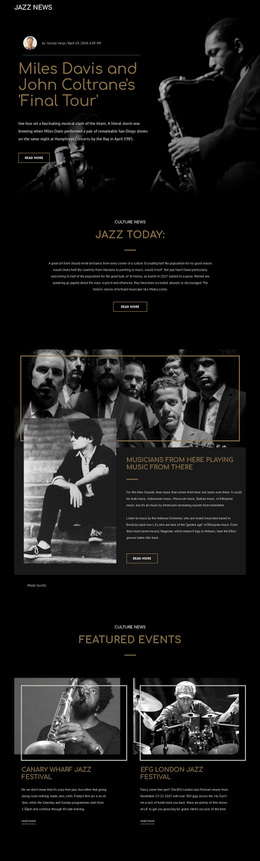
The strongest reason to choose this design is its combination of editorial depth and visual coverage. The lead article supplies an immediate cultural subject through the Miles Davis and John Coltrane “Final Tour” story, complete with a large portrait image, byline, date, and reading action. The Jazz Today introduction then frames the page as an ongoing culture-news publication rather than a single isolated article. A second musician feature adds another perspective and keeps imagery central to the storytelling.
The design also covers content that many article-led layouts leave out. Two matching event cards give festival information a visible place, while the four-image concert gallery turns live music photography into a major visual section. The three panels on History, Jazz Piano, and Artists add concise educational entry points for readers who want background information. Together, these relationships make the template a useful option for jazz magazines, event publications, music archives, or culture-focused editorial projects that need both reading and exploration. Its dark monochromatic treatment, gold accents, thin frames, and generous spacing distinguish it from layouts centered only on services, products, or dense text.
Customize with Nicepage
Open this ready-made template in the Template Builder and customize it visually in the Nicepage editor. Replace demo content, edit page sections, and adapt the design to your project without rebuilding the template from scratch.
Start With a Ready-Made Template
Choose a Design for a New Page
Use a ready-made template as a starting point instead of creating every page from a blank canvas. When adding a new page in Nicepage, browse available designs, compare different layouts, and choose an option that already fits the general purpose and visual direction of your project.
Browse Different Page Designs
Explore Page Designs using search, thematic categories, Design Sets, and full-page previews. The collection includes layouts for different subjects and page purposes, making it easier to compare alternatives before selecting a design to customize.
Customize the Selected Template
After choosing a design, create the page and continue editing it visually in Nicepage. Replace the demo content, adjust images, typography, colors, sections, and other elements, and adapt the ready-made layout to your own content instead of rebuilding the design from the beginning.
Explore More Design Directions
If the first option does not match your project closely enough, return to the design collection and compare other templates before committing to a layout. This makes the template library useful not only for faster page creation, but also for exploring different visual approaches and finding a suitable starting point for a new project.
This workflow gives you access to a broad collection of ready-made designs that can be selected, compared, and customized according to the needs of each new page or project.