Land Cruiser conqueror car Template


Edit Template Offline
2. Create new page and search for id 25392
Edit Template Online
Create Awesome Websites


Free Nicepage Builder
Keywords
A Feature-Led Choice for Land Cruiser Storytelling
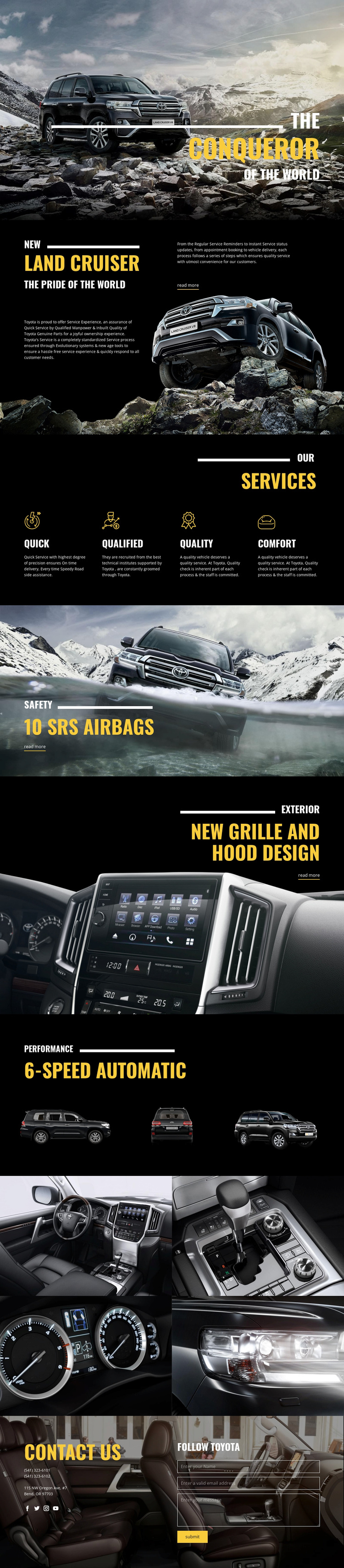
Large vehicle photography carries much of the page’s message, beginning with the mountain scene behind the Conqueror heading. That opening makes the design a useful option for projects where the vehicle itself should remain the primary subject rather than being reduced to a small image beside dense specifications. The following Land Cruiser section adds product explanation and Toyota service context, giving the visual introduction a clearer informational foundation.
The design also covers several reasons a visitor might examine the vehicle. Four service values—Quick, Qualified, Quality, and Comfort—provide a compact service-oriented layer. The separate 10 SRS AIRBAGS, NEW GRILLE AND HOOD DESIGN, and 6-SPEED AUTOMATIC sections then divide safety, exterior appearance, and performance into memorable content moments. Three vehicle views and the later four-image gallery reinforce the image-led direction without changing the page’s central subject.
This combination distinguishes the design from a layout built mainly around pricing tables, long articles, or generic service cards. It is especially suited to a focused automotive product presentation that needs a strong visual opening, several feature highlights, and a final route to Toyota contact content. The selection value comes from the relationship between dramatic imagery and clearly labeled vehicle evidence, not from an unsupported claim about the demo business details.
Customize with Nicepage
Open this ready-made template in the Template Builder and customize it visually in the Nicepage editor. Replace demo content, edit page sections, and adapt the design to your project without rebuilding the template from scratch.
Start With a Ready-Made Template
Choose a Design for a New Page
Use a ready-made template as a starting point instead of creating every page from a blank canvas. When adding a new page in Nicepage, browse available designs, compare different layouts, and choose an option that already fits the general purpose and visual direction of your project.
Browse Different Page Designs
Explore Page Designs using search, thematic categories, Design Sets, and full-page previews. The collection includes layouts for different subjects and page purposes, making it easier to compare alternatives before selecting a design to customize.
Customize the Selected Template
After choosing a design, create the page and continue editing it visually in Nicepage. Replace the demo content, adjust images, typography, colors, sections, and other elements, and adapt the ready-made layout to your own content instead of rebuilding the design from the beginning.
Explore More Design Directions
If the first option does not match your project closely enough, return to the design collection and compare other templates before committing to a layout. This makes the template library useful not only for faster page creation, but also for exploring different visual approaches and finding a suitable starting point for a new project.
This workflow gives you access to a broad collection of ready-made designs that can be selected, compared, and customized according to the needs of each new page or project.