Luxury Private Jet Template


Edit Template Offline
2. Create new page and search for id 6649042
Edit Template Online
Create Awesome Websites


Free Nicepage Builder
Keywords
Aircraft Imagery and Route Cards Make the Design Distinctive
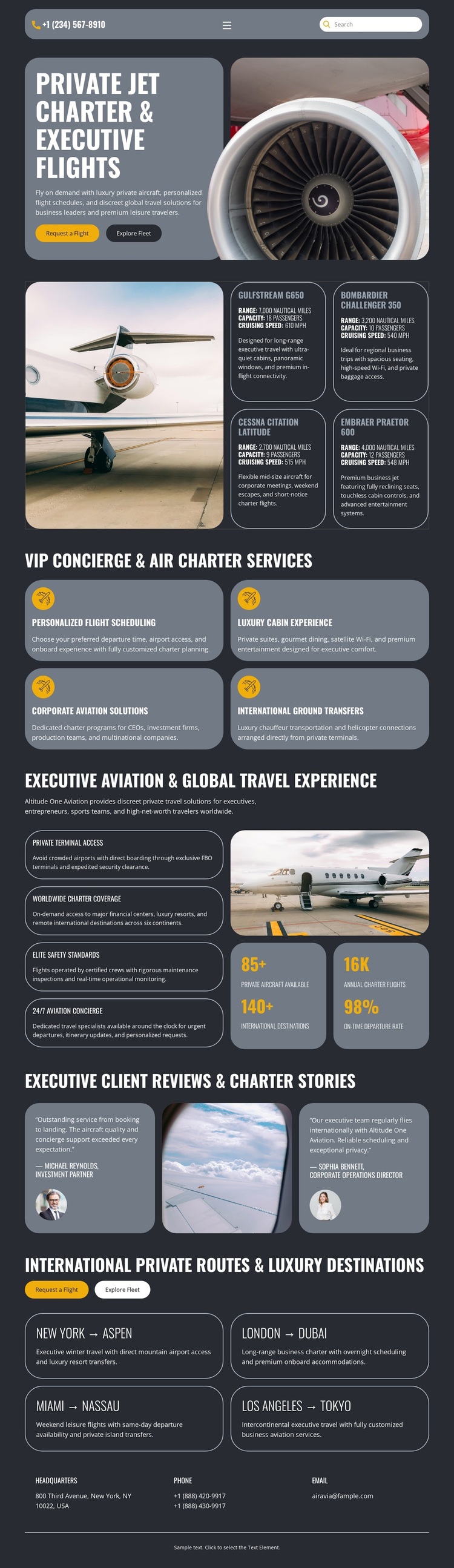
Large aircraft photography carries the subject from the opening charter message into the service, experience, review, and destination sections. That repeated visual emphasis makes the design a strong option for projects where aviation and travel imagery should introduce the offer before visitors work through detailed information. The dark charcoal background and condensed white headings reinforce the executive tone, while muted gray panels keep the content organized rather than allowing the photography to become the only point of focus.
The content coverage also separates this design from a page built around a single service list. Four cards explain personalized flight scheduling, luxury cabin experience, corporate aviation solutions, and international ground transfers. The experience section adds private terminal access, worldwide route coverage, elite guest standards, and 24/7 aviation concierge messaging. Together, these elements present both the service promise and the surrounding travel experience. Two client review cards add a dedicated proof section, giving the page another content role beyond describing the offer.
Four route cards—New York–Aspen, London–Dubai, Miami–Nassau, and Los Angeles–Tokyo—provide a concrete travel layer, while Request a flight and Explore fleet buttons make the design suitable for charter-oriented projects. The displayed metrics and demo route details should be verified before publication, but their structural presence shows the template’s range. It is worth choosing when a project needs premium aviation imagery, service coverage, destination storytelling, and visible inquiry paths in one coherent starting design.
Customize with Nicepage
Open this ready-made template in the Template Builder and customize it visually in the Nicepage editor. Replace demo content, edit page sections, and adapt the design to your project without rebuilding the template from scratch.
Start With a Ready-Made Template
Choose a Design for a New Page
Use a ready-made template as a starting point instead of creating every page from a blank canvas. When adding a new page in Nicepage, browse available designs, compare different layouts, and choose an option that already fits the general purpose and visual direction of your project.
Browse Different Page Designs
Explore Page Designs using search, thematic categories, Design Sets, and full-page previews. The collection includes layouts for different subjects and page purposes, making it easier to compare alternatives before selecting a design to customize.
Customize the Selected Template
After choosing a design, create the page and continue editing it visually in Nicepage. Replace the demo content, adjust images, typography, colors, sections, and other elements, and adapt the ready-made layout to your own content instead of rebuilding the design from the beginning.
Explore More Design Directions
If the first option does not match your project closely enough, return to the design collection and compare other templates before committing to a layout. This makes the template library useful not only for faster page creation, but also for exploring different visual approaches and finding a suitable starting point for a new project.
This workflow gives you access to a broad collection of ready-made designs that can be selected, compared, and customized according to the needs of each new page or project.