Advanced innovation cars Template


Edit Template Offline
2. Create new page and search for id 17201
Edit Template Online
Create Awesome Websites


Free Nicepage Builder
Keywords
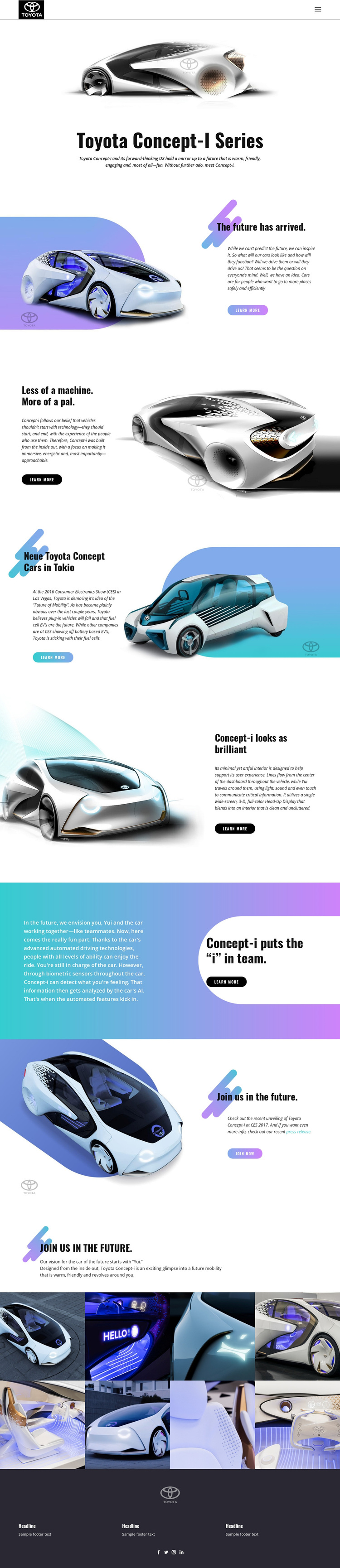
Eight Vehicle and Interior Views Extend the Concept Story
The design is a strong option for projects that need automotive innovation to be communicated through both imagery and short, clearly separated ideas. The opening Toyota Concept-i presentation establishes the subject immediately, while the split sections add different reasons to keep exploring: future mobility, the relationship between people and the machine, the Yui experience, interior and interface design, and automated driving technologies. This range gives the page more depth than a layout focused only on exterior photography or a single technical specification block.
The visual direction also makes the template distinctive. Large vehicle scenes carry the emotional and editorial weight, while bold condensed headings turn statements such as “The future has arrived” and “Less of a machine. More of a pal.” into memorable pauses. Pale blue, cyan, and purple gradient fields add a technology-oriented atmosphere without replacing the white space that keeps the presentation readable. Near the end, an explicit invitation to join the future leads into a gallery of eight vehicle and interior images, allowing the concept to be reviewed from multiple visual angles. This combination suits a concept-car presentation, mobility campaign, design study, or technology showcase that needs a ready-made choice with strong storytelling, recognizable imagery, and enough content variety to hold attention across a long page.
Customize with Nicepage
Open this ready-made template in the Template Builder and customize it visually in the Nicepage editor. Replace demo content, edit page sections, and adapt the design to your project without rebuilding the template from scratch.
Start With a Ready-Made Template
Choose a Design for a New Page
Use a ready-made template as a starting point instead of creating every page from a blank canvas. When adding a new page in Nicepage, browse available designs, compare different layouts, and choose an option that already fits the general purpose and visual direction of your project.
Browse Different Page Designs
Explore Page Designs using search, thematic categories, Design Sets, and full-page previews. The collection includes layouts for different subjects and page purposes, making it easier to compare alternatives before selecting a design to customize.
Customize the Selected Template
After choosing a design, create the page and continue editing it visually in Nicepage. Replace the demo content, adjust images, typography, colors, sections, and other elements, and adapt the ready-made layout to your own content instead of rebuilding the design from the beginning.
Explore More Design Directions
If the first option does not match your project closely enough, return to the design collection and compare other templates before committing to a layout. This makes the template library useful not only for faster page creation, but also for exploring different visual approaches and finding a suitable starting point for a new project.
This workflow gives you access to a broad collection of ready-made designs that can be selected, compared, and customized according to the needs of each new page or project.