Varied lunches WordPress Theme


Six Dinner Categories Form Structured WordPress Page Content
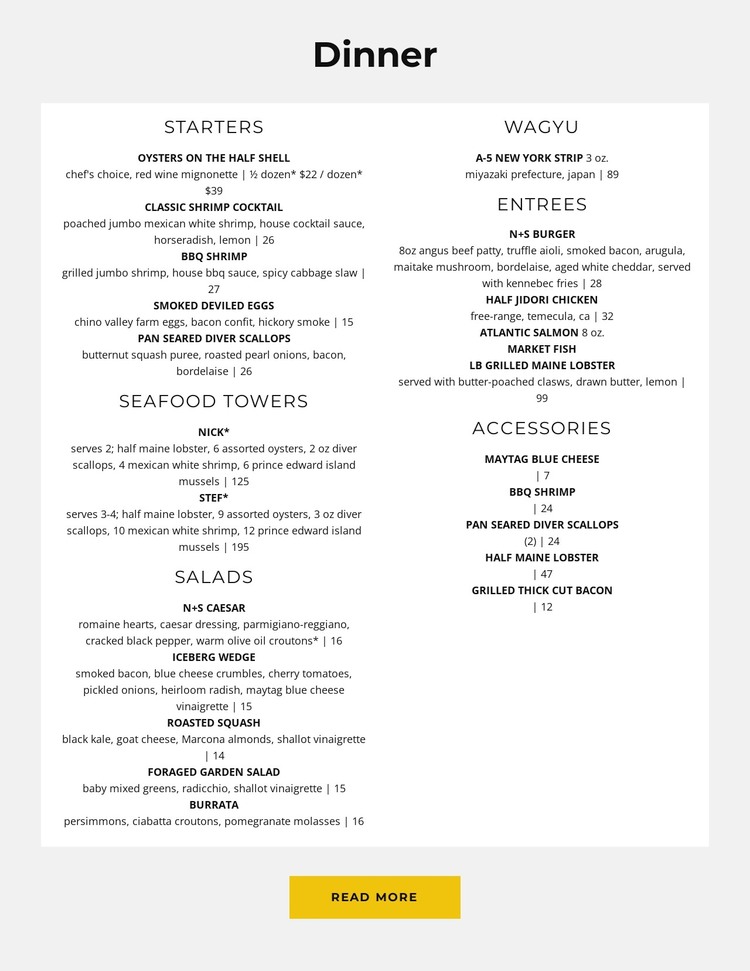
The “Dinner” heading establishes a clear subject for the section, and the white panel turns that subject into organized restaurant content. Six category groups—Starters, Seafood Towers, Salads, Wagyu, Entrees, and Accessories—divide the menu into recognizable information units. The two-column arrangement allows the categories to share one section while preserving a readable distinction between groups. Repeated dish names, descriptions, and displayed prices give the content a consistent pattern; Starters, Salads, and Accessories each show five listed items. The light gray surrounding field and generous vertical spacing keep the menu visually separate from other page content.
In a WordPress-managed project, this block can function as stable dinner information on a restaurant page rather than as a complete theme. Its structured categories are suitable for permanent page content that visitors can scan alongside other sections for the restaurant story, reservations, location, or contact details. The bold uppercase dish names provide quick visual markers, while the lighter descriptions support more detailed reading. The yellow Read More button can lead visitors toward additional menu or restaurant information, with the surrounding WordPress page handling the broader content structure. This makes the section useful when a site needs a defined menu area with enough detail to stand on its own within a larger page.
Customize with Nicepage
Open this ready-made template in the WordPress Website Builder and customize it visually in the Nicepage editor. Replace demo content, edit page sections, and adapt the design to your project without rebuilding the template from scratch.
Edit Template Offline
2. Create a new page or select existing
3. Click Add new block, search for id 5709183 and click enter
Edit Template Online
Create Awesome Websites


Free Nicepage Builder
Keywords
Manage and Edit This Theme in WordPress
Customize and Install the WordPress Theme
Start with this ready-made theme instead of building the WordPress design from scratch. Customize its layout, content, typography, images, sections, and other design elements visually in Nicepage editor, then export and install the WordPress Theme, Plugin, and Pages on your WordPress site. The Nicepage WordPress Plugin lets you continue working with the site after installation.
Edit the Theme Directly in WordPress
After installation, you can edit the WordPress Theme directly in WordPress with the Nicepage WordPress Plugin. Use Site Style to customize site Colors, Fonts, Header, Footer, Blog, and Post Page Templates while working within your WordPress website.
Edit WordPress Pages Visually
Use the Nicepage WordPress Plugin to edit page content directly from the WordPress admin area. Open a WordPress Page with Nicepage and visually change its text, images, sections, and other page elements while continuing to manage the Page through WordPress.
WordPress Content and Theme Integration
Use the customized theme with WordPress Pages, Posts, Blog and Post Templates, menus, widgets, and other CMS-managed content. Shared theme elements such as Colors, Fonts, Header, Footer, Blog, and Post Page Templates can be managed as part of the overall site design, while WordPress provides the CMS environment for managing site content.
This workflow combines a ready-made WordPress Theme with visual customization, direct theme editing in WordPress, and continued content management through the Nicepage WordPress Plugin.