Bbq weekend WordPress Theme



Permanent Event Content With a Strong Visual Entry Point
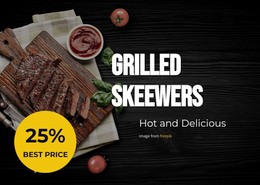
The event heading and activity details read as stable page content rather than as a stream of changing editorial items. “BBQ Weekend” establishes the subject, while Music / Food and Beer / Dance provide a concise description of the event’s offering. The grilled-food photograph reinforces that subject visually, and the circular badge isolates the displayed 28 April date so it can be found quickly beneath the main information. This gives the section a clear content pattern for a WordPress-managed page.
A wider WordPress project can place this block on an event, restaurant, or festival page while other content areas provide longer descriptions, schedules, venue information, or related updates. The section itself remains a reusable visual region, not a standalone WordPress Theme. Its dark wood background and bold type create a strong entry point, while the repeated yellow accent links the highlighted heading word with the date badge. The image attribution line should remain with the photograph as part of the section’s presentation. This interpretation emphasizes the block as publishable page content with a defined subject and visual hierarchy, leaving CMS-level page organization and additional editorial material to the surrounding project.
Customize with Nicepage
Open this ready-made template in the WordPress Website Builder and customize it visually in the Nicepage editor. Replace demo content, edit page sections, and adapt the design to your project without rebuilding the template from scratch.
Edit Template Offline
2. Create a new page or select existing
3. Click Add new block, search for id 5708511 and click enter
Edit Template Online
Create Awesome Websites


Free Nicepage Builder
Keywords
Manage and Edit This Theme in WordPress
Customize and Install the WordPress Theme
Start with this ready-made theme instead of building the WordPress design from scratch. Customize its layout, content, typography, images, sections, and other design elements visually in Nicepage editor, then export and install the WordPress Theme, Plugin, and Pages on your WordPress site. The Nicepage WordPress Plugin lets you continue working with the site after installation.
Edit the Theme Directly in WordPress
After installation, you can edit the WordPress Theme directly in WordPress with the Nicepage WordPress Plugin. Use Site Style to customize site Colors, Fonts, Header, Footer, Blog, and Post Page Templates while working within your WordPress website.
Edit WordPress Pages Visually
Use the Nicepage WordPress Plugin to edit page content directly from the WordPress admin area. Open a WordPress Page with Nicepage and visually change its text, images, sections, and other page elements while continuing to manage the Page through WordPress.
WordPress Content and Theme Integration
Use the customized theme with WordPress Pages, Posts, Blog and Post Templates, menus, widgets, and other CMS-managed content. Shared theme elements such as Colors, Fonts, Header, Footer, Blog, and Post Page Templates can be managed as part of the overall site design, while WordPress provides the CMS environment for managing site content.
This workflow combines a ready-made WordPress Theme with visual customization, direct theme editing in WordPress, and continued content management through the Nicepage WordPress Plugin.