Ice cream menu WordPress Theme


Eight dessert photographs form stable page content
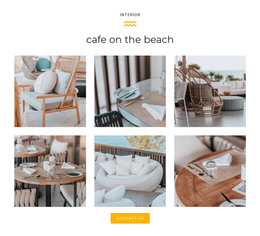
The centered “Ice Cream Menu” heading and eight-image gallery read as a defined content area that can remain part of a WordPress-managed page. The four-column, two-row arrangement groups photographs of ice cream, frozen desserts, fruit, and pastries into one stable visual presentation. Visitors can browse the complete collection and open individual images through the lightbox behavior, giving the section both overview and detail states.
In a WordPress-oriented project, this block can hold permanent gallery content alongside other page sections. Its white background and centered alignment make the section easy to place within a broader layout, while the repeated tile proportions provide a consistent visual pattern when related content is added elsewhere. The source credit beneath the images remains a natural part of the page content and keeps the visual attribution visible.
The section’s role is page-oriented rather than editorially time-sensitive: it presents a recognizable dessert collection that can sit on a menu, story, or visual showcase page while other CMS-managed content develops around it. The wider WordPress project can provide navigation, additional descriptions, or regularly updated material, while this block retains its own heading, image sequence, lightbox interaction, and credit as a coherent gallery region.
Customize with Nicepage
Open this ready-made template in the WordPress Website Builder and customize it visually in the Nicepage editor. Replace demo content, edit page sections, and adapt the design to your project without rebuilding the template from scratch.
Edit Template Offline
2. Create a new page or select existing
3. Click Add new block, search for id 1173002 and click enter
Edit Template Online
Create Awesome Websites


Free Nicepage Builder
Keywords
Manage and Edit This Theme in WordPress
Customize and Install the WordPress Theme
Start with this ready-made theme instead of building the WordPress design from scratch. Customize its layout, content, typography, images, sections, and other design elements visually in Nicepage editor, then export and install the WordPress Theme, Plugin, and Pages on your WordPress site. The Nicepage WordPress Plugin lets you continue working with the site after installation.
Edit the Theme Directly in WordPress
After installation, you can edit the WordPress Theme directly in WordPress with the Nicepage WordPress Plugin. Use Site Style to customize site Colors, Fonts, Header, Footer, Blog, and Post Page Templates while working within your WordPress website.
Edit WordPress Pages Visually
Use the Nicepage WordPress Plugin to edit page content directly from the WordPress admin area. Open a WordPress Page with Nicepage and visually change its text, images, sections, and other page elements while continuing to manage the Page through WordPress.
WordPress Content and Theme Integration
Use the customized theme with WordPress Pages, Posts, Blog and Post Templates, menus, widgets, and other CMS-managed content. Shared theme elements such as Colors, Fonts, Header, Footer, Blog, and Post Page Templates can be managed as part of the overall site design, while WordPress provides the CMS environment for managing site content.
This workflow combines a ready-made WordPress Theme with visual customization, direct theme editing in WordPress, and continued content management through the Nicepage WordPress Plugin.