
Innovative business development WordPress Theme


Edit Template Offline
2. Create new page and search for id 522199
Edit Template Online
Create Awesome Websites


Free Nicepage Builder
Keywords
Projects, Profiles, and Testimonials Support Managed Page Content
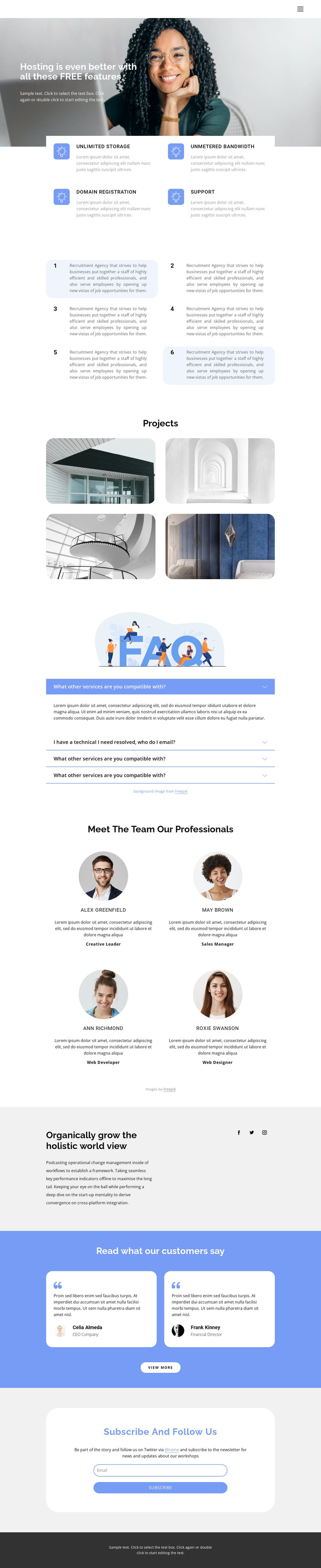
The four-image Projects gallery gives the design a strong page-oriented content area, while the four team profiles create a separate presentation for people and roles. These sections sit within a larger sequence that begins with four hosting feature cards and six numbered recruitment statements. The repeated cards make each content group recognizable, but the gallery and profile layouts introduce visual variation without breaking the shared page language.
The accordion adds four question-and-answer rows for information that may need a compact presentation. Farther down, two testimonial cards provide customer-perspective content, and the company statement with three social links extends the page beyond services into organizational identity. The supplied names, roles, testimonial text, and sample statements should be replaced or verified before publication; their reliable value here is the structure they demonstrate. The final email subscription control creates a natural area for audience updates or newsletter communication.
These relationships make the design suitable for a WordPress-oriented content environment: permanent company information can remain on the page while project, profile, testimonial, or editorial material is updated as the site develops. WordPress Pages could hold the main company and service information, while other managed content may be connected later if the project requires it. The theme interpretation therefore comes from the separation of content areas and their reuse within one visual system, not from claiming that blog or post structures already exist.
Customize with Nicepage
Open this ready-made template in the WordPress Website Builder and customize it visually in the Nicepage editor. Replace demo content, edit page sections, and adapt the design to your project without rebuilding the template from scratch.
Manage and Edit This Theme in WordPress
Customize and Install the WordPress Theme
Start with this ready-made theme instead of building the WordPress design from scratch. Customize its layout, content, typography, images, sections, and other design elements visually in Nicepage editor, then export and install the WordPress Theme, Plugin, and Pages on your WordPress site. The Nicepage WordPress Plugin lets you continue working with the site after installation.
Edit the Theme Directly in WordPress
After installation, you can edit the WordPress Theme directly in WordPress with the Nicepage WordPress Plugin. Use Site Style to customize site Colors, Fonts, Header, Footer, Blog, and Post Page Templates while working within your WordPress website.
Edit WordPress Pages Visually
Use the Nicepage WordPress Plugin to edit page content directly from the WordPress admin area. Open a WordPress Page with Nicepage and visually change its text, images, sections, and other page elements while continuing to manage the Page through WordPress.
WordPress Content and Theme Integration
Use the customized theme with WordPress Pages, Posts, Blog and Post Templates, menus, widgets, and other CMS-managed content. Shared theme elements such as Colors, Fonts, Header, Footer, Blog, and Post Page Templates can be managed as part of the overall site design, while WordPress provides the CMS environment for managing site content.
This workflow combines a ready-made WordPress Theme with visual customization, direct theme editing in WordPress, and continued content management through the Nicepage WordPress Plugin.





















