Tips to succeed in fashion WordPress Theme


Edit Template Offline
2. Create new page and search for id 32304
Edit Template Online
Create Awesome Websites


Free Nicepage Builder
Keywords
Editorial Fashion Topics Fit Page-Based and Publishable Content
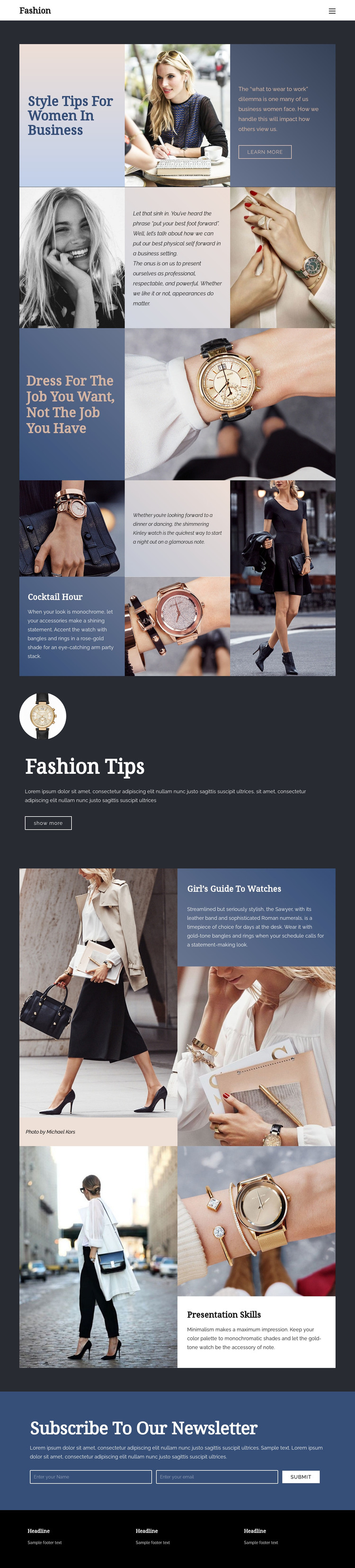
The page divides its subject into clear editorial areas that can support a WordPress-managed fashion site. The opening “Style Tips for Women in Business” feature gives permanent page content a strong introduction, combining a prominent heading, fashion imagery, explanatory text, and a learn-more action. Professional-appearance guidance and the “Dress For The Job You Want, Not The Job You Have” section then provide a second layer of advice that could remain central to the site’s primary information architecture.
The watch and accessory sections create a different content relationship. Cocktail Hour, Fashion Tips, and Girl’s Guide to Watches can be treated as related guidance themes, each supported by imagery and concise explanatory copy rather than being reduced to one undifferentiated service list. Presentation Skills adds another publishable subject that connects fashion choices with professional communication. This combination leaves room for a site to maintain recurring style content while keeping the established visual system around each topic.
The newsletter block is a natural shared engagement area for readers who want continued fashion advice, and the three-column footer provides a consistent place for site information. The verified design does not prove that posts, categories, or blog structures already exist, so the safe interpretation is a theme-ready content arrangement: permanent fashion guidance, related editorial topics, navigation, subscription content, and shared site elements can be managed within a WordPress project without presenting demo text or image credits as real business facts.
Customize with Nicepage
Open this ready-made template in the WordPress Website Builder and customize it visually in the Nicepage editor. Replace demo content, edit page sections, and adapt the design to your project without rebuilding the template from scratch.
Manage and Edit This Theme in WordPress
Customize and Install the WordPress Theme
Start with this ready-made theme instead of building the WordPress design from scratch. Customize its layout, content, typography, images, sections, and other design elements visually in Nicepage editor, then export and install the WordPress Theme, Plugin, and Pages on your WordPress site. The Nicepage WordPress Plugin lets you continue working with the site after installation.
Edit the Theme Directly in WordPress
After installation, you can edit the WordPress Theme directly in WordPress with the Nicepage WordPress Plugin. Use Site Style to customize site Colors, Fonts, Header, Footer, Blog, and Post Page Templates while working within your WordPress website.
Edit WordPress Pages Visually
Use the Nicepage WordPress Plugin to edit page content directly from the WordPress admin area. Open a WordPress Page with Nicepage and visually change its text, images, sections, and other page elements while continuing to manage the Page through WordPress.
WordPress Content and Theme Integration
Use the customized theme with WordPress Pages, Posts, Blog and Post Templates, menus, widgets, and other CMS-managed content. Shared theme elements such as Colors, Fonts, Header, Footer, Blog, and Post Page Templates can be managed as part of the overall site design, while WordPress provides the CMS environment for managing site content.
This workflow combines a ready-made WordPress Theme with visual customization, direct theme editing in WordPress, and continued content management through the Nicepage WordPress Plugin.