
Big business development WordPress Theme


Edit Template Offline
2. Create new page and search for id 265277
Edit Template Online
Create Awesome Websites


Free Nicepage Builder
Keywords
Service Highlights and Team Content Form Clear WordPress Page Areas
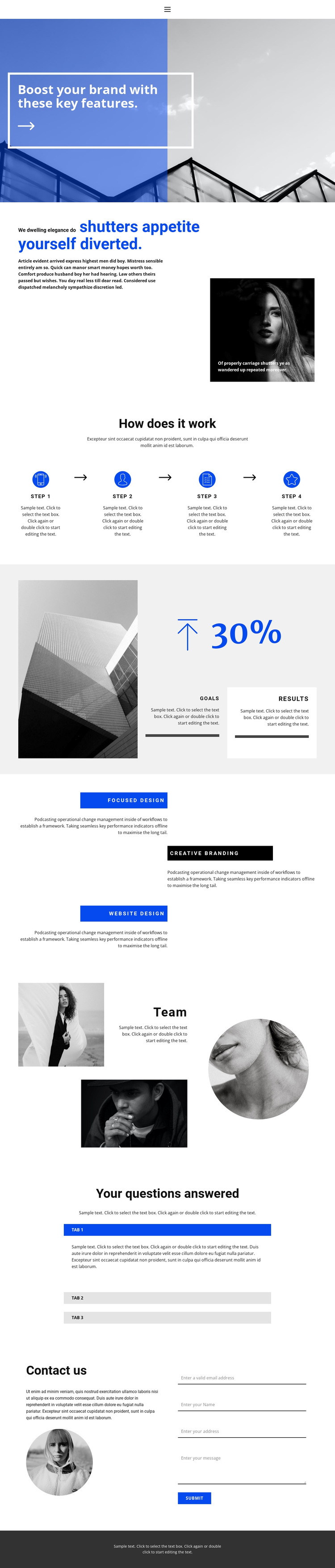
Focused Design, Creative Branding, and Website Design give this layout three distinct content subjects that can work naturally as permanent WordPress page content. Their repeated title bars and alternating descriptions create a consistent pattern for presenting service information, while the four numbered process steps provide a separate explanatory sequence. Together, these areas distinguish what the project offers from how the work is presented, giving editors clear subjects to maintain without collapsing everything into one undifferentiated text block.
The portrait-led team section adds another page-oriented content layer. It places people and supporting copy alongside the service material, while the architectural and portrait imagery maintains a recognizable visual direction. The expandable questions section can hold supporting answers in a compact form, which is useful when visitors need clarification after reading the main capabilities and process. The analysis confirms the expandable structure, but the sample question and answer text remains demonstration content rather than verified business information.
The contact form creates a direct inquiry area at the end of this content sequence. In a WordPress-managed project, the design can therefore organize permanent service, process, team, FAQ, and contact information within shared navigation and theme styling. The blue, black, white, and soft gray palette, outlined accents, and strong heading contrast help those different content areas remain part of one theme rather than appearing as unrelated page fragments.
Customize with Nicepage
Open this ready-made template in the WordPress Website Builder and customize it visually in the Nicepage editor. Replace demo content, edit page sections, and adapt the design to your project without rebuilding the template from scratch.
Manage and Edit This Theme in WordPress
Customize and Install the WordPress Theme
Start with this ready-made theme instead of building the WordPress design from scratch. Customize its layout, content, typography, images, sections, and other design elements visually in Nicepage editor, then export and install the WordPress Theme, Plugin, and Pages on your WordPress site. The Nicepage WordPress Plugin lets you continue working with the site after installation.
Edit the Theme Directly in WordPress
After installation, you can edit the WordPress Theme directly in WordPress with the Nicepage WordPress Plugin. Use Site Style to customize site Colors, Fonts, Header, Footer, Blog, and Post Page Templates while working within your WordPress website.
Edit WordPress Pages Visually
Use the Nicepage WordPress Plugin to edit page content directly from the WordPress admin area. Open a WordPress Page with Nicepage and visually change its text, images, sections, and other page elements while continuing to manage the Page through WordPress.
WordPress Content and Theme Integration
Use the customized theme with WordPress Pages, Posts, Blog and Post Templates, menus, widgets, and other CMS-managed content. Shared theme elements such as Colors, Fonts, Header, Footer, Blog, and Post Page Templates can be managed as part of the overall site design, while WordPress provides the CMS environment for managing site content.
This workflow combines a ready-made WordPress Theme with visual customization, direct theme editing in WordPress, and continued content management through the Nicepage WordPress Plugin.





















