
Music Festival WordPress Theme


Edit Template Offline
2. Create new page and search for id 26443
Edit Template Online
Create Awesome Websites


Free Nicepage Builder
Keywords
Editorial Festival Content Fits a WordPress-Oriented Page Structure
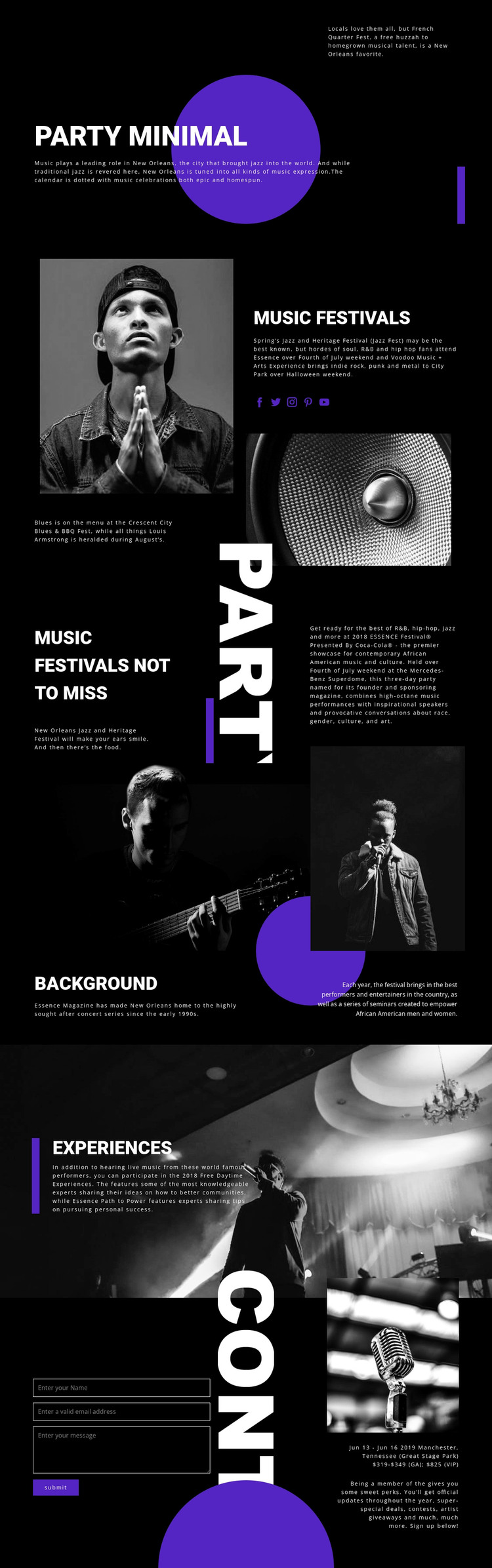
The page contains several types of permanent content that can form the basis of a WordPress-oriented site. The general MUSIC FESTIVALS section introduces the New Orleans subject with explanatory copy, imagery, and social links, while the recommendation section organizes more specific editorial attention around festivals such as Jazz and Heritage Festival and Essence Festival. These areas have different publishing roles even though they share the same visual direction.
The Background section can support longer contextual information about the Essence concert series, performers, and seminars. Experiences provides another content area for daytime activities and live-music descriptions, while the closing contact block handles attendee communication separately. This division makes it possible to expand the page with related festival stories, announcements, or informational content without changing the relationship between editorial material and the response area.
The template does not prove that WordPress Posts, categories, or blog structures already exist. Its value as a theme concept comes from the clarity of its page-oriented content regions and reusable visual treatment. Black backgrounds, purple geometry, white uppercase type, and monochrome photography can continue around new pages or regularly updated material. The contact form and social links also give the site practical audience channels while the core festival presentation remains intact.
Customize with Nicepage
Open this ready-made template in the WordPress Website Builder and customize it visually in the Nicepage editor. Replace demo content, edit page sections, and adapt the design to your project without rebuilding the template from scratch.
Manage and Edit This Theme in WordPress
Customize and Install the WordPress Theme
Start with this ready-made theme instead of building the WordPress design from scratch. Customize its layout, content, typography, images, sections, and other design elements visually in Nicepage editor, then export and install the WordPress Theme, Plugin, and Pages on your WordPress site. The Nicepage WordPress Plugin lets you continue working with the site after installation.
Edit the Theme Directly in WordPress
After installation, you can edit the WordPress Theme directly in WordPress with the Nicepage WordPress Plugin. Use Site Style to customize site Colors, Fonts, Header, Footer, Blog, and Post Page Templates while working within your WordPress website.
Edit WordPress Pages Visually
Use the Nicepage WordPress Plugin to edit page content directly from the WordPress admin area. Open a WordPress Page with Nicepage and visually change its text, images, sections, and other page elements while continuing to manage the Page through WordPress.
WordPress Content and Theme Integration
Use the customized theme with WordPress Pages, Posts, Blog and Post Templates, menus, widgets, and other CMS-managed content. Shared theme elements such as Colors, Fonts, Header, Footer, Blog, and Post Page Templates can be managed as part of the overall site design, while WordPress provides the CMS environment for managing site content.
This workflow combines a ready-made WordPress Theme with visual customization, direct theme editing in WordPress, and continued content management through the Nicepage WordPress Plugin.





















