
Best world places for travel WordPress Theme


Edit Template Offline
2. Create new page and search for id 91275
Edit Template Online
Create Awesome Websites


Free Nicepage Builder
Keywords
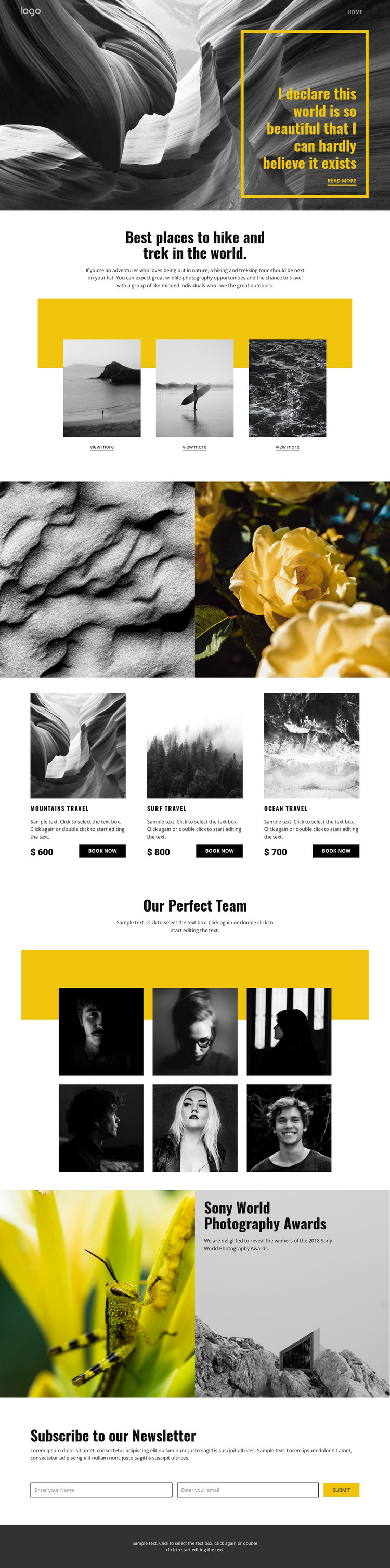
Destination Cards and Editorial Imagery Suit WordPress Content
The page separates permanent travel information into recognizable content areas. Its three hiking and trekking features use the same image-and-link pattern, making them suitable for page-oriented destination content that can remain visually consistent as descriptions and imagery change. The two-image nature showcase serves a different role: it carries the photography emphasis without competing with the more structured destination items.
The travel package row adds repeated commercial-style content through mountains, surf, and ocean cards. Each card reserves space for an image, description, displayed price, and Book now action. The listed amounts are sample values from the design, not verified offers, but their arrangement demonstrates how package information can sit beside more editorial material. Six portrait images under Our Perfect Team provide another recurring visual group, while the Sony World Photography Awards feature can frame photography-related copy with two large photographs. The newsletter subscription section closes the page with a focused audience-response area. In a WordPress-managed project, these page regions could support lasting destination and package information alongside later editorial content, while the navigation, shared footer, and visual treatment keep those additions within one recognizable theme direction.
Customize with Nicepage
Open this ready-made template in the WordPress Website Builder and customize it visually in the Nicepage editor. Replace demo content, edit page sections, and adapt the design to your project without rebuilding the template from scratch.
Manage and Edit This Theme in WordPress
Customize and Install the WordPress Theme
Start with this ready-made theme instead of building the WordPress design from scratch. Customize its layout, content, typography, images, sections, and other design elements visually in Nicepage editor, then export and install the WordPress Theme, Plugin, and Pages on your WordPress site. The Nicepage WordPress Plugin lets you continue working with the site after installation.
Edit the Theme Directly in WordPress
After installation, you can edit the WordPress Theme directly in WordPress with the Nicepage WordPress Plugin. Use Site Style to customize site Colors, Fonts, Header, Footer, Blog, and Post Page Templates while working within your WordPress website.
Edit WordPress Pages Visually
Use the Nicepage WordPress Plugin to edit page content directly from the WordPress admin area. Open a WordPress Page with Nicepage and visually change its text, images, sections, and other page elements while continuing to manage the Page through WordPress.
WordPress Content and Theme Integration
Use the customized theme with WordPress Pages, Posts, Blog and Post Templates, menus, widgets, and other CMS-managed content. Shared theme elements such as Colors, Fonts, Header, Footer, Blog, and Post Page Templates can be managed as part of the overall site design, while WordPress provides the CMS environment for managing site content.
This workflow combines a ready-made WordPress Theme with visual customization, direct theme editing in WordPress, and continued content management through the Nicepage WordPress Plugin.





















