
Best places for hiking and fishing WordPress Theme
Edit Template Offline
2. Create new page and search for id 149829
Edit Template Online
Create Awesome Websites


Free Nicepage Builder
Keywords
Agency pages and structured pass content fit a WordPress-ready visual system
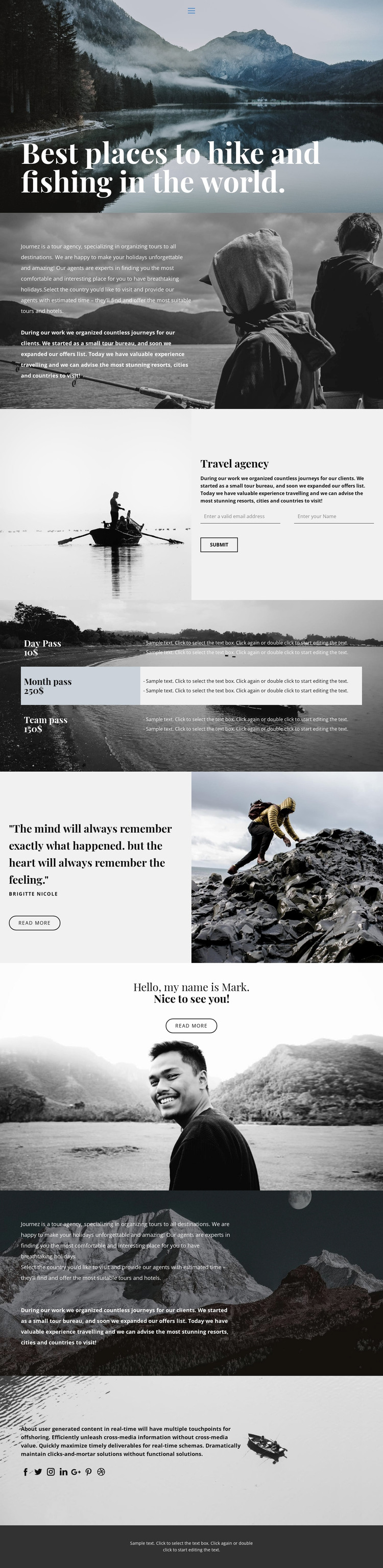
The page separates several kinds of content that could be maintained within a WordPress-managed travel project. The mountain-lake hero and image-backed agency descriptions provide page-oriented material for explaining destinations, organized tours, and holiday planning. Their large photographic treatment gives permanent informational content a consistent visual setting rather than treating each text area as an unrelated article block.
The contact section supplies another clear content area: a fishing image accompanies agency copy and a form requesting a name and email address. The three pass offerings are presented in a table, which gives the design a structured place for comparing travel options without claiming that the displayed demo prices are verified commercial data. The quote attributed to Brigitte Nicole and the personal introduction provide additional editorial-style material that could support agency storytelling or profile content.
Social links and shared navigation create recognizable site-level regions, while the mobile-navigation component indicates that the page includes a separate narrow-screen navigation consideration. These elements can remain part of the same visual system as additional WordPress-managed pages are prepared. The current analysis confirms one promotional page, not existing blog posts, categories, or a complete WordPress content architecture; those should be added only if the project requires them.
The strongest WordPress interpretation therefore comes from the relationship between permanent agency information, structured pass content, inquiry details, and reusable navigation. The design can preserve its outdoor identity while content is expanded or maintained in a CMS environment, without presenting unverified sample names, prices, quotes, or addresses as real business records.
Customize with Nicepage
Open this ready-made template in the WordPress Website Builder and customize it visually in the Nicepage editor. Replace demo content, edit page sections, and adapt the design to your project without rebuilding the template from scratch.
Manage and Edit This Theme in WordPress
Customize and Install the WordPress Theme
Start with this ready-made theme instead of building the WordPress design from scratch. Customize its layout, content, typography, images, sections, and other design elements visually in Nicepage editor, then export and install the WordPress Theme, Plugin, and Pages on your WordPress site. The Nicepage WordPress Plugin lets you continue working with the site after installation.
Edit the Theme Directly in WordPress
After installation, you can edit the WordPress Theme directly in WordPress with the Nicepage WordPress Plugin. Use Site Style to customize site Colors, Fonts, Header, Footer, Blog, and Post Page Templates while working within your WordPress website.
Edit WordPress Pages Visually
Use the Nicepage WordPress Plugin to edit page content directly from the WordPress admin area. Open a WordPress Page with Nicepage and visually change its text, images, sections, and other page elements while continuing to manage the Page through WordPress.
WordPress Content and Theme Integration
Use the customized theme with WordPress Pages, Posts, Blog and Post Templates, menus, widgets, and other CMS-managed content. Shared theme elements such as Colors, Fonts, Header, Footer, Blog, and Post Page Templates can be managed as part of the overall site design, while WordPress provides the CMS environment for managing site content.
This workflow combines a ready-made WordPress Theme with visual customization, direct theme editing in WordPress, and continued content management through the Nicepage WordPress Plugin.





















