
Skies and beauty of nature WordPress Theme


Edit Template Offline
2. Create new page and search for id 17024
Edit Template Online
Create Awesome Websites


Free Nicepage Builder
Keywords
Action Cards and Project Stories Support WordPress Content Areas
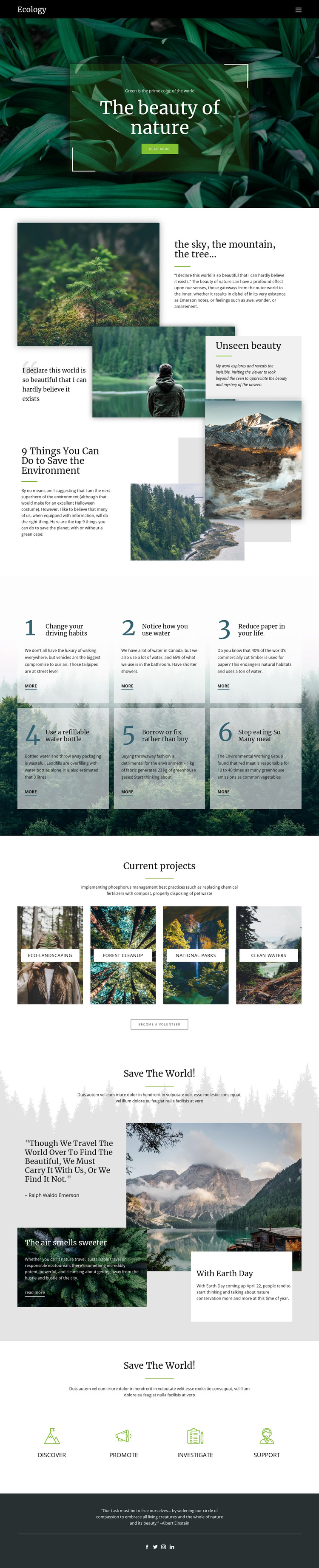
The six numbered environmental action cards create a strong page-oriented content area for practical guidance. Their repeated structure keeps each habit visually related while allowing the surrounding copy to be updated as the campaign develops. This is different from the “Current projects” gallery, where four labeled categories—Eco-landscaping, Forest cleanup, National parks, and Clean waters—organize conservation stories through photographs and short labels. Together, these areas distinguish recurring advice from project-focused material.
The opening hero and “Unseen beauty” section can provide the permanent campaign context around that changing content. A full-width nature photograph introduces the subject, while overlapping landscapes and forest images create an editorial explanation before visitors reach the action cards. The later mountain image, quotation, and two supporting story panels offer another place for narrative content, helping the page accommodate both concise guidance and longer environmental storytelling.
The “Discover,” “Promote,” “Investigate,” and “Support” pathways then give the design four clear content directions for participation. A WordPress-oriented project could use the page as a visual framework for permanent environmental information alongside regularly updated project or editorial material, without claiming that such posts already exist in the template. The dark footer and social icons complete the shared site presentation, keeping navigation and social connection visually separate from the main conservation content.
Customize with Nicepage
Open this ready-made template in the WordPress Website Builder and customize it visually in the Nicepage editor. Replace demo content, edit page sections, and adapt the design to your project without rebuilding the template from scratch.
Manage and Edit This Theme in WordPress
Customize and Install the WordPress Theme
Start with this ready-made theme instead of building the WordPress design from scratch. Customize its layout, content, typography, images, sections, and other design elements visually in Nicepage editor, then export and install the WordPress Theme, Plugin, and Pages on your WordPress site. The Nicepage WordPress Plugin lets you continue working with the site after installation.
Edit the Theme Directly in WordPress
After installation, you can edit the WordPress Theme directly in WordPress with the Nicepage WordPress Plugin. Use Site Style to customize site Colors, Fonts, Header, Footer, Blog, and Post Page Templates while working within your WordPress website.
Edit WordPress Pages Visually
Use the Nicepage WordPress Plugin to edit page content directly from the WordPress admin area. Open a WordPress Page with Nicepage and visually change its text, images, sections, and other page elements while continuing to manage the Page through WordPress.
WordPress Content and Theme Integration
Use the customized theme with WordPress Pages, Posts, Blog and Post Templates, menus, widgets, and other CMS-managed content. Shared theme elements such as Colors, Fonts, Header, Footer, Blog, and Post Page Templates can be managed as part of the overall site design, while WordPress provides the CMS environment for managing site content.
This workflow combines a ready-made WordPress Theme with visual customization, direct theme editing in WordPress, and continued content management through the Nicepage WordPress Plugin.





















