
Pictures of nature WordPress Theme


Edit Template Offline
2. Create new page and search for id 18484
Edit Template Online
Create Awesome Websites


Free Nicepage Builder
Keywords
Photo Stories and Captioned Collections Fit Page-Oriented Content
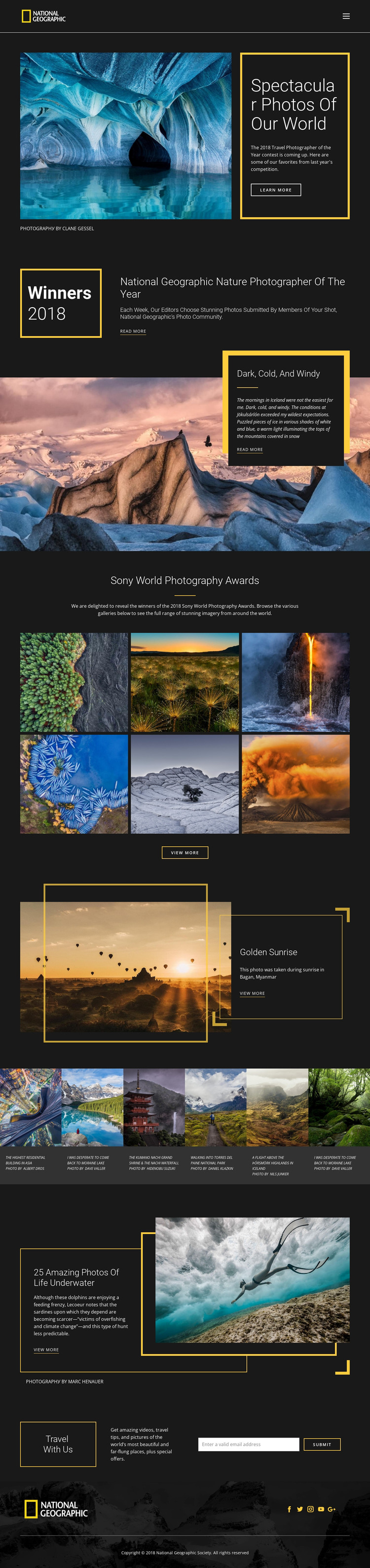
The page separates its permanent presentation into content areas that can be interpreted naturally in a WordPress-managed site. The hero and award introduction work as page-oriented editorial content, establishing the photography subject before visitors reach the more repeated image groups. The Iceland, Golden Sunrise, and underwater sections then provide distinct story areas, each combining a heading, large photograph, supporting description, and a link for continued reading.
The six-image Sony World Photography Awards gallery is useful as a grouped visual feature, while the separate six-card collection is organized around individual photographs, captions, and photographer credits. That distinction gives a WordPress project more than one content relationship to preserve: a themed collection can sit alongside recurring photo entries without forcing both into the same presentation. The Travel With Us section adds a clearly defined email subscription area, and the footer's Facebook, Twitter, Instagram, YouTube, and Google links provide shared site context. WordPress Pages or other managed content could be used to organize comparable editorial areas, but the template analysis does not prove that posts, categories, or blog structures already exist. Its theme value comes from keeping permanent page content, repeated photography, credits, and audience communication inside one visual system of dark panels, yellow borders, geometric accents, and large imagery.
Customize with Nicepage
Open this ready-made template in the WordPress Website Builder and customize it visually in the Nicepage editor. Replace demo content, edit page sections, and adapt the design to your project without rebuilding the template from scratch.
Manage and Edit This Theme in WordPress
Customize and Install the WordPress Theme
Start with this ready-made theme instead of building the WordPress design from scratch. Customize its layout, content, typography, images, sections, and other design elements visually in Nicepage editor, then export and install the WordPress Theme, Plugin, and Pages on your WordPress site. The Nicepage WordPress Plugin lets you continue working with the site after installation.
Edit the Theme Directly in WordPress
After installation, you can edit the WordPress Theme directly in WordPress with the Nicepage WordPress Plugin. Use Site Style to customize site Colors, Fonts, Header, Footer, Blog, and Post Page Templates while working within your WordPress website.
Edit WordPress Pages Visually
Use the Nicepage WordPress Plugin to edit page content directly from the WordPress admin area. Open a WordPress Page with Nicepage and visually change its text, images, sections, and other page elements while continuing to manage the Page through WordPress.
WordPress Content and Theme Integration
Use the customized theme with WordPress Pages, Posts, Blog and Post Templates, menus, widgets, and other CMS-managed content. Shared theme elements such as Colors, Fonts, Header, Footer, Blog, and Post Page Templates can be managed as part of the overall site design, while WordPress provides the CMS environment for managing site content.
This workflow combines a ready-made WordPress Theme with visual customization, direct theme editing in WordPress, and continued content management through the Nicepage WordPress Plugin.





















