
Clean energy to save nature WordPress Theme


Edit Template Offline
2. Create new page and search for id 21777
Edit Template Online
Create Awesome Websites


Free Nicepage Builder
Keywords
Mission Content and Project Highlights Support WordPress Page Expansion
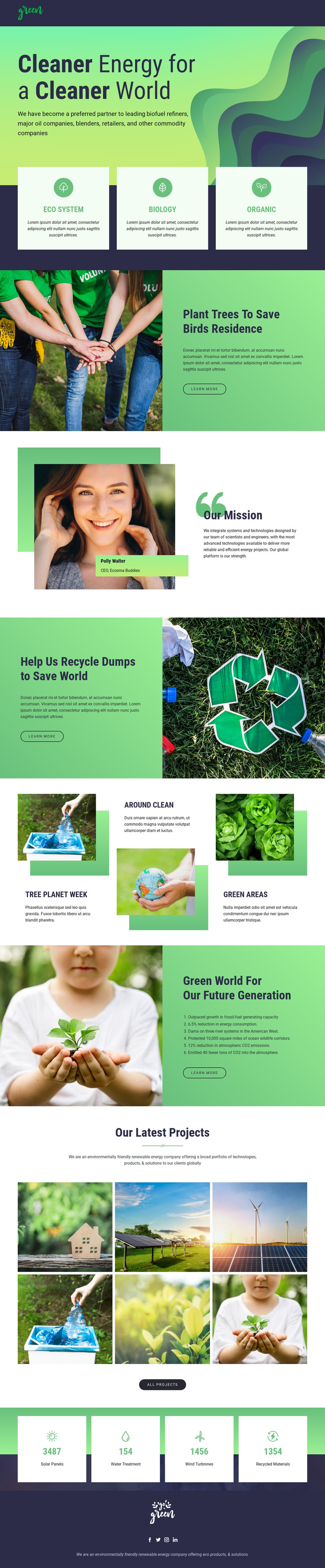
The page-oriented sections provide a useful basis for permanent environmental content in a WordPress-managed site. The hero can introduce the organization’s renewable-energy direction, while the three category cards organize broad subjects such as Eco System, Biology, and Organic. The tree-planting and recycling blocks offer distinct initiative areas with their own imagery and “Learn more” actions, making them more meaningful than simple repeated text panels.
“Our Mission” supplies a separate organizational message and portrait-led identity, while the future-generation section adds a numbered outcome list. These page areas can remain stable as the site’s core information changes. The six-image “Our Latest Projects” gallery has a different role: it can represent project-oriented content that may grow over time, although the analysis confirms the gallery’s structure, not a WordPress Posts system or an existing project archive. Likewise, the four counters are structural demo content and should be verified before being presented as actual impact data.
Navigation, mobile navigation, the social footer, and recurring image-text treatments help preserve a shared theme character around these content areas. If the project needs direct CMS editing, the WordPress Plugin is a verified Nicepage capability, but it does not prove that WordPress content already exists in this template. The stronger theme interpretation comes from mapping permanent mission and initiative sections with project-focused visual content, allowing future editorial additions to sit within the same environmental design direction.
Customize with Nicepage
Open this ready-made template in the WordPress Website Builder and customize it visually in the Nicepage editor. Replace demo content, edit page sections, and adapt the design to your project without rebuilding the template from scratch.
Manage and Edit This Theme in WordPress
Customize and Install the WordPress Theme
Start with this ready-made theme instead of building the WordPress design from scratch. Customize its layout, content, typography, images, sections, and other design elements visually in Nicepage editor, then export and install the WordPress Theme, Plugin, and Pages on your WordPress site. The Nicepage WordPress Plugin lets you continue working with the site after installation.
Edit the Theme Directly in WordPress
After installation, you can edit the WordPress Theme directly in WordPress with the Nicepage WordPress Plugin. Use Site Style to customize site Colors, Fonts, Header, Footer, Blog, and Post Page Templates while working within your WordPress website.
Edit WordPress Pages Visually
Use the Nicepage WordPress Plugin to edit page content directly from the WordPress admin area. Open a WordPress Page with Nicepage and visually change its text, images, sections, and other page elements while continuing to manage the Page through WordPress.
WordPress Content and Theme Integration
Use the customized theme with WordPress Pages, Posts, Blog and Post Templates, menus, widgets, and other CMS-managed content. Shared theme elements such as Colors, Fonts, Header, Footer, Blog, and Post Page Templates can be managed as part of the overall site design, while WordPress provides the CMS environment for managing site content.
This workflow combines a ready-made WordPress Theme with visual customization, direct theme editing in WordPress, and continued content management through the Nicepage WordPress Plugin.





















