
Beauty simplicity of nature WordPress Theme


Edit Template Offline
2. Create new page and search for id 80962
Edit Template Online
Create Awesome Websites


Free Nicepage Builder
Keywords
Portfolio Images and Studio Pages Can Share One WordPress Visual Direction
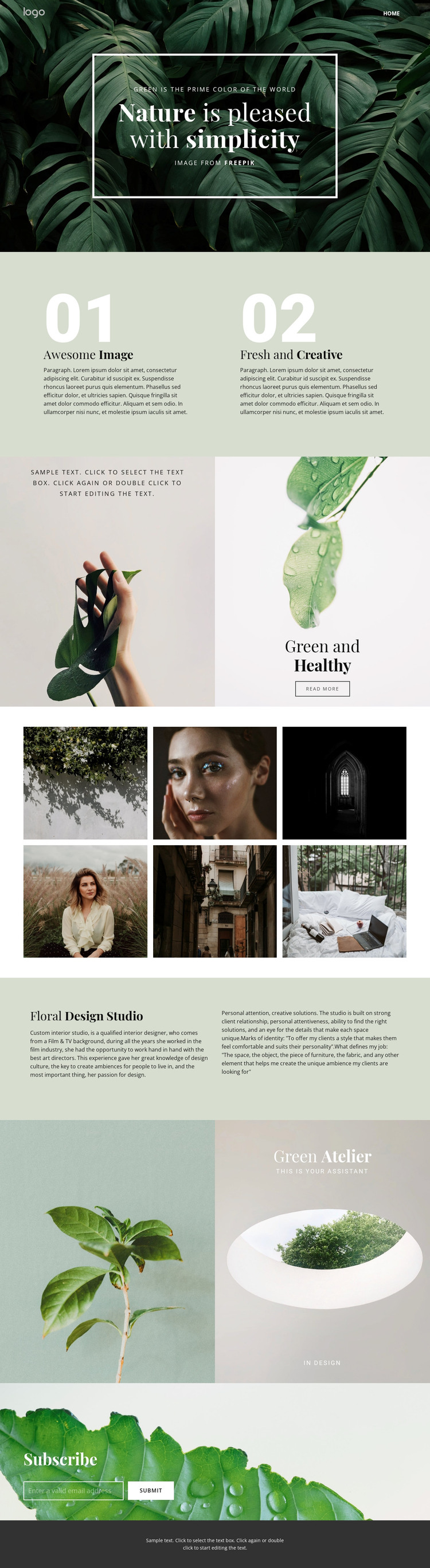
The six-image gallery gives the design a clear page-oriented content area for presenting selected interior or floral work. Its two-row arrangement groups visual examples into a coherent portfolio region, while the surrounding text sections provide context rather than competing with the images. In a WordPress-managed project, this relationship can support permanent studio information alongside content that may be expanded or updated over time, without claiming that posts or categories already exist in the template.
The Floral Design Studio section is especially suited to page content because it combines a stable title with supporting copy about the studio’s approach and creative solutions. Green and Healthy adds another content region with paired images, explanatory text, and a read-more action, creating a natural place for a service description or project detail. The compact header and Home link provide the navigation framework connecting those areas, while Green Atelier contributes a shorter brand statement that can remain part of the shared visual language.
The Subscribe block has a different role: it provides an explicit email response point after visitors have encountered the studio context and portfolio imagery. Its horizontal form and leafy background can remain visually connected to the theme while collecting ongoing interest. The dark footer closes the page with a consistent shared region. This interpretation concerns how the verified content areas fit a WordPress theme environment, not an assertion that WordPress-specific content structures are already present.
Customize with Nicepage
Open this ready-made template in the WordPress Website Builder and customize it visually in the Nicepage editor. Replace demo content, edit page sections, and adapt the design to your project without rebuilding the template from scratch.
Manage and Edit This Theme in WordPress
Customize and Install the WordPress Theme
Start with this ready-made theme instead of building the WordPress design from scratch. Customize its layout, content, typography, images, sections, and other design elements visually in Nicepage editor, then export and install the WordPress Theme, Plugin, and Pages on your WordPress site. The Nicepage WordPress Plugin lets you continue working with the site after installation.
Edit the Theme Directly in WordPress
After installation, you can edit the WordPress Theme directly in WordPress with the Nicepage WordPress Plugin. Use Site Style to customize site Colors, Fonts, Header, Footer, Blog, and Post Page Templates while working within your WordPress website.
Edit WordPress Pages Visually
Use the Nicepage WordPress Plugin to edit page content directly from the WordPress admin area. Open a WordPress Page with Nicepage and visually change its text, images, sections, and other page elements while continuing to manage the Page through WordPress.
WordPress Content and Theme Integration
Use the customized theme with WordPress Pages, Posts, Blog and Post Templates, menus, widgets, and other CMS-managed content. Shared theme elements such as Colors, Fonts, Header, Footer, Blog, and Post Page Templates can be managed as part of the overall site design, while WordPress provides the CMS environment for managing site content.
This workflow combines a ready-made WordPress Theme with visual customization, direct theme editing in WordPress, and continued content management through the Nicepage WordPress Plugin.





















