
Island Travel WordPress Theme


Edit Template Offline
2. Create new page and search for id 20994
Edit Template Online
Create Awesome Websites


Free Nicepage Builder
Keywords
Service Pages and Destination Content Within a Travel Theme
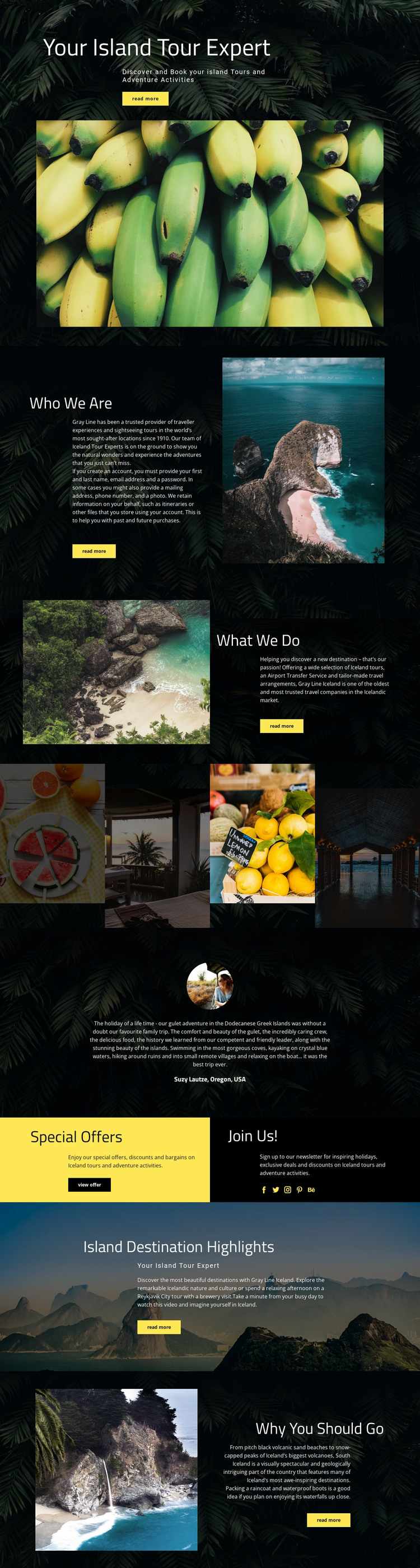
The “Who We Are” and “What We Do” sections create clear page-oriented content for a WordPress-managed travel site. One area can explain the organization, while the other groups Iceland tours, airport transfer services, tailor-made travel arrangements, and adventure activities into a coherent service presentation. This relationship suits permanent page content because visitors can understand the provider before moving toward a specific offer or destination. The design does not require those areas to be treated as blog content; their role is closer to stable travel information.
The destination imagery supports a second content pattern. Four adjacent photographs provide a compact visual showcase, and the later Iceland, Reykjavik, and South Iceland sections connect images with regional descriptions. If a project later publishes travel updates or announcements, those additions can sit around the established service and destination pages while retaining the same dark, image-led direction. The existing testimonial also gives visitor feedback a recognizable place without presenting the sample attribution as a verified business record.
The “Special Offers” area adds a more changeable layer to the theme. Its offer panel, newsletter promotion, and social links distinguish promotional communication from permanent company and service information. The “View offer” action can lead visitors toward current travel content, while “Read more” actions can connect to expanded pages as the project grows. WordPress Pages and other CMS-managed content can therefore be interpreted through different roles rather than as repeated sections. The theme’s value comes from its separation of services, destinations, proof, and promotions.
Customize with Nicepage
Open this ready-made template in the WordPress Website Builder and customize it visually in the Nicepage editor. Replace demo content, edit page sections, and adapt the design to your project without rebuilding the template from scratch.
Manage and Edit This Theme in WordPress
Customize and Install the WordPress Theme
Start with this ready-made theme instead of building the WordPress design from scratch. Customize its layout, content, typography, images, sections, and other design elements visually in Nicepage editor, then export and install the WordPress Theme, Plugin, and Pages on your WordPress site. The Nicepage WordPress Plugin lets you continue working with the site after installation.
Edit the Theme Directly in WordPress
After installation, you can edit the WordPress Theme directly in WordPress with the Nicepage WordPress Plugin. Use Site Style to customize site Colors, Fonts, Header, Footer, Blog, and Post Page Templates while working within your WordPress website.
Edit WordPress Pages Visually
Use the Nicepage WordPress Plugin to edit page content directly from the WordPress admin area. Open a WordPress Page with Nicepage and visually change its text, images, sections, and other page elements while continuing to manage the Page through WordPress.
WordPress Content and Theme Integration
Use the customized theme with WordPress Pages, Posts, Blog and Post Templates, menus, widgets, and other CMS-managed content. Shared theme elements such as Colors, Fonts, Header, Footer, Blog, and Post Page Templates can be managed as part of the overall site design, while WordPress provides the CMS environment for managing site content.
This workflow combines a ready-made WordPress Theme with visual customization, direct theme editing in WordPress, and continued content management through the Nicepage WordPress Plugin.





















