
Amazing ideas for travel WordPress Theme


Edit Template Offline
2. Create new page and search for id 14317
Edit Template Online
Create Awesome Websites


Free Nicepage Builder
Keywords
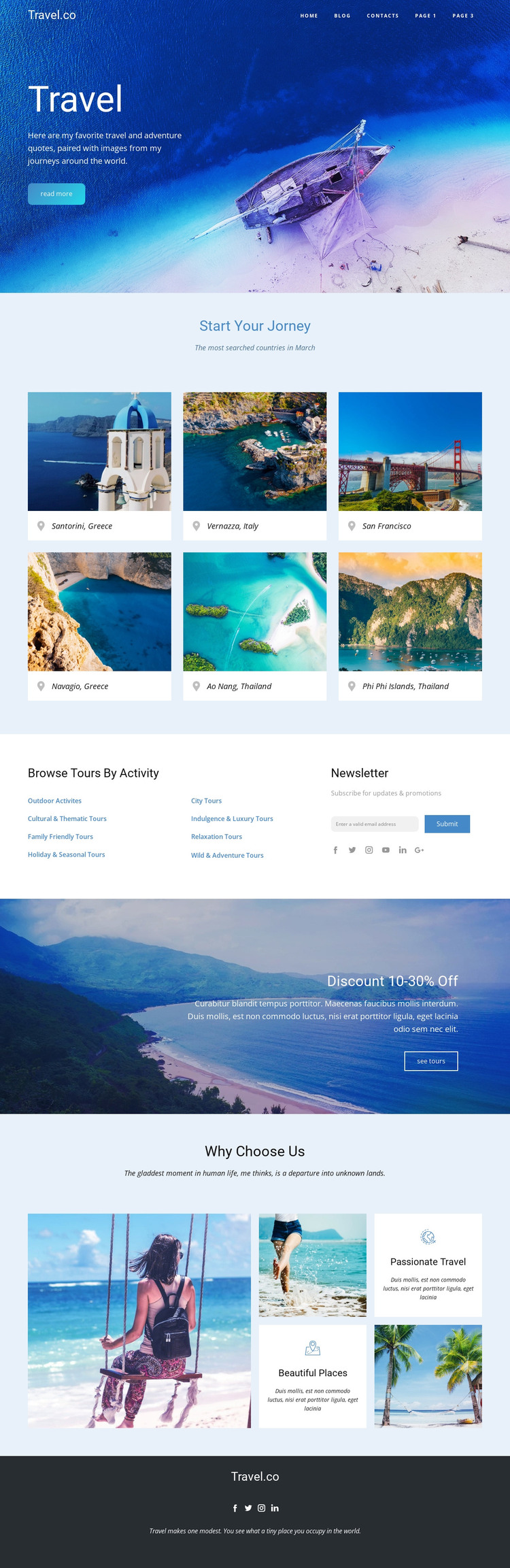
Destination Cards and Activity Links Support Two Kinds of Travel Content
The six destination cards provide the clearest page-oriented content group in the design. They present places as compact, repeatable choices beneath Start Your Journey, while the activity browsing area organizes a different kind of information through links for outdoor, cultural, family, city, scenic, relaxation, and water experiences. Keeping those roles separate is useful for a WordPress-managed project: destination information can remain distinct from broader activity or tour content instead of being forced into one repeated card pattern.
The newsletter section adds an ongoing communication context beside the activity links, and the discount banner offers a separate place for changing promotional messaging. Why Choose Us supplies supporting page content through travel images and the Passionate Travel and Beautiful Places themes. The dark footer then groups site identity and social links into a shared closing region. These observations describe the content relationships that can be carried into WordPress; they do not claim that Posts, categories, or blog structures already exist in this template. A WordPress theme interpretation is strongest when permanent destination and explanatory content can coexist with regularly updated offers or editorial material while retaining the blue travel identity, airy spacing, and recognizable section roles established by the design.
Customize with Nicepage
Open this ready-made template in the WordPress Website Builder and customize it visually in the Nicepage editor. Replace demo content, edit page sections, and adapt the design to your project without rebuilding the template from scratch.
Manage and Edit This Theme in WordPress
Customize and Install the WordPress Theme
Start with this ready-made theme instead of building the WordPress design from scratch. Customize its layout, content, typography, images, sections, and other design elements visually in Nicepage editor, then export and install the WordPress Theme, Plugin, and Pages on your WordPress site. The Nicepage WordPress Plugin lets you continue working with the site after installation.
Edit the Theme Directly in WordPress
After installation, you can edit the WordPress Theme directly in WordPress with the Nicepage WordPress Plugin. Use Site Style to customize site Colors, Fonts, Header, Footer, Blog, and Post Page Templates while working within your WordPress website.
Edit WordPress Pages Visually
Use the Nicepage WordPress Plugin to edit page content directly from the WordPress admin area. Open a WordPress Page with Nicepage and visually change its text, images, sections, and other page elements while continuing to manage the Page through WordPress.
WordPress Content and Theme Integration
Use the customized theme with WordPress Pages, Posts, Blog and Post Templates, menus, widgets, and other CMS-managed content. Shared theme elements such as Colors, Fonts, Header, Footer, Blog, and Post Page Templates can be managed as part of the overall site design, while WordPress provides the CMS environment for managing site content.
This workflow combines a ready-made WordPress Theme with visual customization, direct theme editing in WordPress, and continued content management through the Nicepage WordPress Plugin.





















