Everything is technology WordPress Theme


Edit Template Offline
2. Create new page and search for id 19816
Edit Template Online
Create Awesome Websites


Free Nicepage Builder
Keywords
Feature-led content gives a WordPress project clear page areas
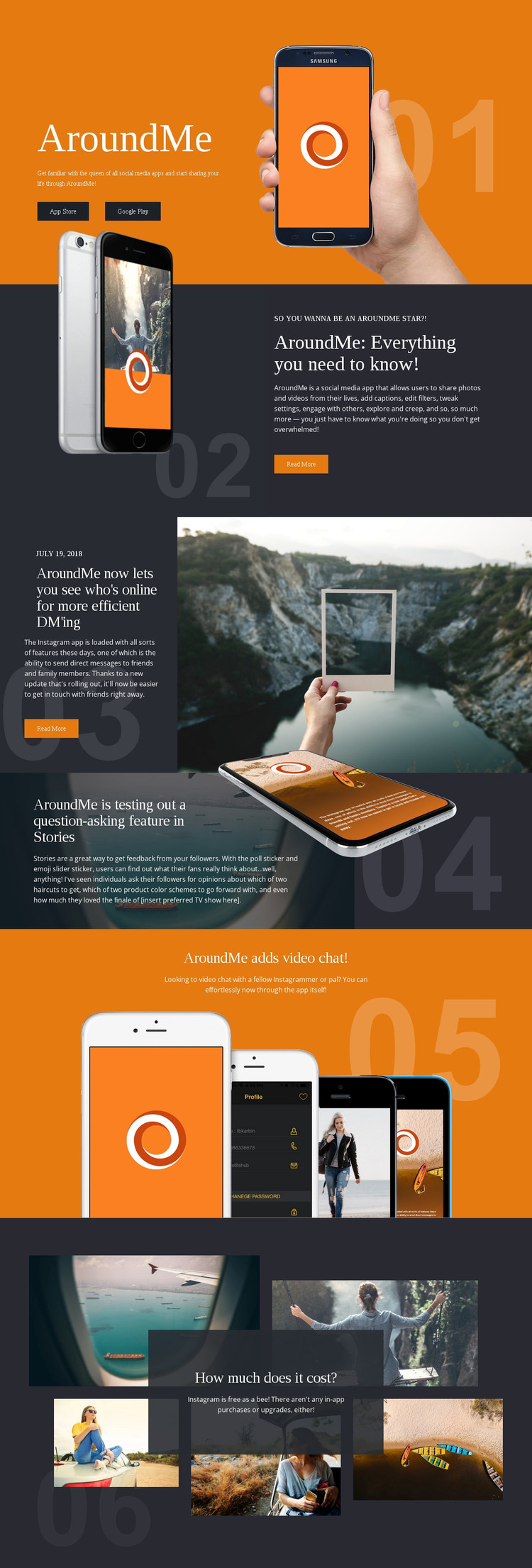
The design contains several permanent content areas that can be interpreted naturally in a WordPress environment. The opening introduction presents AroundMe and its two download destinations, while the following sections explain sharing and editing, direct messaging, Stories, and video chat. These areas are more specific than a generic app homepage: each has a distinct subject, image relationship, and amount of explanatory copy that can guide page content or recurring feature presentation.
The direct-messaging section is especially editorial in structure. Its date label, headline, article copy, Read More action, and lifestyle image create a model for feature announcements or regularly refreshed app stories. The Stories section uses a different treatment, combining a dark photographic panel with phone imagery, while the video-chat announcement provides a shorter product update. This variation allows content to remain connected to one visual system without forcing every item into the same format.
The closing collage and free-use message can remain as stable value content around those more changeable feature areas. WordPress Pages, Posts, and the Nicepage WordPress Plugin should not be presented as existing elements of the analyzed page, but they can be relevant bridges when the project adds permanent information and updated editorial content. The template's content relationships therefore support a WordPress-oriented site without reducing the explanation to a platform-name substitution.
Customize with Nicepage
Open this ready-made template in the WordPress Website Builder and customize it visually in the Nicepage editor. Replace demo content, edit page sections, and adapt the design to your project without rebuilding the template from scratch.
Manage and Edit This Theme in WordPress
Customize and Install the WordPress Theme
Start with this ready-made theme instead of building the WordPress design from scratch. Customize its layout, content, typography, images, sections, and other design elements visually in Nicepage editor, then export and install the WordPress Theme, Plugin, and Pages on your WordPress site. The Nicepage WordPress Plugin lets you continue working with the site after installation.
Edit the Theme Directly in WordPress
After installation, you can edit the WordPress Theme directly in WordPress with the Nicepage WordPress Plugin. Use Site Style to customize site Colors, Fonts, Header, Footer, Blog, and Post Page Templates while working within your WordPress website.
Edit WordPress Pages Visually
Use the Nicepage WordPress Plugin to edit page content directly from the WordPress admin area. Open a WordPress Page with Nicepage and visually change its text, images, sections, and other page elements while continuing to manage the Page through WordPress.
WordPress Content and Theme Integration
Use the customized theme with WordPress Pages, Posts, Blog and Post Templates, menus, widgets, and other CMS-managed content. Shared theme elements such as Colors, Fonts, Header, Footer, Blog, and Post Page Templates can be managed as part of the overall site design, while WordPress provides the CMS environment for managing site content.
This workflow combines a ready-made WordPress Theme with visual customization, direct theme editing in WordPress, and continued content management through the Nicepage WordPress Plugin.