Snapchat Launchers WordPress Theme



Edit Template Offline
2. Create new page and search for id 12789
Edit Template Online
Create Awesome Websites


Free Nicepage Builder
Keywords
Product Review Sections Give WordPress Content a Strong Editorial Frame
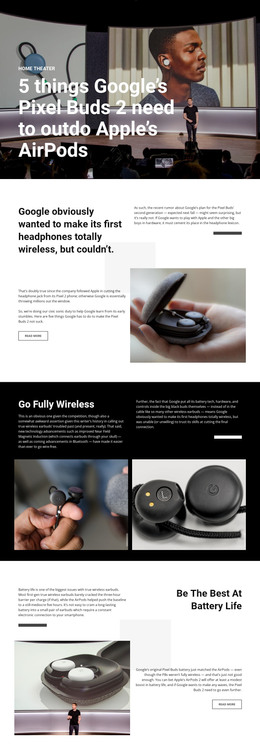
The design divides permanent product information into clearly usable content areas. The turquoise hero can introduce a featured Spectacles V2 review with its product image, summary, source label, date, and Read more action. The over-grid excerpt provides a compact review perspective, while the Thirds section separates specification-focused discussion into a heading panel and explanatory columns. Together, these areas suit page-oriented content that needs both an introduction and supporting detail.
The later split sections add reusable editorial subjects rather than merely extending the same product claim. Water resistance and outdoor imagery create a practical-use feature area. The phone illustration and copy about Bluetooth syncing and HD export provide a connectivity-focused area. The smaller charging case and the final discussion of Snapchat’s product direction can support additional review or comparison content without changing the visual character of the page.
In a WordPress project, these verified areas can be interpreted as permanent product and review content, while future articles or announcements may be presented within the same visual system if the site adds them. That possibility does not mean blog posts or WordPress-specific structures already exist in the template. The value comes from the clear relationship between product imagery, editorial text, source information, and linked reading actions, which gives CMS-managed content a coherent design frame.
Customize with Nicepage
Open this ready-made template in the WordPress Website Builder and customize it visually in the Nicepage editor. Replace demo content, edit page sections, and adapt the design to your project without rebuilding the template from scratch.
Manage and Edit This Theme in WordPress
Customize and Install the WordPress Theme
Start with this ready-made theme instead of building the WordPress design from scratch. Customize its layout, content, typography, images, sections, and other design elements visually in Nicepage editor, then export and install the WordPress Theme, Plugin, and Pages on your WordPress site. The Nicepage WordPress Plugin lets you continue working with the site after installation.
Edit the Theme Directly in WordPress
After installation, you can edit the WordPress Theme directly in WordPress with the Nicepage WordPress Plugin. Use Site Style to customize site Colors, Fonts, Header, Footer, Blog, and Post Page Templates while working within your WordPress website.
Edit WordPress Pages Visually
Use the Nicepage WordPress Plugin to edit page content directly from the WordPress admin area. Open a WordPress Page with Nicepage and visually change its text, images, sections, and other page elements while continuing to manage the Page through WordPress.
WordPress Content and Theme Integration
Use the customized theme with WordPress Pages, Posts, Blog and Post Templates, menus, widgets, and other CMS-managed content. Shared theme elements such as Colors, Fonts, Header, Footer, Blog, and Post Page Templates can be managed as part of the overall site design, while WordPress provides the CMS environment for managing site content.
This workflow combines a ready-made WordPress Theme with visual customization, direct theme editing in WordPress, and continued content management through the Nicepage WordPress Plugin.