
Design and development team WordPress Theme


Edit Template Offline
2. Create new page and search for id 179700
Edit Template Online
Create Awesome Websites


Free Nicepage Builder
Keywords
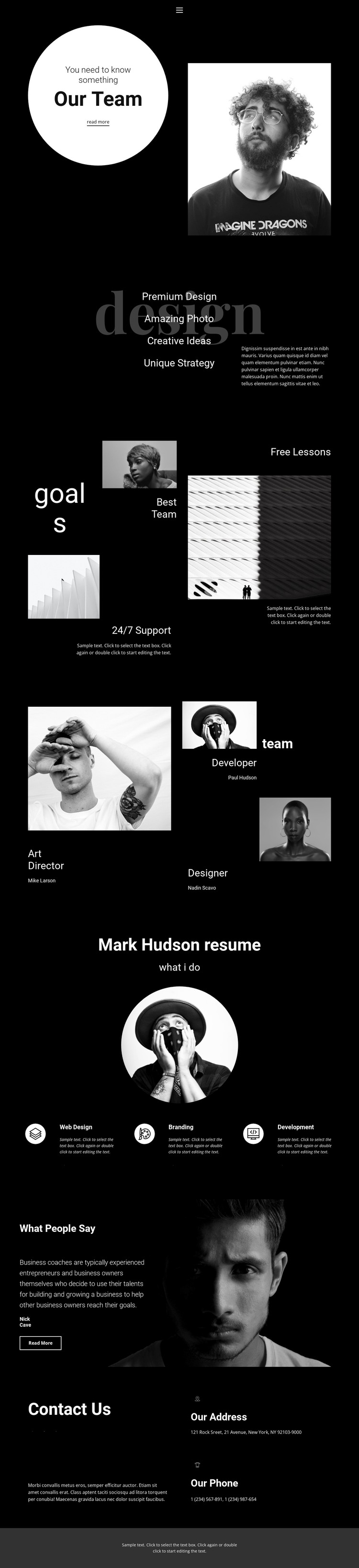
Service Cards and Profile Items Map Naturally to WordPress Page Content
The three service cards give the design a strong page-oriented content core. Web Design, Branding, and Development are presented as distinct capability labels, so they can be interpreted as permanent service information within a WordPress-managed site rather than as decorative text alone. The preceding design statement adds context through Premium Design, Creative Ideas, and Unique Strategy, helping the service content retain a clear relationship with the portfolio’s visual identity.
The profile section contributes a different type of content. Art Director, Developer, and Designer are arranged as three team roles with portrait-led presentation, creating a repeatable structure for people-focused information. The opening Our Team section and the goals collage can support the same professional narrative, while the testimonial area provides a separate quote-and-attribution treatment for supporting evidence. These areas could be adapted as page content without claiming that WordPress Posts, categories, or a blog already exist in the template.
Navigation, social links, contact details, and the compact footer establish shared site elements around the main presentation. In a WordPress theme interpretation, those regions can frame permanent pages and additional published content while maintaining the monochrome palette, serif display typography, and collage-like composition. The value lies in the way the existing design separates services, people, proof, and communication into recognizable content areas that can continue to work as the site grows.
Customize with Nicepage
Open this ready-made template in the WordPress Website Builder and customize it visually in the Nicepage editor. Replace demo content, edit page sections, and adapt the design to your project without rebuilding the template from scratch.
Manage and Edit This Theme in WordPress
Customize and Install the WordPress Theme
Start with this ready-made theme instead of building the WordPress design from scratch. Customize its layout, content, typography, images, sections, and other design elements visually in Nicepage editor, then export and install the WordPress Theme, Plugin, and Pages on your WordPress site. The Nicepage WordPress Plugin lets you continue working with the site after installation.
Edit the Theme Directly in WordPress
After installation, you can edit the WordPress Theme directly in WordPress with the Nicepage WordPress Plugin. Use Site Style to customize site Colors, Fonts, Header, Footer, Blog, and Post Page Templates while working within your WordPress website.
Edit WordPress Pages Visually
Use the Nicepage WordPress Plugin to edit page content directly from the WordPress admin area. Open a WordPress Page with Nicepage and visually change its text, images, sections, and other page elements while continuing to manage the Page through WordPress.
WordPress Content and Theme Integration
Use the customized theme with WordPress Pages, Posts, Blog and Post Templates, menus, widgets, and other CMS-managed content. Shared theme elements such as Colors, Fonts, Header, Footer, Blog, and Post Page Templates can be managed as part of the overall site design, while WordPress provides the CMS environment for managing site content.
This workflow combines a ready-made WordPress Theme with visual customization, direct theme editing in WordPress, and continued content management through the Nicepage WordPress Plugin.





















