Norway experiences WordPress Theme


Travel Offers Organized as Stable WordPress Page Content
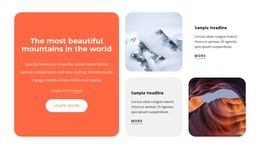
The headings Nature Tours and Exclusive deals make this section read as lasting travel information rather than a stream of changing entries. Nature Tours combines its title, supporting description, orange background, and Learn more button into one focused content group. Exclusive deals uses a white panel and View all button, with a city street image positioned above it. The separate treatments help a WordPress-managed page present two related offerings without merging their actions or visual emphasis.
The image collage supplies the block's broader content context. A tall mountain cabin and forest image occupies the central visual area, while additional photography shows mountains, forests, a city street, and a scenic road. These images do not replace the offer information; they frame it and create an editorial travel setting around the two text panels. The asymmetric three-column structure keeps the text-led areas identifiable while giving the section substantial visual presence within a page.
In a WordPress-oriented website, the block can serve as a reusable services or vacation-offers region on a stable page, while other parts of the project handle destination articles, booking information, galleries, or contact content. The section's page-content logic comes from its two clearly labeled offers and their actions, not from any assumed blog or category structure. Its visual arrangement can therefore remain consistent while the wider site grows around it.
Customize with Nicepage
Open this ready-made template in the WordPress Website Builder and customize it visually in the Nicepage editor. Replace demo content, edit page sections, and adapt the design to your project without rebuilding the template from scratch.
Edit Template Offline
2. Create a new page or select existing
3. Click Add new block, search for id 1569646 and click enter
Edit Template Online
Create Awesome Websites


Free Nicepage Builder
Keywords
Manage and Edit This Theme in WordPress
Customize and Install the WordPress Theme
Start with this ready-made theme instead of building the WordPress design from scratch. Customize its layout, content, typography, images, sections, and other design elements visually in Nicepage editor, then export and install the WordPress Theme, Plugin, and Pages on your WordPress site. The Nicepage WordPress Plugin lets you continue working with the site after installation.
Edit the Theme Directly in WordPress
After installation, you can edit the WordPress Theme directly in WordPress with the Nicepage WordPress Plugin. Use Site Style to customize site Colors, Fonts, Header, Footer, Blog, and Post Page Templates while working within your WordPress website.
Edit WordPress Pages Visually
Use the Nicepage WordPress Plugin to edit page content directly from the WordPress admin area. Open a WordPress Page with Nicepage and visually change its text, images, sections, and other page elements while continuing to manage the Page through WordPress.
WordPress Content and Theme Integration
Use the customized theme with WordPress Pages, Posts, Blog and Post Templates, menus, widgets, and other CMS-managed content. Shared theme elements such as Colors, Fonts, Header, Footer, Blog, and Post Page Templates can be managed as part of the overall site design, while WordPress provides the CMS environment for managing site content.
This workflow combines a ready-made WordPress Theme with visual customization, direct theme editing in WordPress, and continued content management through the Nicepage WordPress Plugin.