Interesting architecture WordPress Theme


A Bottom-Aligned About Region for WordPress Page Content
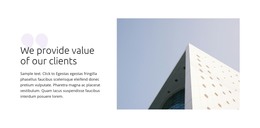
The block’s single heading and paragraph read as stable page content rather than a stream of dated editorial entries. They introduce an architecture firm’s focus on sustainable buildings and spaces, then connect that focus with creative design work and client vision. The right-side architectural image supports the message visually, while the left panel keeps the written explanation separate and easy to locate.
In a WordPress-managed site, this section can provide a durable about or practice-introduction area inside a page. It can remain visually consistent while the surrounding project adds separate content for services, completed work, team information, or contact details. The block does not need to carry those other functions; its value comes from giving the practice a concise statement and a representative architectural setting.
The composition is especially recognizable because the text sits near the lower edge of the white panel beside a full-height image. That relationship creates a strong visual anchor without relying on multiple cards or interactive controls. The monochrome palette and generous spacing can help the section sit comfortably within a restrained WordPress site style, while the clear heading-to-paragraph hierarchy keeps the firm’s design approach as the primary content.
Customize with Nicepage
Open this ready-made template in the WordPress Website Builder and customize it visually in the Nicepage editor. Replace demo content, edit page sections, and adapt the design to your project without rebuilding the template from scratch.
Edit Template Offline
2. Create a new page or select existing
3. Click Add new block, search for id 139889 and click enter
Edit Template Online
Create Awesome Websites


Free Nicepage Builder
Keywords
Manage and Edit This Theme in WordPress
Customize and Install the WordPress Theme
Start with this ready-made theme instead of building the WordPress design from scratch. Customize its layout, content, typography, images, sections, and other design elements visually in Nicepage editor, then export and install the WordPress Theme, Plugin, and Pages on your WordPress site. The Nicepage WordPress Plugin lets you continue working with the site after installation.
Edit the Theme Directly in WordPress
After installation, you can edit the WordPress Theme directly in WordPress with the Nicepage WordPress Plugin. Use Site Style to customize site Colors, Fonts, Header, Footer, Blog, and Post Page Templates while working within your WordPress website.
Edit WordPress Pages Visually
Use the Nicepage WordPress Plugin to edit page content directly from the WordPress admin area. Open a WordPress Page with Nicepage and visually change its text, images, sections, and other page elements while continuing to manage the Page through WordPress.
WordPress Content and Theme Integration
Use the customized theme with WordPress Pages, Posts, Blog and Post Templates, menus, widgets, and other CMS-managed content. Shared theme elements such as Colors, Fonts, Header, Footer, Blog, and Post Page Templates can be managed as part of the overall site design, while WordPress provides the CMS environment for managing site content.
This workflow combines a ready-made WordPress Theme with visual customization, direct theme editing in WordPress, and continued content management through the Nicepage WordPress Plugin.