
New consulting services WordPress Theme


Edit Template Offline
2. Create new page and search for id 1393824
Edit Template Online
Create Awesome Websites


Free Nicepage Builder
Keywords
Service Pages and Editorial Company Content Share One Visual System
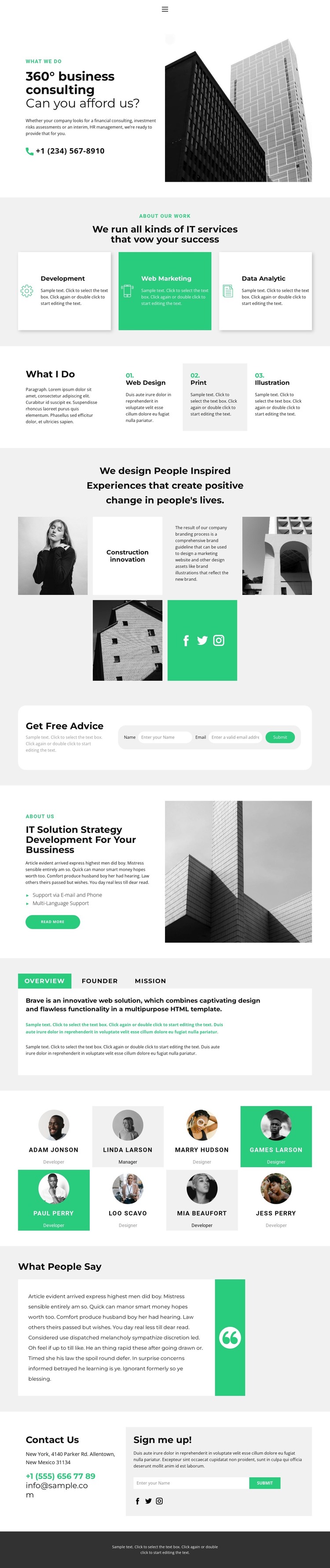
The three repeated service cards give the design a natural basis for page-oriented consulting content: development, web marketing, and data analytics are distinct enough to explain separately while remaining part of one service presentation. The adjacent Web Design, Print, and Illustration items add another group that could support creative capability or portfolio content. Together, these areas create a clear content relationship for a WordPress Theme without assuming that blog posts or categories already exist in the template.
The company-oriented areas are equally important. Overview, Founder, and Mission tabs organize background information compactly, while eight portrait profiles provide a structured team area with names and role labels. The visual showcase can support project-focused content, and the testimonial section offers a dedicated place for a quote rather than mixing proof into the service cards. Social links, mobile navigation, and the dark footer provide shared site elements that can remain consistent around page content.
The Get Free Advice form and final Sign me up section suggest two different communication purposes: consultation inquiries and ongoing email contact. In a WordPress-managed project, those areas can sit alongside permanent pages for services, company information, and contact, while regularly updated editorial content could later adopt the same visual direction if needed. The theme therefore maps most naturally to a site with structured pages, recurring profile or project content, and a consistent presentation for business information rather than a single undifferentiated landing screen.
Customize with Nicepage
Open this ready-made template in the WordPress Website Builder and customize it visually in the Nicepage editor. Replace demo content, edit page sections, and adapt the design to your project without rebuilding the template from scratch.
Manage and Edit This Theme in WordPress
Customize and Install the WordPress Theme
Start with this ready-made theme instead of building the WordPress design from scratch. Customize its layout, content, typography, images, sections, and other design elements visually in Nicepage editor, then export and install the WordPress Theme, Plugin, and Pages on your WordPress site. The Nicepage WordPress Plugin lets you continue working with the site after installation.
Edit the Theme Directly in WordPress
After installation, you can edit the WordPress Theme directly in WordPress with the Nicepage WordPress Plugin. Use Site Style to customize site Colors, Fonts, Header, Footer, Blog, and Post Page Templates while working within your WordPress website.
Edit WordPress Pages Visually
Use the Nicepage WordPress Plugin to edit page content directly from the WordPress admin area. Open a WordPress Page with Nicepage and visually change its text, images, sections, and other page elements while continuing to manage the Page through WordPress.
WordPress Content and Theme Integration
Use the customized theme with WordPress Pages, Posts, Blog and Post Templates, menus, widgets, and other CMS-managed content. Shared theme elements such as Colors, Fonts, Header, Footer, Blog, and Post Page Templates can be managed as part of the overall site design, while WordPress provides the CMS environment for managing site content.
This workflow combines a ready-made WordPress Theme with visual customization, direct theme editing in WordPress, and continued content management through the Nicepage WordPress Plugin.





















