
Personal webiste art WordPress Theme


Edit Template Offline
2. Create new page and search for id 12925
Edit Template Online
Create Awesome Websites


Free Nicepage Builder
Keywords
Portfolio and Contact Areas Give the Theme Clear WordPress Content Roles
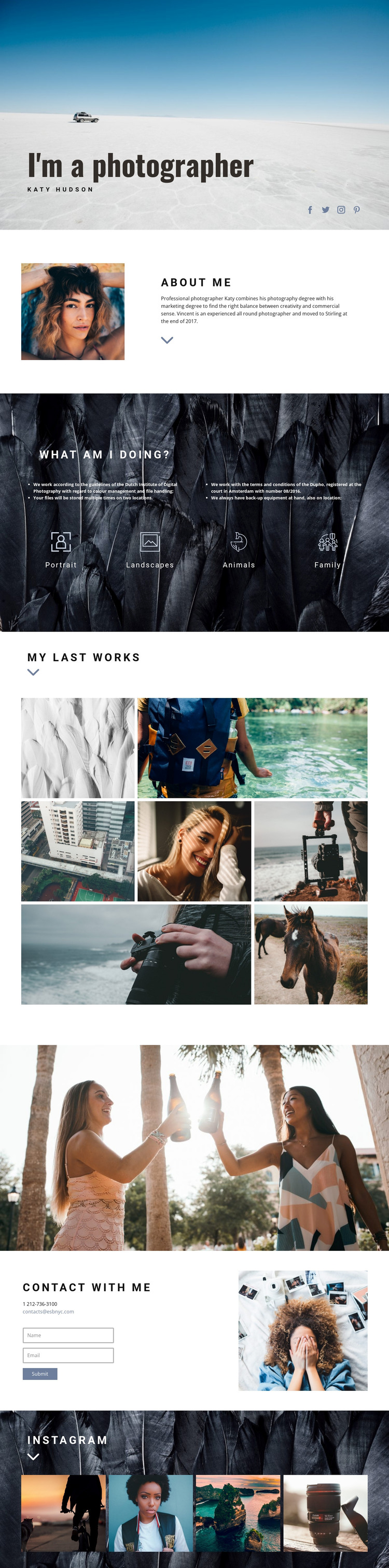
The portrait, biography, category labels, and portfolio images divide the design into recognizable page-oriented content areas. The hero can introduce the photographer visually, while the About Me section provides permanent personal information beside a portrait. The four categories—Portrait, Landscapes, Animals, and Family—give visitors a concise way to understand the scope of the work before reaching the seven-image portfolio.
The portfolio is especially suitable for content that needs visual emphasis. Its seven photographs use varied widths, so the work is presented as an editorial collection rather than a plain list. The full-width photographic band can separate this selected-work area from the contact content, preserving a clear transition between viewing photographs and deciding to communicate. The closing Instagram section adds four more images that can support an ongoing social-photo presence without changing the core page character.
The contact block gives the theme a practical communication role through phone and email details, a short inquiry form, and a supporting portrait. In a WordPress-managed project, these distinct areas can be treated as permanent page content while the visual direction remains consistent around them. The design therefore offers more than a decorative homepage: it provides a coherent arrangement for personal information, photography categories, selected work, social imagery, and contact communication.
Customize with Nicepage
Open this ready-made template in the WordPress Website Builder and customize it visually in the Nicepage editor. Replace demo content, edit page sections, and adapt the design to your project without rebuilding the template from scratch.
Manage and Edit This Theme in WordPress
Customize and Install the WordPress Theme
Start with this ready-made theme instead of building the WordPress design from scratch. Customize its layout, content, typography, images, sections, and other design elements visually in Nicepage editor, then export and install the WordPress Theme, Plugin, and Pages on your WordPress site. The Nicepage WordPress Plugin lets you continue working with the site after installation.
Edit the Theme Directly in WordPress
After installation, you can edit the WordPress Theme directly in WordPress with the Nicepage WordPress Plugin. Use Site Style to customize site Colors, Fonts, Header, Footer, Blog, and Post Page Templates while working within your WordPress website.
Edit WordPress Pages Visually
Use the Nicepage WordPress Plugin to edit page content directly from the WordPress admin area. Open a WordPress Page with Nicepage and visually change its text, images, sections, and other page elements while continuing to manage the Page through WordPress.
WordPress Content and Theme Integration
Use the customized theme with WordPress Pages, Posts, Blog and Post Templates, menus, widgets, and other CMS-managed content. Shared theme elements such as Colors, Fonts, Header, Footer, Blog, and Post Page Templates can be managed as part of the overall site design, while WordPress provides the CMS environment for managing site content.
This workflow combines a ready-made WordPress Theme with visual customization, direct theme editing in WordPress, and continued content management through the Nicepage WordPress Plugin.





















