Pixel Buds 2 WordPress Theme


Edit Template Offline
2. Create new page and search for id 12853
Edit Template Online
Create Awesome Websites


Free Nicepage Builder
Keywords
Product Topics and Repeated Image Pairs Suit Editorial WordPress Content
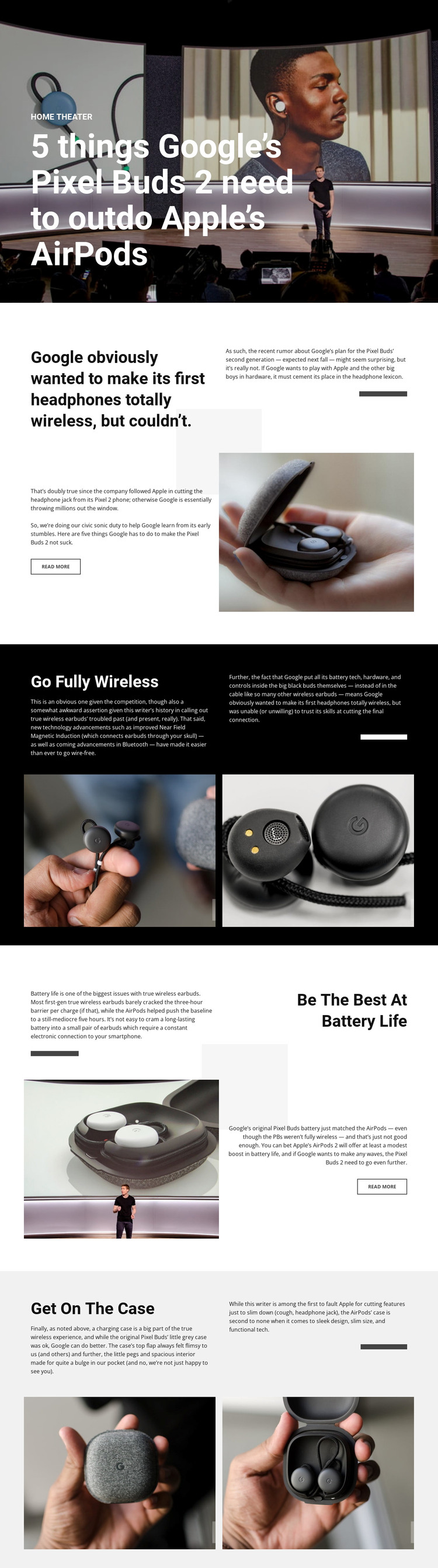
The page separates its subject into content areas that are easy to understand as ongoing editorial material. The opening hero gives a technology publication a clear article-level presentation, while the split introduction combines the premise with a product photograph and a READ MORE action. This relationship is suited to page-oriented content that needs a strong headline, explanatory lead, and visual context before the main recommendations begin.
The feature sections offer a different kind of WordPress-oriented value. “Go Fully Wireless,” “Be The Best At Battery Life,” and “Get On The Case” divide the review into reusable topic patterns, with each heading followed by analysis and two product photographs. That repeated arrangement can support additional product comparisons or updated editorial pieces while keeping the visual presentation recognizable. The alternating dark, white, and light-gray backgrounds distinguish the subjects, and the shared two-column treatment helps related content remain part of one theme direction. The design does not prove that WordPress Posts, categories, or blog templates already exist, so those structures should be supplied according to the final publication setup. Its strongest role as a WordPress Theme is to provide a concrete visual and content model for technology articles, where permanent review pages and regularly updated product coverage can share the same editorial character.
Customize with Nicepage
Open this ready-made template in the WordPress Website Builder and customize it visually in the Nicepage editor. Replace demo content, edit page sections, and adapt the design to your project without rebuilding the template from scratch.
Manage and Edit This Theme in WordPress
Customize and Install the WordPress Theme
Start with this ready-made theme instead of building the WordPress design from scratch. Customize its layout, content, typography, images, sections, and other design elements visually in Nicepage editor, then export and install the WordPress Theme, Plugin, and Pages on your WordPress site. The Nicepage WordPress Plugin lets you continue working with the site after installation.
Edit the Theme Directly in WordPress
After installation, you can edit the WordPress Theme directly in WordPress with the Nicepage WordPress Plugin. Use Site Style to customize site Colors, Fonts, Header, Footer, Blog, and Post Page Templates while working within your WordPress website.
Edit WordPress Pages Visually
Use the Nicepage WordPress Plugin to edit page content directly from the WordPress admin area. Open a WordPress Page with Nicepage and visually change its text, images, sections, and other page elements while continuing to manage the Page through WordPress.
WordPress Content and Theme Integration
Use the customized theme with WordPress Pages, Posts, Blog and Post Templates, menus, widgets, and other CMS-managed content. Shared theme elements such as Colors, Fonts, Header, Footer, Blog, and Post Page Templates can be managed as part of the overall site design, while WordPress provides the CMS environment for managing site content.
This workflow combines a ready-made WordPress Theme with visual customization, direct theme editing in WordPress, and continued content management through the Nicepage WordPress Plugin.