Multimedia technology WordPress Theme


Edit Template Offline
2. Create new page and search for id 66149
Edit Template Online
Create Awesome Websites


Free Nicepage Builder
Keywords
Page Content Moves From Service Process to Visual Proof
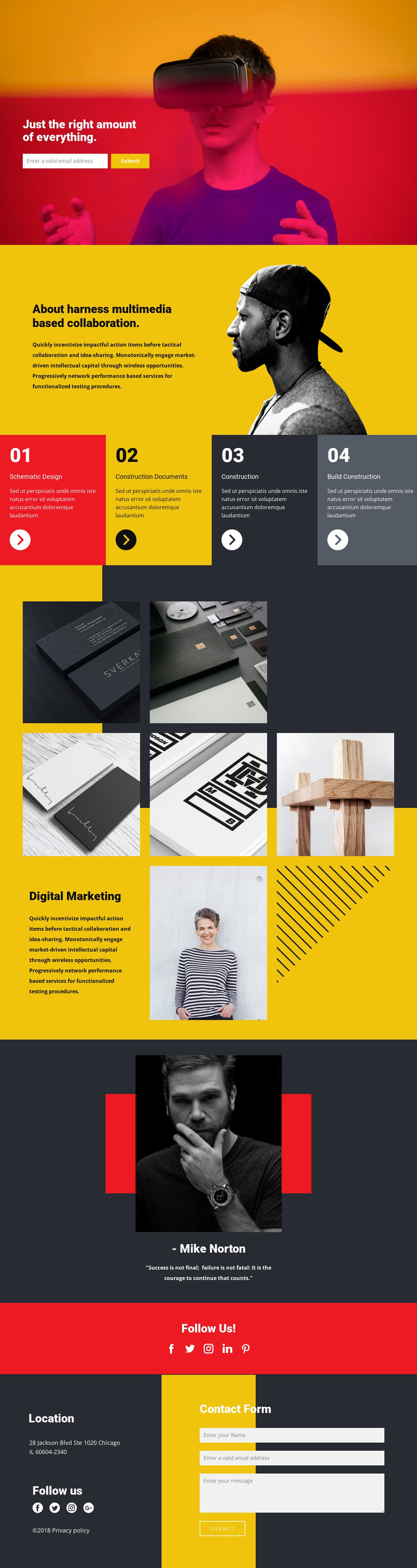
The four process stages provide the clearest page-oriented content structure for this design. Schematic Design, Construction Documents, Construction, and Build Construction are presented as recurring informational units, making them suitable for permanent service content rather than one undifferentiated text area. The About section supplies another stable page area, pairing explanatory copy with a portrait image before visitors reach the process sequence.
The seven-image gallery changes the content relationship from service explanation to visual project material. Its yellow-and-charcoal arrangement includes a Digital Marketing panel, allowing the design to hold both image-led and text-led information within the same visual system. The testimonial adds a separate quote-and-portrait area, while the social section creates a compact connection point. These components can be understood as distinct page content zones without claiming that WordPress Posts, categories, or blog structures already exist.
The footer brings together location text, social information, and a second contact form, giving the page a shared closing region. For a WordPress-managed project, the existing page areas can remain coordinated while content is maintained around them. The WordPress Theme and Pages installation documentation describes the product bridge, but the template-specific value lies in its separation of permanent introduction, service, gallery, testimonial, social, location, and inquiry content.
Customize with Nicepage
Open this ready-made template in the WordPress Website Builder and customize it visually in the Nicepage editor. Replace demo content, edit page sections, and adapt the design to your project without rebuilding the template from scratch.
Manage and Edit This Theme in WordPress
Customize and Install the WordPress Theme
Start with this ready-made theme instead of building the WordPress design from scratch. Customize its layout, content, typography, images, sections, and other design elements visually in Nicepage editor, then export and install the WordPress Theme, Plugin, and Pages on your WordPress site. The Nicepage WordPress Plugin lets you continue working with the site after installation.
Edit the Theme Directly in WordPress
After installation, you can edit the WordPress Theme directly in WordPress with the Nicepage WordPress Plugin. Use Site Style to customize site Colors, Fonts, Header, Footer, Blog, and Post Page Templates while working within your WordPress website.
Edit WordPress Pages Visually
Use the Nicepage WordPress Plugin to edit page content directly from the WordPress admin area. Open a WordPress Page with Nicepage and visually change its text, images, sections, and other page elements while continuing to manage the Page through WordPress.
WordPress Content and Theme Integration
Use the customized theme with WordPress Pages, Posts, Blog and Post Templates, menus, widgets, and other CMS-managed content. Shared theme elements such as Colors, Fonts, Header, Footer, Blog, and Post Page Templates can be managed as part of the overall site design, while WordPress provides the CMS environment for managing site content.
This workflow combines a ready-made WordPress Theme with visual customization, direct theme editing in WordPress, and continued content management through the Nicepage WordPress Plugin.