
Vintage Designer Portfolio WordPress Theme


Edit Template Offline
2. Create new page and search for id 6654355
Edit Template Online
Create Awesome Websites


Free Nicepage Builder
Keywords
Project Cards and Capability Content Suit WordPress Page Structure
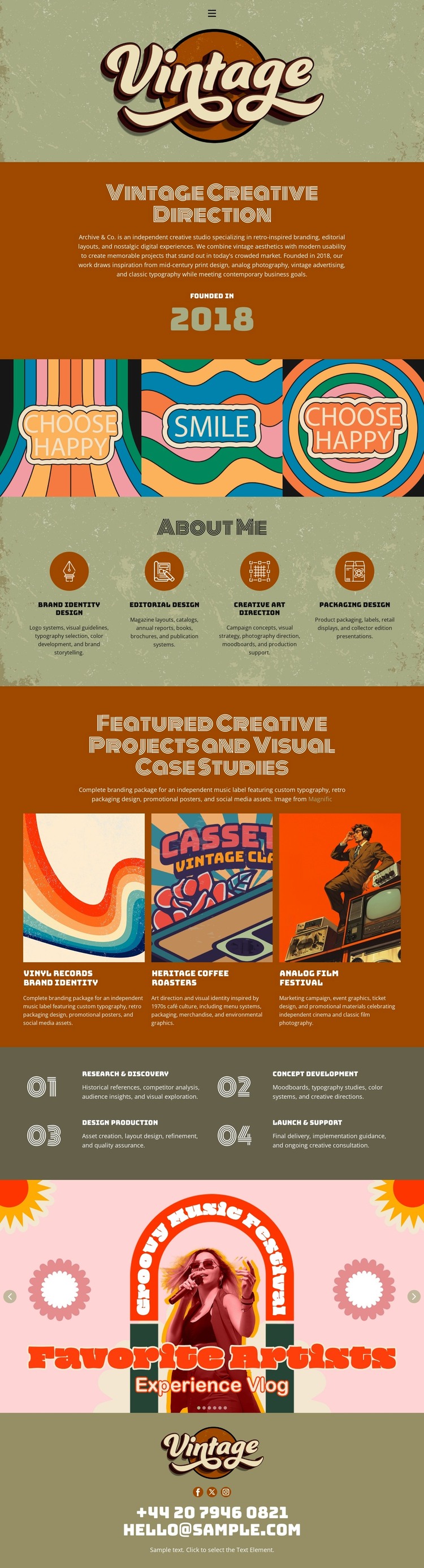
The four capability items provide stable page-oriented content for a creative portfolio: brand identity design, editorial design, creative art direction, and packaging design. Their even arrangement makes the service information easy to distinguish from the three featured visual case studies that follow. The project cards can therefore function as a visual portfolio area, while the capability group explains the type of work represented by that portfolio. This relationship is more useful than treating the page as a collection of unrelated illustrations.
The four process stages add another content pattern that can support expanded project stories or supporting editorial material. Research and discovery, concept development, design production, and launch and support create a sequence around the work, while the illustrated slogan strip and Favorite Phrases section preserve the recognizable creative character. The centered logo and olive contact footer can serve as shared visual regions if related pages are developed, although the sample contact wording and email require replacement.
The template does not verify WordPress Posts, a blog, categories, or other CMS-specific structures. Its WordPress theme interpretation should therefore remain focused on permanent page content, portfolio projects, service information, and reusable visual regions. If regularly updated articles are added later, they would need their own verified content plan rather than being assumed here. Nicepage documents the WordPress Plugin for editing page content in WordPress, but the design-specific value is the separation of capability, case-study, process, and contact content.
Customize with Nicepage
Open this ready-made template in the WordPress Website Builder and customize it visually in the Nicepage editor. Replace demo content, edit page sections, and adapt the design to your project without rebuilding the template from scratch.
Manage and Edit This Theme in WordPress
Customize and Install the WordPress Theme
Start with this ready-made theme instead of building the WordPress design from scratch. Customize its layout, content, typography, images, sections, and other design elements visually in Nicepage editor, then export and install the WordPress Theme, Plugin, and Pages on your WordPress site. The Nicepage WordPress Plugin lets you continue working with the site after installation.
Edit the Theme Directly in WordPress
After installation, you can edit the WordPress Theme directly in WordPress with the Nicepage WordPress Plugin. Use Site Style to customize site Colors, Fonts, Header, Footer, Blog, and Post Page Templates while working within your WordPress website.
Edit WordPress Pages Visually
Use the Nicepage WordPress Plugin to edit page content directly from the WordPress admin area. Open a WordPress Page with Nicepage and visually change its text, images, sections, and other page elements while continuing to manage the Page through WordPress.
WordPress Content and Theme Integration
Use the customized theme with WordPress Pages, Posts, Blog and Post Templates, menus, widgets, and other CMS-managed content. Shared theme elements such as Colors, Fonts, Header, Footer, Blog, and Post Page Templates can be managed as part of the overall site design, while WordPress provides the CMS environment for managing site content.
This workflow combines a ready-made WordPress Theme with visual customization, direct theme editing in WordPress, and continued content management through the Nicepage WordPress Plugin.





















