Premium Helmets WordPress Theme


Edit Template Offline
2. Create new page and search for id 19500
Edit Template Online
Create Awesome Websites


Free Nicepage Builder
Keywords
Model Pages, Reviews, and Reusable Product Content in One Visual System
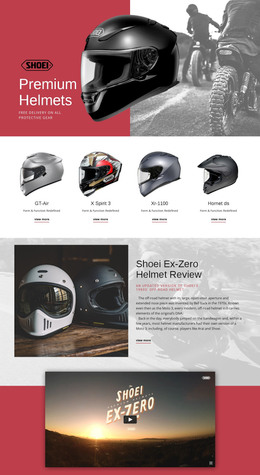
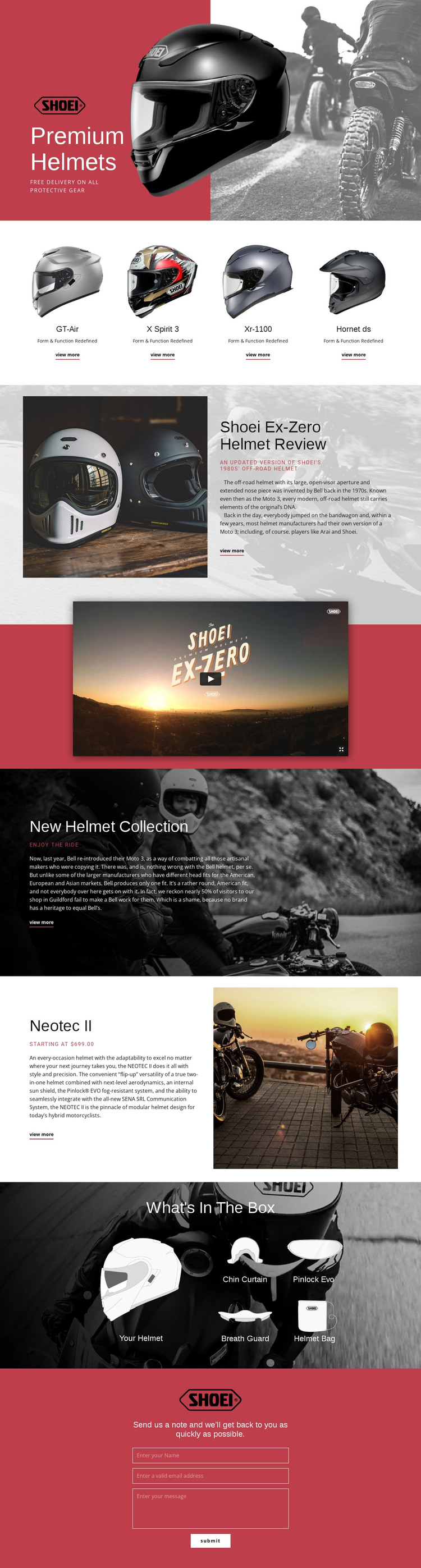
The repeated model cards give the design a natural page-oriented content structure for a WordPress project. GT-Air, X Spirit 3, Xr-1100, and Hornet ds each appear within the same collection treatment, making the visual relationship between recurring helmet information and the shared site direction easy to preserve. The Ex-Zero Helmet Review provides a different content role: it is an editorial feature built from a heading, large image, explanatory copy, and View more link rather than another compact model card.
The Neotec II section offers a useful example of deeper product content. Its description, starting price, modular construction, flip-up functionality, and internal sun shield can be interpreted as information for a featured product page or permanent product section, while the What's In The Box gallery supports related accessory content. The Chin Curtain, Pinlock Evo, Breath Guard, and Helmet Bag are presented as a connected package group, not as unrelated promotional items.
The video and contact form add media and communication layers to the page. WordPress-managed pages can retain the red, white, black, and photographic design language while the content focus expands around models, reviews, and accessories. The important mapping is editorial: recurring product information belongs with the model collection, deeper explanation belongs with review or feature content, and the final form remains the visitor inquiry area. No unverified blog or post structure is assumed.
Customize with Nicepage
Open this ready-made template in the WordPress Website Builder and customize it visually in the Nicepage editor. Replace demo content, edit page sections, and adapt the design to your project without rebuilding the template from scratch.
Manage and Edit This Theme in WordPress
Customize and Install the WordPress Theme
Start with this ready-made theme instead of building the WordPress design from scratch. Customize its layout, content, typography, images, sections, and other design elements visually in Nicepage editor, then export and install the WordPress Theme, Plugin, and Pages on your WordPress site. The Nicepage WordPress Plugin lets you continue working with the site after installation.
Edit the Theme Directly in WordPress
After installation, you can edit the WordPress Theme directly in WordPress with the Nicepage WordPress Plugin. Use Site Style to customize site Colors, Fonts, Header, Footer, Blog, and Post Page Templates while working within your WordPress website.
Edit WordPress Pages Visually
Use the Nicepage WordPress Plugin to edit page content directly from the WordPress admin area. Open a WordPress Page with Nicepage and visually change its text, images, sections, and other page elements while continuing to manage the Page through WordPress.
WordPress Content and Theme Integration
Use the customized theme with WordPress Pages, Posts, Blog and Post Templates, menus, widgets, and other CMS-managed content. Shared theme elements such as Colors, Fonts, Header, Footer, Blog, and Post Page Templates can be managed as part of the overall site design, while WordPress provides the CMS environment for managing site content.
This workflow combines a ready-made WordPress Theme with visual customization, direct theme editing in WordPress, and continued content management through the Nicepage WordPress Plugin.