
Innovative Paths to Progress WordPress Theme


Edit Template Offline
2. Create new page and search for id 6527747
Edit Template Online
Create Awesome Websites


Free Nicepage Builder
Keywords
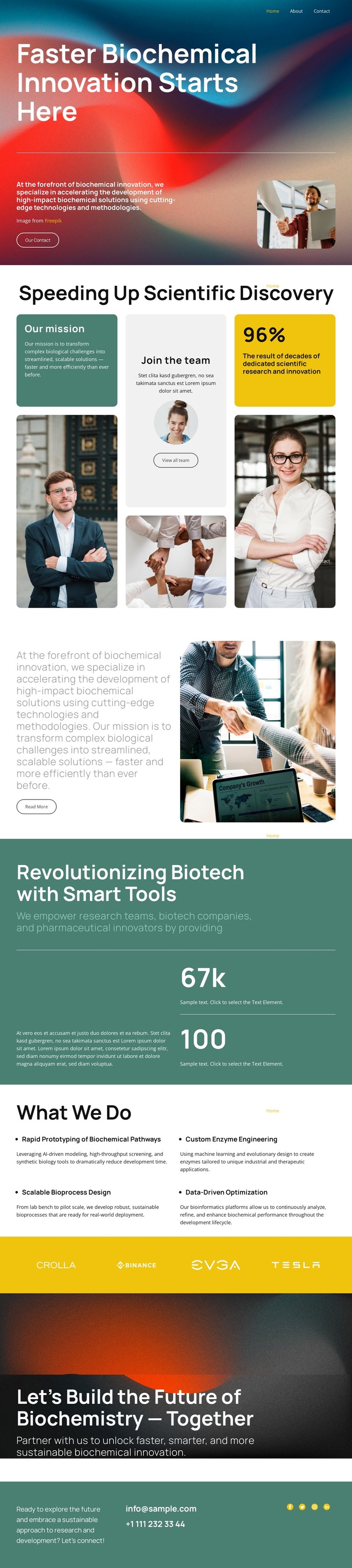
Mission, Capabilities, and Contact Areas Form a WordPress Content Framework
The page separates its subject into clear areas that can be understood as permanent site content: an opening biotechnology statement, a mission explanation, a What We Do section, and a closing contact path. The navigation includes Home, About, and Contact links, so the design already suggests movement between core information areas rather than presenting an isolated visual poster. The mission section and its research photograph provide context, while the four capability descriptions give the subject a practical content focus.
Those capabilities—biochemical pathway prototyping, custom enzyme engineering, scalable bioprocess design, and data-driven optimization—are concise enough to introduce distinct service or research topics without claiming that separate pages already exist. The editorial collage, professional portraits, and laboratory imagery can support page content that needs both explanatory text and visual evidence. The two numeric callouts can remain structural highlights, while the sample values should be replaced with verified organization-specific information.
The closing collaboration message and direct footer email and telephone number give the design a natural contact area for prospective partners. In a WordPress-managed project, these page-oriented sections could remain part of one visual system while additional editorial or organizational content is added around them. The design therefore offers a clear starting structure for publishing mission, capabilities, research context, and contact information without requiring unsupported assumptions about existing posts or blog templates.
Customize with Nicepage
Open this ready-made template in the WordPress Website Builder and customize it visually in the Nicepage editor. Replace demo content, edit page sections, and adapt the design to your project without rebuilding the template from scratch.
Manage and Edit This Theme in WordPress
Customize and Install the WordPress Theme
Start with this ready-made theme instead of building the WordPress design from scratch. Customize its layout, content, typography, images, sections, and other design elements visually in Nicepage editor, then export and install the WordPress Theme, Plugin, and Pages on your WordPress site. The Nicepage WordPress Plugin lets you continue working with the site after installation.
Edit the Theme Directly in WordPress
After installation, you can edit the WordPress Theme directly in WordPress with the Nicepage WordPress Plugin. Use Site Style to customize site Colors, Fonts, Header, Footer, Blog, and Post Page Templates while working within your WordPress website.
Edit WordPress Pages Visually
Use the Nicepage WordPress Plugin to edit page content directly from the WordPress admin area. Open a WordPress Page with Nicepage and visually change its text, images, sections, and other page elements while continuing to manage the Page through WordPress.
WordPress Content and Theme Integration
Use the customized theme with WordPress Pages, Posts, Blog and Post Templates, menus, widgets, and other CMS-managed content. Shared theme elements such as Colors, Fonts, Header, Footer, Blog, and Post Page Templates can be managed as part of the overall site design, while WordPress provides the CMS environment for managing site content.
This workflow combines a ready-made WordPress Theme with visual customization, direct theme editing in WordPress, and continued content management through the Nicepage WordPress Plugin.





















