It takes great people to do great work WordPress Theme

Edit Template Offline
2. Create new page and search for id 5334380
Edit Template Online
Create Awesome Websites


Free Nicepage Builder
Keywords
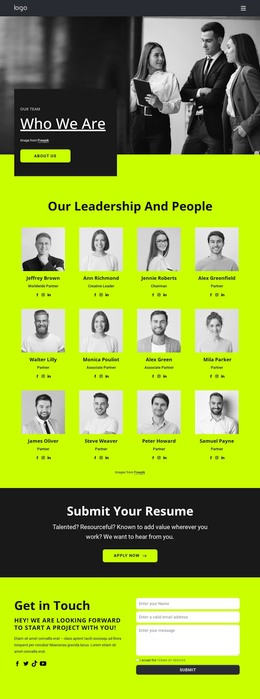
Twelve Profiles Give the Team Content a Clear WordPress Shape
The repeated profile directory gives this design a practical content center for a WordPress-managed team site. Twelve portrait cards divide the people section into consistent records, with a visual portrait, name, role label, and social links in each unit. That arrangement makes the design suitable for maintaining team information as page content while preserving a recognizable presentation across the directory. The opening Who We Are area adds organizational context through a large team image, a dark text panel, and an About Us button before visitors reach the profile collection.
The recruitment content has its own distinct role. The Submit Your Resume block separates the application invitation from the team records and places Apply Now beneath the message, so a future role or application destination can be connected without confusing it with an individual profile. The Get in Touch area then supports broader communication through a two-column layout, introductory copy, social links, a terms checkbox, and a message form. This division gives the site separate places for team information, applications, and general inquiries rather than forcing every response into one block.
The neon lime, charcoal, white, and black palette, bold sans-serif typography, compact spacing, and rounded buttons provide the visual system that can surround these content areas. In a WordPress project, the design can therefore organize permanent team and recruitment information around a consistent theme character while leaving the demonstrated names and labels as replaceable content rather than treating them as verified organizational facts.
Customize with Nicepage
Open this ready-made template in the WordPress Website Builder and customize it visually in the Nicepage editor. Replace demo content, edit page sections, and adapt the design to your project without rebuilding the template from scratch.
Manage and Edit This Theme in WordPress
Customize and Install the WordPress Theme
Start with this ready-made theme instead of building the WordPress design from scratch. Customize its layout, content, typography, images, sections, and other design elements visually in Nicepage editor, then export and install the WordPress Theme, Plugin, and Pages on your WordPress site. The Nicepage WordPress Plugin lets you continue working with the site after installation.
Edit the Theme Directly in WordPress
After installation, you can edit the WordPress Theme directly in WordPress with the Nicepage WordPress Plugin. Use Site Style to customize site Colors, Fonts, Header, Footer, Blog, and Post Page Templates while working within your WordPress website.
Edit WordPress Pages Visually
Use the Nicepage WordPress Plugin to edit page content directly from the WordPress admin area. Open a WordPress Page with Nicepage and visually change its text, images, sections, and other page elements while continuing to manage the Page through WordPress.
WordPress Content and Theme Integration
Use the customized theme with WordPress Pages, Posts, Blog and Post Templates, menus, widgets, and other CMS-managed content. Shared theme elements such as Colors, Fonts, Header, Footer, Blog, and Post Page Templates can be managed as part of the overall site design, while WordPress provides the CMS environment for managing site content.
This workflow combines a ready-made WordPress Theme with visual customization, direct theme editing in WordPress, and continued content management through the Nicepage WordPress Plugin.