Make every move count WordPress Theme


A Focused Sports Message for WordPress-Managed Page Content
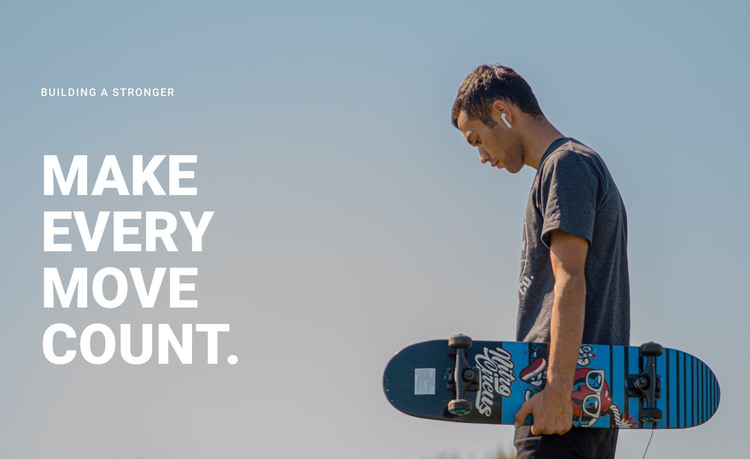
The eyebrow “Building a stronger” and the headline “Make Every Move Count” give this section a stable content role: a brief introduction to movement, sport, or an active lifestyle. The smaller line establishes the lead-in, while the larger white headline carries the main message. Since the block is static and contains no form, cards, or other interactive component, its page value comes from the clarity of this two-level text hierarchy and the atmosphere created by the image.
The full-width photographic background extends behind the content, with a skateboarder holding a skateboard positioned on the right. The left-side text remains visually separate from the subject because generous open space divides the message from the image detail. This arrangement gives the section enough identity to remain recognizable when used with other content areas, while keeping its purpose limited to an introductory hero rather than a complete page.
In a WordPress-oriented project, the block can function as stable page content on a sports, recreation, or active-lifestyle page. The wording and image can be maintained as part of that page’s visual content, while other sections handle detailed information, programs, stories, or contact actions. Nicepage’s WordPress workflow supports working with page content in the CMS context, but the section itself remains one reusable visual area within the wider theme and site.
Customize with Nicepage
Open this ready-made template in the WordPress Website Builder and customize it visually in the Nicepage editor. Replace demo content, edit page sections, and adapt the design to your project without rebuilding the template from scratch.
Edit Template Offline
2. Create a new page or select existing
3. Click Add new block, search for id 46991 and click enter
Edit Template Online
Create Awesome Websites


Free Nicepage Builder
Keywords
Manage and Edit This Theme in WordPress
Customize and Install the WordPress Theme
Start with this ready-made theme instead of building the WordPress design from scratch. Customize its layout, content, typography, images, sections, and other design elements visually in Nicepage editor, then export and install the WordPress Theme, Plugin, and Pages on your WordPress site. The Nicepage WordPress Plugin lets you continue working with the site after installation.
Edit the Theme Directly in WordPress
After installation, you can edit the WordPress Theme directly in WordPress with the Nicepage WordPress Plugin. Use Site Style to customize site Colors, Fonts, Header, Footer, Blog, and Post Page Templates while working within your WordPress website.
Edit WordPress Pages Visually
Use the Nicepage WordPress Plugin to edit page content directly from the WordPress admin area. Open a WordPress Page with Nicepage and visually change its text, images, sections, and other page elements while continuing to manage the Page through WordPress.
WordPress Content and Theme Integration
Use the customized theme with WordPress Pages, Posts, Blog and Post Templates, menus, widgets, and other CMS-managed content. Shared theme elements such as Colors, Fonts, Header, Footer, Blog, and Post Page Templates can be managed as part of the overall site design, while WordPress provides the CMS environment for managing site content.
This workflow combines a ready-made WordPress Theme with visual customization, direct theme editing in WordPress, and continued content management through the Nicepage WordPress Plugin.