Finding the best marketing WordPress Theme


The valuation checklist and price card form stable page content
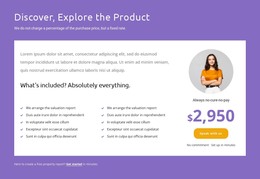
The section’s fixed-rate message gives a WordPress-managed services page a clear piece of permanent content to present before visitors reach other site information. The white panel carries the main explanatory load: ten checklist entries are arranged in two five-item columns, with “We arrange the valuation report” repeated at the start of both columns. This organization suits a publishable service area because the included items can be read as a defined content group rather than as isolated promotional fragments.
The adjacent pricing card provides a different kind of page content. Its circular portrait image, displayed $2,950 figure, “Always no-cure-no-pay” label, and “Speak with us” action condense the commercial summary into one visually bounded region. The purple background, white panel, purple check marks, and rounded yellow-orange button give the section a consistent visual pattern that can sit within a wider WordPress page while other content areas handle navigation, articles, proof, or contact details.
The lower “Get started” prompt adds a separate action connected to a free property report. That relationship allows the block to support both direct conversation and an initial report request without requiring the section to carry every page function. In a WordPress-oriented project, the block can therefore remain a stable pricing area while surrounding pages and publishable content expand the service context.
Customize with Nicepage
Open this ready-made template in the WordPress Website Builder and customize it visually in the Nicepage editor. Replace demo content, edit page sections, and adapt the design to your project without rebuilding the template from scratch.
Edit Template Offline
2. Create a new page or select existing
3. Click Add new block, search for id 4366445 and click enter
Edit Template Online
Create Awesome Websites


Free Nicepage Builder
Keywords
Manage and Edit This Theme in WordPress
Customize and Install the WordPress Theme
Start with this ready-made theme instead of building the WordPress design from scratch. Customize its layout, content, typography, images, sections, and other design elements visually in Nicepage editor, then export and install the WordPress Theme, Plugin, and Pages on your WordPress site. The Nicepage WordPress Plugin lets you continue working with the site after installation.
Edit the Theme Directly in WordPress
After installation, you can edit the WordPress Theme directly in WordPress with the Nicepage WordPress Plugin. Use Site Style to customize site Colors, Fonts, Header, Footer, Blog, and Post Page Templates while working within your WordPress website.
Edit WordPress Pages Visually
Use the Nicepage WordPress Plugin to edit page content directly from the WordPress admin area. Open a WordPress Page with Nicepage and visually change its text, images, sections, and other page elements while continuing to manage the Page through WordPress.
WordPress Content and Theme Integration
Use the customized theme with WordPress Pages, Posts, Blog and Post Templates, menus, widgets, and other CMS-managed content. Shared theme elements such as Colors, Fonts, Header, Footer, Blog, and Post Page Templates can be managed as part of the overall site design, while WordPress provides the CMS environment for managing site content.
This workflow combines a ready-made WordPress Theme with visual customization, direct theme editing in WordPress, and continued content management through the Nicepage WordPress Plugin.