
Personal page with portfolio WordPress Theme


Edit Template Offline
2. Create new page and search for id 3554542
Edit Template Online
Create Awesome Websites


Free Nicepage Builder
Keywords
Service Cards and Project Entries Support WordPress Portfolio Content
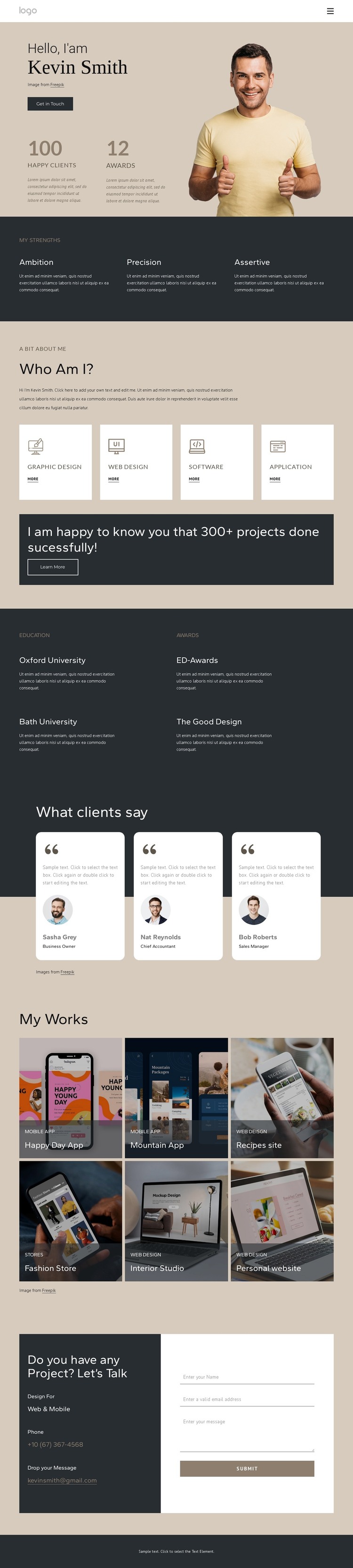
The four service cards provide a natural page-oriented content base for a WordPress theme. Graphic Design, Web Design, Software, and Application work are visibly separated, allowing the personal profile to introduce the designer before visitors explore specific capabilities. The opening portrait, short introduction, metrics, and Get in Touch button establish the permanent identity of the page, while the service area gives that identity a practical professional context.
The six-item My Works gallery can be understood as a distinct portfolio content region. Its labels—Happy Day App, Mountain App, Recipes site, Fashion Store, Interior Studio, and Personal website—show the range of entries the visual system is prepared to present, without treating the sample names as verified client records. Three testimonial cards add a separate client-feedback layer, and the Education & Awards section supplies background content that can remain alongside the more frequently updated work presentation.
The closing contact panel connects these content areas to a project inquiry form and direct contact details. In a WordPress project, permanent profile and service information could coexist with an expanding portfolio presentation while retaining the same visual direction. The design therefore works as a theme-oriented starting point for managed personal content, but the analysis does not claim that WordPress Posts, categories, or other CMS structures already exist in the template.
Customize with Nicepage
Open this ready-made template in the WordPress Website Builder and customize it visually in the Nicepage editor. Replace demo content, edit page sections, and adapt the design to your project without rebuilding the template from scratch.
Manage and Edit This Theme in WordPress
Customize and Install the WordPress Theme
Start with this ready-made theme instead of building the WordPress design from scratch. Customize its layout, content, typography, images, sections, and other design elements visually in Nicepage editor, then export and install the WordPress Theme, Plugin, and Pages on your WordPress site. The Nicepage WordPress Plugin lets you continue working with the site after installation.
Edit the Theme Directly in WordPress
After installation, you can edit the WordPress Theme directly in WordPress with the Nicepage WordPress Plugin. Use Site Style to customize site Colors, Fonts, Header, Footer, Blog, and Post Page Templates while working within your WordPress website.
Edit WordPress Pages Visually
Use the Nicepage WordPress Plugin to edit page content directly from the WordPress admin area. Open a WordPress Page with Nicepage and visually change its text, images, sections, and other page elements while continuing to manage the Page through WordPress.
WordPress Content and Theme Integration
Use the customized theme with WordPress Pages, Posts, Blog and Post Templates, menus, widgets, and other CMS-managed content. Shared theme elements such as Colors, Fonts, Header, Footer, Blog, and Post Page Templates can be managed as part of the overall site design, while WordPress provides the CMS environment for managing site content.
This workflow combines a ready-made WordPress Theme with visual customization, direct theme editing in WordPress, and continued content management through the Nicepage WordPress Plugin.





















