
Workshop pottery art WordPress Theme


Edit Template Offline
2. Create new page and search for id 12379
Edit Template Online
Create Awesome Websites


Free Nicepage Builder
Keywords
Page Content and Repeated Studio Offers Suit a WordPress Theme Structure
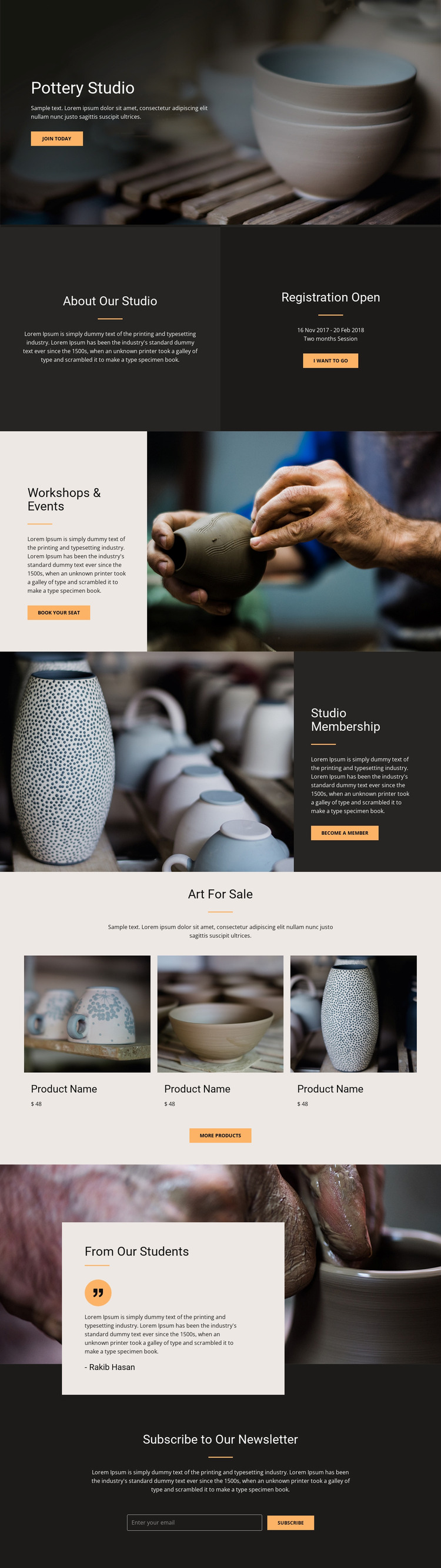
The About Our Studio, Workshops & Events, Studio Membership, and Art For Sale areas divide the design into clear page-oriented content categories. That division is useful when interpreting the design as a WordPress theme because permanent information can remain distinct from repeatedly updated material. The workshop and event section can carry activity-focused content, while the membership area communicates an ongoing studio relationship rather than a single class invitation.
The three pottery product cards provide a repeated content pattern that differs from the image-and-text service sections. In a WordPress-managed project, that distinction can help a team think about product or catalog information separately from studio descriptions, without claiming that WordPress products or a shop already exist in this template. The student testimonial adds another reusable editorial pattern: community perspective can be presented as supporting content alongside the main studio offers. The newsletter form remains a focused subscription area rather than being confused with registration or product response.
The visual system helps these content types remain related. Terracotta, cream, charcoal, bold headings, and large ceramic imagery connect the sections even as their content roles change. If the project later adds regularly updated announcements or articles, the same design direction could frame them without altering the core studio identity. Nicepage’s WordPress Plugin supports direct theme editing in WordPress, but the key value here is the template’s separation of studio, activity, membership, product, testimonial, and subscription content.
Customize with Nicepage
Open this ready-made template in the WordPress Website Builder and customize it visually in the Nicepage editor. Replace demo content, edit page sections, and adapt the design to your project without rebuilding the template from scratch.
Manage and Edit This Theme in WordPress
Customize and Install the WordPress Theme
Start with this ready-made theme instead of building the WordPress design from scratch. Customize its layout, content, typography, images, sections, and other design elements visually in Nicepage editor, then export and install the WordPress Theme, Plugin, and Pages on your WordPress site. The Nicepage WordPress Plugin lets you continue working with the site after installation.
Edit the Theme Directly in WordPress
After installation, you can edit the WordPress Theme directly in WordPress with the Nicepage WordPress Plugin. Use Site Style to customize site Colors, Fonts, Header, Footer, Blog, and Post Page Templates while working within your WordPress website.
Edit WordPress Pages Visually
Use the Nicepage WordPress Plugin to edit page content directly from the WordPress admin area. Open a WordPress Page with Nicepage and visually change its text, images, sections, and other page elements while continuing to manage the Page through WordPress.
WordPress Content and Theme Integration
Use the customized theme with WordPress Pages, Posts, Blog and Post Templates, menus, widgets, and other CMS-managed content. Shared theme elements such as Colors, Fonts, Header, Footer, Blog, and Post Page Templates can be managed as part of the overall site design, while WordPress provides the CMS environment for managing site content.
This workflow combines a ready-made WordPress Theme with visual customization, direct theme editing in WordPress, and continued content management through the Nicepage WordPress Plugin.





















