
Organization of large business WordPress Theme
Edit Template Offline
2. Create new page and search for id 338484
Edit Template Online
Create Awesome Websites


Free Nicepage Builder
Keywords
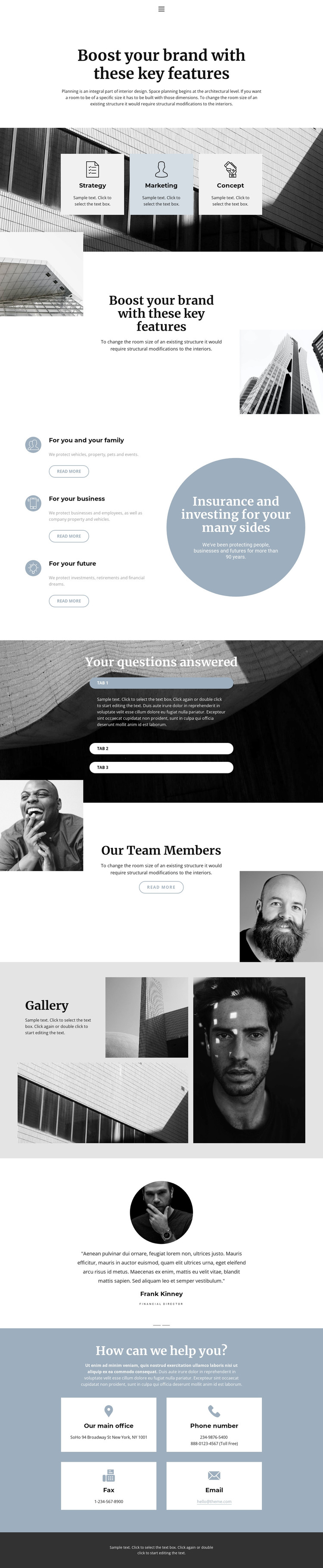
Service Cards and Editorial Content Give the Theme Clear Page Roles
The page separates several kinds of permanent content that can fit naturally within a WordPress-oriented site structure. Its Home, About, and Contact links establish page-level navigation, while the three cards for Strategy, Marketing, and Concept provide a clear starting point for describing offerings. The audience grid then distinguishes personal and family needs, business concerns, and future planning, giving the content more specific directions than a single undivided company statement.
The design also contains recurring information that can be maintained as part of the same visual system. Three expandable questions create a focused area for answers, and the team section combines portraits with a heading and Read more action. The gallery presents three image tiles, while the testimonial area contains two slides with portraits, quotes, names, roles, and navigation controls. These relationships make the layout suitable for permanent company content that may later sit alongside regularly updated editorial material, without claiming that posts or blog structures already exist in this template.
At the bottom, office, phone, fax, and email categories create a practical contact destination, supported by the shared navigation and dark footer. The muted palette, serif display type, sans-serif text, architectural imagery, and circular accents provide the theme’s visual continuity as page content changes. In a WordPress project, that combination can keep service, people, proof, and contact information recognizably connected rather than treating each content area as a separate design.
Customize with Nicepage
Open this ready-made template in the WordPress Website Builder and customize it visually in the Nicepage editor. Replace demo content, edit page sections, and adapt the design to your project without rebuilding the template from scratch.
Manage and Edit This Theme in WordPress
Customize and Install the WordPress Theme
Start with this ready-made theme instead of building the WordPress design from scratch. Customize its layout, content, typography, images, sections, and other design elements visually in Nicepage editor, then export and install the WordPress Theme, Plugin, and Pages on your WordPress site. The Nicepage WordPress Plugin lets you continue working with the site after installation.
Edit the Theme Directly in WordPress
After installation, you can edit the WordPress Theme directly in WordPress with the Nicepage WordPress Plugin. Use Site Style to customize site Colors, Fonts, Header, Footer, Blog, and Post Page Templates while working within your WordPress website.
Edit WordPress Pages Visually
Use the Nicepage WordPress Plugin to edit page content directly from the WordPress admin area. Open a WordPress Page with Nicepage and visually change its text, images, sections, and other page elements while continuing to manage the Page through WordPress.
WordPress Content and Theme Integration
Use the customized theme with WordPress Pages, Posts, Blog and Post Templates, menus, widgets, and other CMS-managed content. Shared theme elements such as Colors, Fonts, Header, Footer, Blog, and Post Page Templates can be managed as part of the overall site design, while WordPress provides the CMS environment for managing site content.
This workflow combines a ready-made WordPress Theme with visual customization, direct theme editing in WordPress, and continued content management through the Nicepage WordPress Plugin.





















