We work with ambitious clients WordPress Theme


Stable Capability Content Fits a WordPress-Managed Page
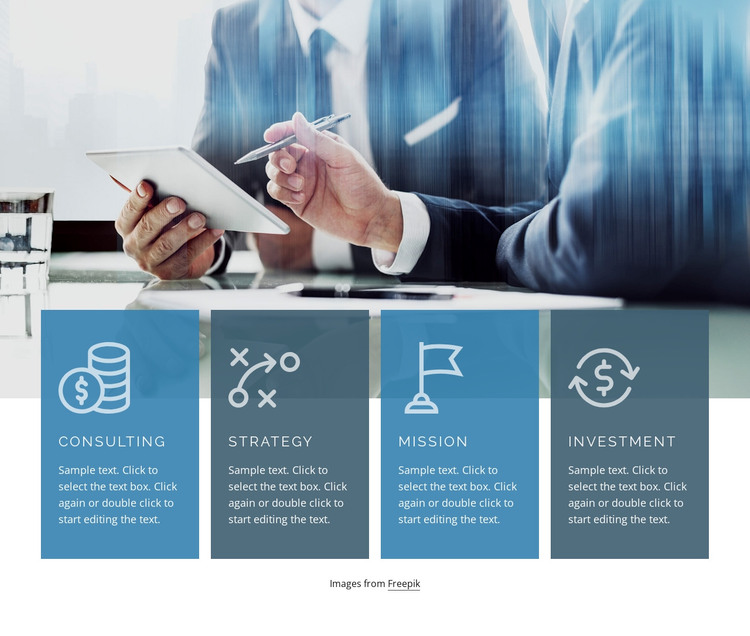
The four card labels give the block a clear page-content role: it presents Consulting, Strategy, Mission, and Investment as related business capabilities. A wide meeting photograph introduces the visual context, while the cards overlap its lower edge and hold the readable information. Each item follows the same pattern of pale line icon, uppercase heading, and compact description, so the section can remain visually consistent when its text is adapted for a particular page.
This content model is different from a stream of dated updates. It reads as a stable capability area that can sit on a services, company, or business-information page within a WordPress-managed site. The repeated cards make the categories easy to distinguish, and the static interaction means visitors can review all four at once. Blue and slate surfaces separate the content from the image while preserving the section’s visual relationship between context and capability.
A broader WordPress project can place other page content around this section, including introductions, detailed service information, case material, or contact areas. Nicepage’s WordPress Pages workflow provides a relevant CMS context for placing designed content on managed pages, but it does not change the scope of this block. The image, four capability cards, icons, headings, and descriptions remain the section’s defining content.
Customize with Nicepage
Open this ready-made template in the WordPress Website Builder and customize it visually in the Nicepage editor. Replace demo content, edit page sections, and adapt the design to your project without rebuilding the template from scratch.
Edit Template Offline
2. Create a new page or select existing
3. Click Add new block, search for id 330308 and click enter
Edit Template Online
Create Awesome Websites


Free Nicepage Builder
Keywords
Manage and Edit This Theme in WordPress
Customize and Install the WordPress Theme
Start with this ready-made theme instead of building the WordPress design from scratch. Customize its layout, content, typography, images, sections, and other design elements visually in Nicepage editor, then export and install the WordPress Theme, Plugin, and Pages on your WordPress site. The Nicepage WordPress Plugin lets you continue working with the site after installation.
Edit the Theme Directly in WordPress
After installation, you can edit the WordPress Theme directly in WordPress with the Nicepage WordPress Plugin. Use Site Style to customize site Colors, Fonts, Header, Footer, Blog, and Post Page Templates while working within your WordPress website.
Edit WordPress Pages Visually
Use the Nicepage WordPress Plugin to edit page content directly from the WordPress admin area. Open a WordPress Page with Nicepage and visually change its text, images, sections, and other page elements while continuing to manage the Page through WordPress.
WordPress Content and Theme Integration
Use the customized theme with WordPress Pages, Posts, Blog and Post Templates, menus, widgets, and other CMS-managed content. Shared theme elements such as Colors, Fonts, Header, Footer, Blog, and Post Page Templates can be managed as part of the overall site design, while WordPress provides the CMS environment for managing site content.
This workflow combines a ready-made WordPress Theme with visual customization, direct theme editing in WordPress, and continued content management through the Nicepage WordPress Plugin.