
Amazing performace of art WordPress Theme
Edit Template Offline
2. Create new page and search for id 32116
Edit Template Online
Create Awesome Websites


Free Nicepage Builder
Keywords
Portrait-Led Sections Give Music Content Distinct Page Roles
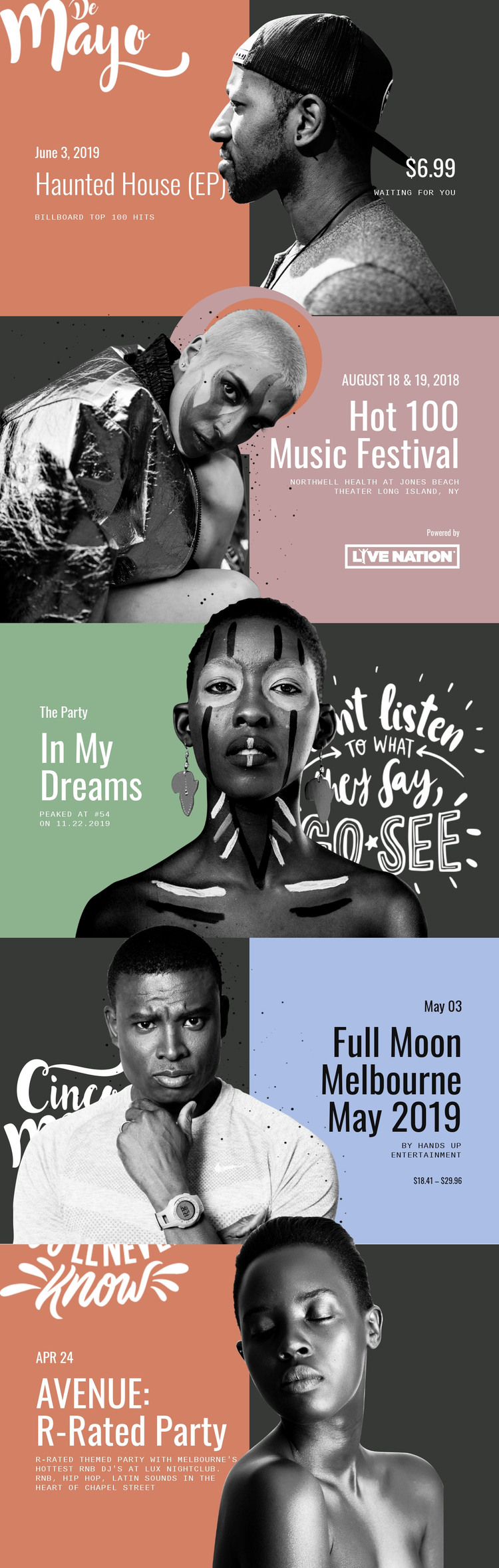
The opening Haunted House (EP) panel and the In My Dreams feature establish two page-oriented content roles for a WordPress-managed music project: a release presentation and a chart-related artist or song feature. Their portrait images sit beside concise supporting information, including a release title, chart reference, and linked destination. This pairing makes the design suitable for permanent music content that needs a strong visual entry point without relying on long text.
The other three sections shift toward publishable event information. Hot 100 Music Festival presents performer imagery with a date, venue, and sponsor detail. Full Moon Melbourne May 2019 adds an organizer and ticket range, while AVENUE: R-Rated Party describes a themed nightlife event through its date, venue context, and RNB, Hip Hop, and Latin sounds. These differences create useful content groupings within one consistent presentation.
In WordPress, the repeated panel pattern could support a site where relatively stable release or artist pages sit alongside regularly updated event information. The design does not establish a blog or post structure, but its clear separation of image, heading, and supporting details gives new content a recognizable place within the theme. The high-contrast photography and color fields keep those changing entries visually connected.
Customize with Nicepage
Open this ready-made template in the WordPress Website Builder and customize it visually in the Nicepage editor. Replace demo content, edit page sections, and adapt the design to your project without rebuilding the template from scratch.
Manage and Edit This Theme in WordPress
Customize and Install the WordPress Theme
Start with this ready-made theme instead of building the WordPress design from scratch. Customize its layout, content, typography, images, sections, and other design elements visually in Nicepage editor, then export and install the WordPress Theme, Plugin, and Pages on your WordPress site. The Nicepage WordPress Plugin lets you continue working with the site after installation.
Edit the Theme Directly in WordPress
After installation, you can edit the WordPress Theme directly in WordPress with the Nicepage WordPress Plugin. Use Site Style to customize site Colors, Fonts, Header, Footer, Blog, and Post Page Templates while working within your WordPress website.
Edit WordPress Pages Visually
Use the Nicepage WordPress Plugin to edit page content directly from the WordPress admin area. Open a WordPress Page with Nicepage and visually change its text, images, sections, and other page elements while continuing to manage the Page through WordPress.
WordPress Content and Theme Integration
Use the customized theme with WordPress Pages, Posts, Blog and Post Templates, menus, widgets, and other CMS-managed content. Shared theme elements such as Colors, Fonts, Header, Footer, Blog, and Post Page Templates can be managed as part of the overall site design, while WordPress provides the CMS environment for managing site content.
This workflow combines a ready-made WordPress Theme with visual customization, direct theme editing in WordPress, and continued content management through the Nicepage WordPress Plugin.





















