Dream real estate agency WordPress Theme



Edit Template Offline
2. Create new page and search for id 31871
Edit Template Online
Create Awesome Websites


Free Nicepage Builder
Keywords
Project Showcases and Practice Pages Fit a WordPress Content Model
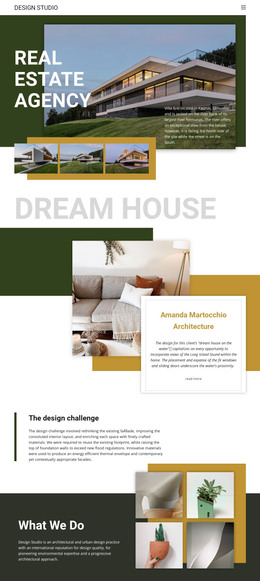
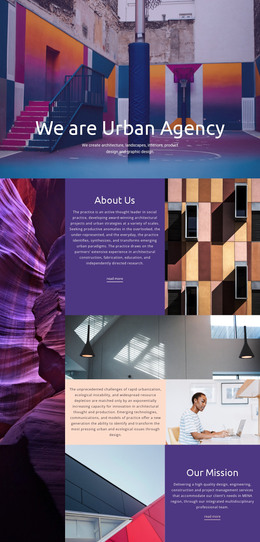
The page separates permanent practice information from project-oriented presentation in a way that can translate naturally to a WordPress-managed site. The hero and “The design challenge” provide page-oriented context about the studio and its approach, while “What We Do” introduces architectural and urban design through text paired with four images. These areas can remain stable parts of the site’s visual direction as the practice updates individual project content.
The project grid offers a different content relationship. Four links—Meraki Market Parklet, Turner Residence, Tech Office Space, and David Ireland House—are presented beside architectural imagery, making the design suitable for a collection of project entries or case-study destinations without claiming that WordPress Posts or categories already exist in the template. The “Dream house” and “Good Work” cards provide two additional examples of how featured project content can be highlighted with a large image, concise description, and Read More path. Mission, Projects, Awards, and Contacts also give the navigation a clear page-oriented map.
The footer’s Facebook, Twitter, Instagram, and LinkedIn links act as shared site elements, while the closing Read More band provides a separate continuation point. If the design is extended inside WordPress, the WordPress Plugin can support visual work with the site, but the template-specific value comes from its division between studio context, recurring project content, navigation, and social presentation.
Customize with Nicepage
Open this ready-made template in the WordPress Website Builder and customize it visually in the Nicepage editor. Replace demo content, edit page sections, and adapt the design to your project without rebuilding the template from scratch.
Manage and Edit This Theme in WordPress
Customize and Install the WordPress Theme
Start with this ready-made theme instead of building the WordPress design from scratch. Customize its layout, content, typography, images, sections, and other design elements visually in Nicepage editor, then export and install the WordPress Theme, Plugin, and Pages on your WordPress site. The Nicepage WordPress Plugin lets you continue working with the site after installation.
Edit the Theme Directly in WordPress
After installation, you can edit the WordPress Theme directly in WordPress with the Nicepage WordPress Plugin. Use Site Style to customize site Colors, Fonts, Header, Footer, Blog, and Post Page Templates while working within your WordPress website.
Edit WordPress Pages Visually
Use the Nicepage WordPress Plugin to edit page content directly from the WordPress admin area. Open a WordPress Page with Nicepage and visually change its text, images, sections, and other page elements while continuing to manage the Page through WordPress.
WordPress Content and Theme Integration
Use the customized theme with WordPress Pages, Posts, Blog and Post Templates, menus, widgets, and other CMS-managed content. Shared theme elements such as Colors, Fonts, Header, Footer, Blog, and Post Page Templates can be managed as part of the overall site design, while WordPress provides the CMS environment for managing site content.
This workflow combines a ready-made WordPress Theme with visual customization, direct theme editing in WordPress, and continued content management through the Nicepage WordPress Plugin.