
Urban real estate WordPress Theme


Edit Template Offline
2. Create new page and search for id 32311
Edit Template Online
Create Awesome Websites


Free Nicepage Builder
Keywords
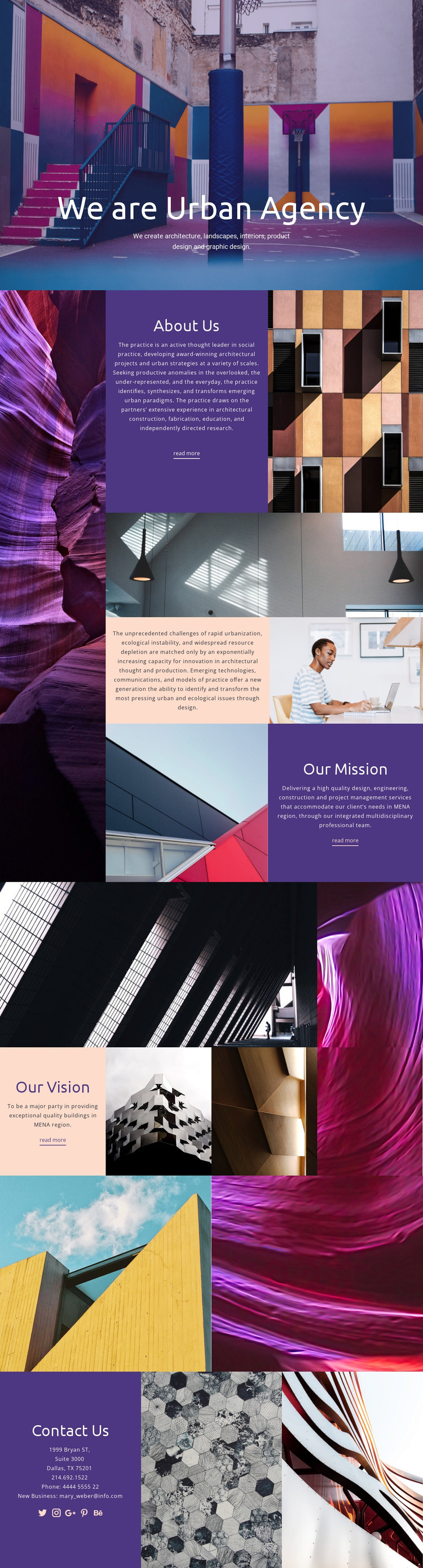
Agency Pages and Visual Content Share One Design Direction
The page-oriented content is well suited to a site where permanent agency information forms the core of the presentation. The hero can introduce the practice and its disciplines, while About Us supplies a general page area for describing the agency. Our Mission and Our Vision provide two additional content relationships: one explains the practice’s orientation, and the other presents its intended direction. Together, these sections create more useful page content than a single undifferentiated company statement.
The architectural galleries can be interpreted as visual project or portfolio-oriented areas, although the analysis confirms the galleries’ imagery rather than a specific post or portfolio system. Their placement between the mission and vision content gives visual material a role in the wider editorial flow. Contact Us then provides permanent contact content with location, phone, email, and social links. In a WordPress-managed project, these page areas could remain part of a shared theme direction while regularly updated content is added only where the project requires it. The design therefore offers a clear visual environment for pages and recurring agency material without claiming that WordPress Posts, categories, or blog structures already exist in the template.
Customize with Nicepage
Open this ready-made template in the WordPress Website Builder and customize it visually in the Nicepage editor. Replace demo content, edit page sections, and adapt the design to your project without rebuilding the template from scratch.
Manage and Edit This Theme in WordPress
Customize and Install the WordPress Theme
Start with this ready-made theme instead of building the WordPress design from scratch. Customize its layout, content, typography, images, sections, and other design elements visually in Nicepage editor, then export and install the WordPress Theme, Plugin, and Pages on your WordPress site. The Nicepage WordPress Plugin lets you continue working with the site after installation.
Edit the Theme Directly in WordPress
After installation, you can edit the WordPress Theme directly in WordPress with the Nicepage WordPress Plugin. Use Site Style to customize site Colors, Fonts, Header, Footer, Blog, and Post Page Templates while working within your WordPress website.
Edit WordPress Pages Visually
Use the Nicepage WordPress Plugin to edit page content directly from the WordPress admin area. Open a WordPress Page with Nicepage and visually change its text, images, sections, and other page elements while continuing to manage the Page through WordPress.
WordPress Content and Theme Integration
Use the customized theme with WordPress Pages, Posts, Blog and Post Templates, menus, widgets, and other CMS-managed content. Shared theme elements such as Colors, Fonts, Header, Footer, Blog, and Post Page Templates can be managed as part of the overall site design, while WordPress provides the CMS environment for managing site content.
This workflow combines a ready-made WordPress Theme with visual customization, direct theme editing in WordPress, and continued content management through the Nicepage WordPress Plugin.





















