
Travel Live WordPress Theme


Edit Template Offline
2. Create new page and search for id 29758
Edit Template Online
Create Awesome Websites


Free Nicepage Builder
Keywords
Travel Stories and Ordered Advice Give WordPress Content Clear Roles
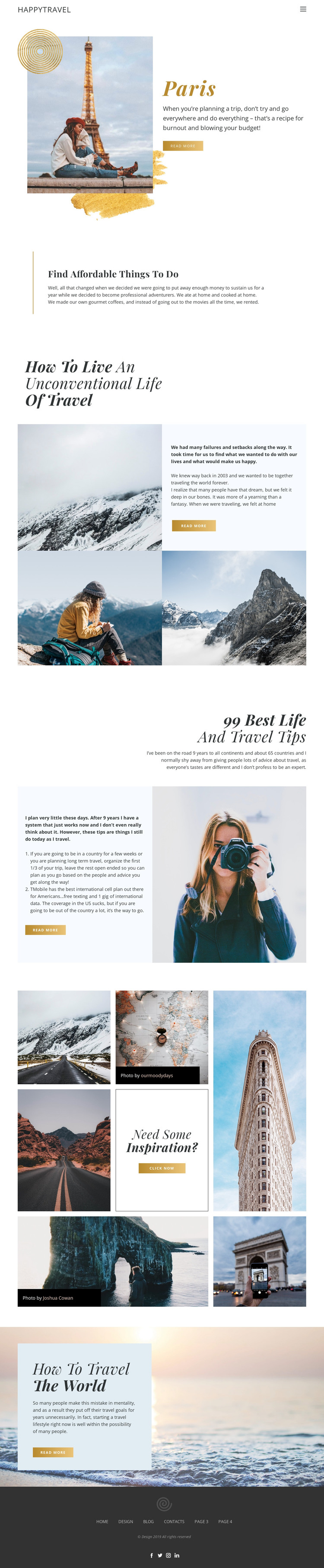
The page-oriented content is suited to a travel site where permanent destination and advice sections can remain part of one visual system. Paris provides a strong introductory subject with a photograph, description, and read-more action. The centered “Find Affordable Things to do” section supplies a separate practical theme, while the unconventional travel story gives the design a personal narrative area supported by mountain imagery. These relationships create different kinds of content without claiming that WordPress Posts, categories, or blog structures already exist in the template.
The ordered “99 Best Life and Travel Tips” feature is particularly useful for an editorial interpretation because it presents advice as a substantial, scannable content unit rather than a short promotional statement. Its portrait image and read-more action can sit alongside other travel guidance in the same design direction. The seven-image mosaic adds a visual publishing area with destination scenes, credit labels, and an inspiration prompt. Navigation in the header and social links in the footer connect these content areas across the page.
The result is a theme concept that can accommodate both lasting page content and additional travel material as a WordPress project develops. The key value is the mapping between the verified design areas: destination storytelling, practical advice, personal travel narrative, image-led discovery, and shared site elements each have a recognizable role instead of being reduced to one interchangeable content block.
Customize with Nicepage
Open this ready-made template in the WordPress Website Builder and customize it visually in the Nicepage editor. Replace demo content, edit page sections, and adapt the design to your project without rebuilding the template from scratch.
Manage and Edit This Theme in WordPress
Customize and Install the WordPress Theme
Start with this ready-made theme instead of building the WordPress design from scratch. Customize its layout, content, typography, images, sections, and other design elements visually in Nicepage editor, then export and install the WordPress Theme, Plugin, and Pages on your WordPress site. The Nicepage WordPress Plugin lets you continue working with the site after installation.
Edit the Theme Directly in WordPress
After installation, you can edit the WordPress Theme directly in WordPress with the Nicepage WordPress Plugin. Use Site Style to customize site Colors, Fonts, Header, Footer, Blog, and Post Page Templates while working within your WordPress website.
Edit WordPress Pages Visually
Use the Nicepage WordPress Plugin to edit page content directly from the WordPress admin area. Open a WordPress Page with Nicepage and visually change its text, images, sections, and other page elements while continuing to manage the Page through WordPress.
WordPress Content and Theme Integration
Use the customized theme with WordPress Pages, Posts, Blog and Post Templates, menus, widgets, and other CMS-managed content. Shared theme elements such as Colors, Fonts, Header, Footer, Blog, and Post Page Templates can be managed as part of the overall site design, while WordPress provides the CMS environment for managing site content.
This workflow combines a ready-made WordPress Theme with visual customization, direct theme editing in WordPress, and continued content management through the Nicepage WordPress Plugin.





















