
Northern Travel WordPress Theme


Edit Template Offline
2. Create new page and search for id 26328
Edit Template Online
Create Awesome Websites


Free Nicepage Builder
Keywords
Travel Content Structured Around Services and Experiences
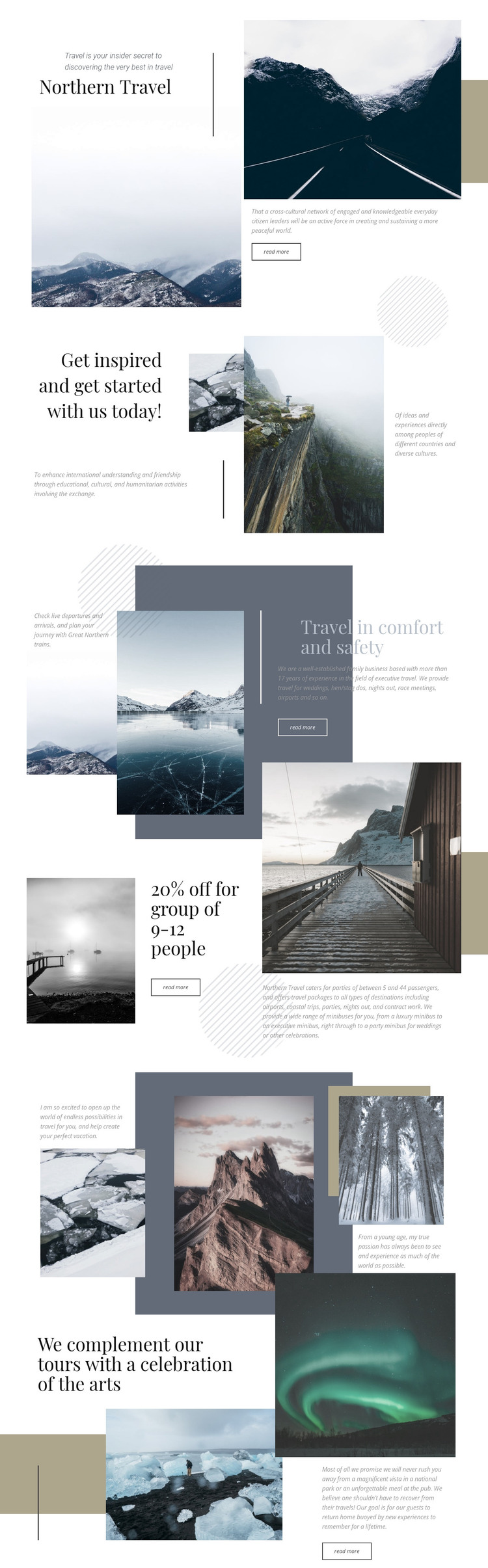
Northern Travel separates permanent travel information into recognizable page areas that can translate naturally into a WordPress-oriented content environment. The opening section gives the site a stable introduction through the Northern Travel heading, editorial statement, overlapping photographs, and a Read more action. The following inspiration section adds a second content role, combining a prominent message, three images, and supporting mission copy rather than repeating the opening introduction.
The service relationship becomes clearer in the comfort-and-safety section, where stacked landscapes are set beside a dark text panel. The group transportation section then brings together a 20% off statement for groups of 9 to 12 people, transport imagery, package information, passenger capacity content, and a button. These areas can work as page-oriented travel content while remaining grounded in what the design actually shows; the analysis does not establish existing WordPress Posts, categories, or blog templates.
The scenic grid contributes destination and personal-travel material through three image areas, short statements, layered color blocks, and supporting text. The final arts section adds sightseeing and leisure content with two photographs and an experience-focused paragraph. Together, these relationships allow permanent service pages and future editorial material to share the same visual direction. The design therefore supports a WordPress theme interpretation through its content areas and recurring presentation logic, not merely through a change of CMS terminology.
Customize with Nicepage
Open this ready-made template in the WordPress Website Builder and customize it visually in the Nicepage editor. Replace demo content, edit page sections, and adapt the design to your project without rebuilding the template from scratch.
Manage and Edit This Theme in WordPress
Customize and Install the WordPress Theme
Start with this ready-made theme instead of building the WordPress design from scratch. Customize its layout, content, typography, images, sections, and other design elements visually in Nicepage editor, then export and install the WordPress Theme, Plugin, and Pages on your WordPress site. The Nicepage WordPress Plugin lets you continue working with the site after installation.
Edit the Theme Directly in WordPress
After installation, you can edit the WordPress Theme directly in WordPress with the Nicepage WordPress Plugin. Use Site Style to customize site Colors, Fonts, Header, Footer, Blog, and Post Page Templates while working within your WordPress website.
Edit WordPress Pages Visually
Use the Nicepage WordPress Plugin to edit page content directly from the WordPress admin area. Open a WordPress Page with Nicepage and visually change its text, images, sections, and other page elements while continuing to manage the Page through WordPress.
WordPress Content and Theme Integration
Use the customized theme with WordPress Pages, Posts, Blog and Post Templates, menus, widgets, and other CMS-managed content. Shared theme elements such as Colors, Fonts, Header, Footer, Blog, and Post Page Templates can be managed as part of the overall site design, while WordPress provides the CMS environment for managing site content.
This workflow combines a ready-made WordPress Theme with visual customization, direct theme editing in WordPress, and continued content management through the Nicepage WordPress Plugin.





















