
Season Winter Sports WordPress Theme
Edit Template Offline
2. Create new page and search for id 23145
Edit Template Online
Create Awesome Websites


Free Nicepage Builder
Keywords
Destination Panels and Editorial Content Fit a Managed Resort Theme
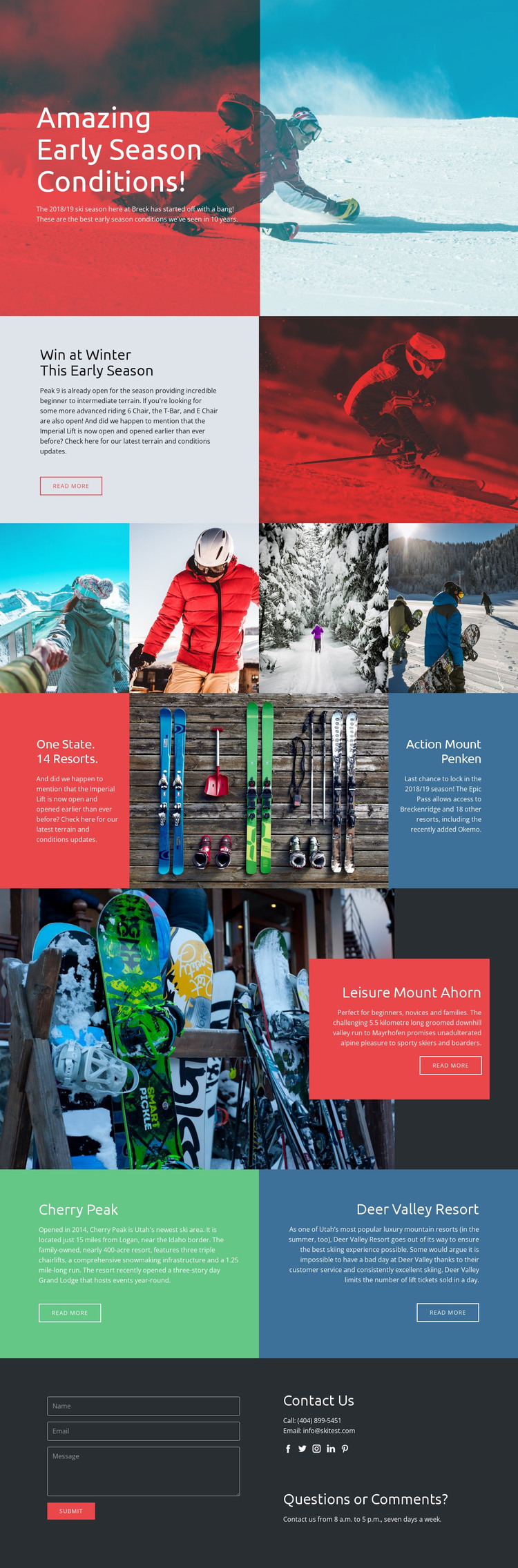
The page separates permanent resort information into clear content areas that can be interpreted as managed page content. The early-season hero and terrain panel provide an informational introduction, while the four-image gallery supplies a visual section for ski and snowboard photography. The three connected tiles add a compact promotional unit, giving the design a place for resort-count or pass-related messaging without changing the main page direction.
The destination sections offer a different content relationship. Mount Ahorn is presented as a single featured location with a large image, description, and action, whereas Cherry Peak and Deer Valley Resort appear as parallel panels. That distinction can help a resort-oriented WordPress project separate a highlighted destination from comparable location content. The analysis confirms these visible sections, but it does not verify WordPress Posts, categories, or blog structures, so those should not be treated as existing template components.
The contact block provides a page-oriented closing area for inquiries, combining a form with contact details, social links, and questions content. In a WordPress-managed project, these permanent information zones could remain part of the theme’s visual system while their text and images are adapted to the actual resort or travel organization. The result is a content interpretation based on destination pages, promotional sections, visual media, and contact communication rather than on CMS terminology alone.
Customize with Nicepage
Open this ready-made template in the WordPress Website Builder and customize it visually in the Nicepage editor. Replace demo content, edit page sections, and adapt the design to your project without rebuilding the template from scratch.
Manage and Edit This Theme in WordPress
Customize and Install the WordPress Theme
Start with this ready-made theme instead of building the WordPress design from scratch. Customize its layout, content, typography, images, sections, and other design elements visually in Nicepage editor, then export and install the WordPress Theme, Plugin, and Pages on your WordPress site. The Nicepage WordPress Plugin lets you continue working with the site after installation.
Edit the Theme Directly in WordPress
After installation, you can edit the WordPress Theme directly in WordPress with the Nicepage WordPress Plugin. Use Site Style to customize site Colors, Fonts, Header, Footer, Blog, and Post Page Templates while working within your WordPress website.
Edit WordPress Pages Visually
Use the Nicepage WordPress Plugin to edit page content directly from the WordPress admin area. Open a WordPress Page with Nicepage and visually change its text, images, sections, and other page elements while continuing to manage the Page through WordPress.
WordPress Content and Theme Integration
Use the customized theme with WordPress Pages, Posts, Blog and Post Templates, menus, widgets, and other CMS-managed content. Shared theme elements such as Colors, Fonts, Header, Footer, Blog, and Post Page Templates can be managed as part of the overall site design, while WordPress provides the CMS environment for managing site content.
This workflow combines a ready-made WordPress Theme with visual customization, direct theme editing in WordPress, and continued content management through the Nicepage WordPress Plugin.





















