
Guided backpacking trips WordPress Theme


Edit Template Offline
2. Create new page and search for id 19196
Edit Template Online
Create Awesome Websites


Free Nicepage Builder
Keywords
Destination and Trip Content Fit the Theme’s Page-Oriented Structure
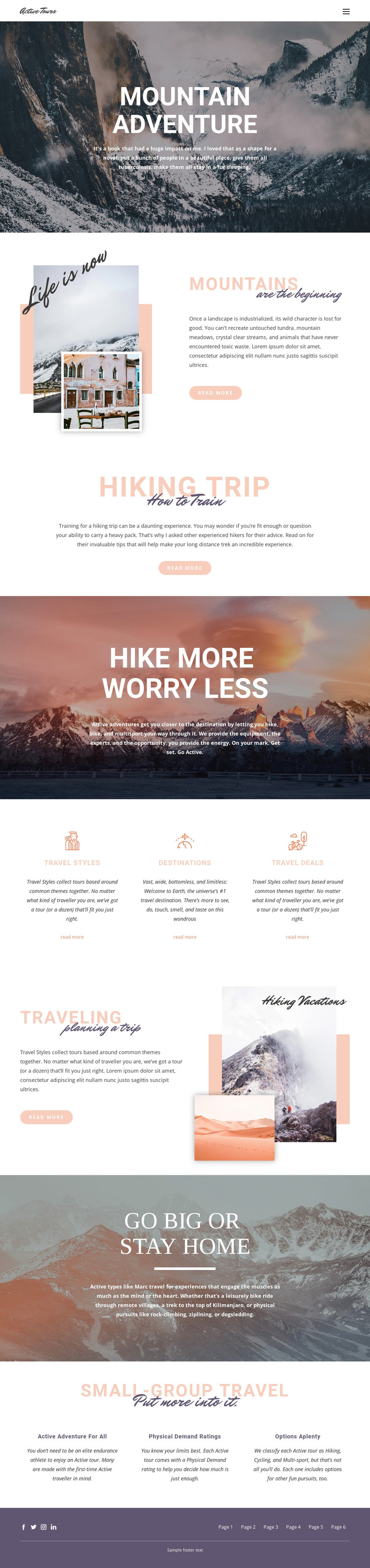
The page separates permanent travel information into recognizable areas that can translate naturally into a WordPress-managed site. Mountains, Hiking Trip, and Traveling provide different editorial subjects: destination inspiration, activity preparation, and planning guidance. Together they give the design more range than a single promotional statement, while the read-more links indicate places where visitors can continue into more detailed content when those destinations or topics are developed.
Travel Styles, Destinations, and Travel Deals are especially useful as recurring content groupings. Their three-column presentation makes the categories easy to distinguish visually, while the mountain imagery keeps them within one shared theme. The Small-group travel section offers another page-oriented content relationship through Active adventure for all, Physical Demand ratings, and Options aplenty. These labels can frame future explanations of trip choice without asserting that WordPress Posts, categories, or blog templates already exist in the source design.
The six-link header and footer support movement among related content areas, and the footer’s Facebook, Twitter, Instagram, and LinkedIn icons provide a defined location for social connections. In a WordPress theme implementation, the main advantage is the combination of clear permanent information zones and a repeatable visual language: scenic banners for emphasis, split image-text sections for explanation, and equal columns for grouped travel options. The CMS can then manage the evolving content while this design keeps its mountain-focused character.
Customize with Nicepage
Open this ready-made template in the WordPress Website Builder and customize it visually in the Nicepage editor. Replace demo content, edit page sections, and adapt the design to your project without rebuilding the template from scratch.
Manage and Edit This Theme in WordPress
Customize and Install the WordPress Theme
Start with this ready-made theme instead of building the WordPress design from scratch. Customize its layout, content, typography, images, sections, and other design elements visually in Nicepage editor, then export and install the WordPress Theme, Plugin, and Pages on your WordPress site. The Nicepage WordPress Plugin lets you continue working with the site after installation.
Edit the Theme Directly in WordPress
After installation, you can edit the WordPress Theme directly in WordPress with the Nicepage WordPress Plugin. Use Site Style to customize site Colors, Fonts, Header, Footer, Blog, and Post Page Templates while working within your WordPress website.
Edit WordPress Pages Visually
Use the Nicepage WordPress Plugin to edit page content directly from the WordPress admin area. Open a WordPress Page with Nicepage and visually change its text, images, sections, and other page elements while continuing to manage the Page through WordPress.
WordPress Content and Theme Integration
Use the customized theme with WordPress Pages, Posts, Blog and Post Templates, menus, widgets, and other CMS-managed content. Shared theme elements such as Colors, Fonts, Header, Footer, Blog, and Post Page Templates can be managed as part of the overall site design, while WordPress provides the CMS environment for managing site content.
This workflow combines a ready-made WordPress Theme with visual customization, direct theme editing in WordPress, and continued content management through the Nicepage WordPress Plugin.





















