
We develop and help you WordPress Theme


Edit Template Offline
2. Create new page and search for id 182250
Edit Template Online
Create Awesome Websites


Free Nicepage Builder
Keywords
Page Content, Repeated Services, and Reviews Fit a WordPress Theme Structure
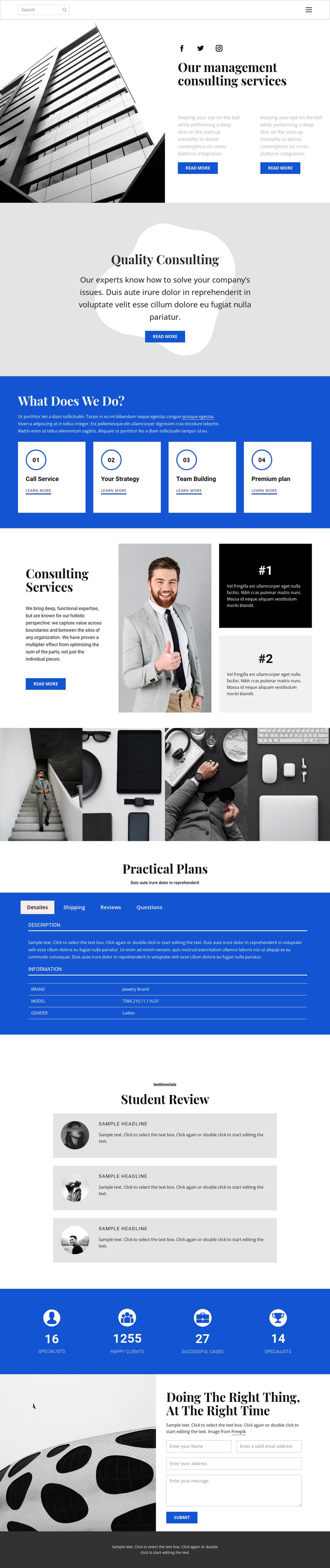
The page-oriented content is organized around several permanent information areas that can work together in a WordPress-managed consulting site. The opening split section gives the main page a clear introduction to management consulting, pairing an architectural photograph with a heading, supporting copy, and read-more links. The Quality Consulting band then isolates a related subject, while the four repeated service cards present Call Service, Your Strategy, Team Building, and Premium plan in a consistent content pattern.
The three-part Consulting Services area can hold another substantial page section because its text panel, central photograph, and two numbered highlights explain the subject through both copy and visual emphasis. The four-image workplace gallery offers a separate image-led area, while the three testimonial cards create a repeated review structure. These relationships are useful for a WordPress theme because permanent consulting information and recurring proof content can remain visually coordinated without treating sample names or statements as verified business data.
The Practical Plans tabs add compact page content for Details, Shipping, Reviews, and Questions, although the sample product-style wording should be replaced if it does not match the final consulting project. A blue metrics band supplies four displayed numeric items, and the final image-and-form section provides a natural inquiry area. Shared navigation, search, social links, and the dark footer complete the page-oriented theme context, leaving room for future editorial or service content without claiming that such content already exists.
Customize with Nicepage
Open this ready-made template in the WordPress Website Builder and customize it visually in the Nicepage editor. Replace demo content, edit page sections, and adapt the design to your project without rebuilding the template from scratch.
Manage and Edit This Theme in WordPress
Customize and Install the WordPress Theme
Start with this ready-made theme instead of building the WordPress design from scratch. Customize its layout, content, typography, images, sections, and other design elements visually in Nicepage editor, then export and install the WordPress Theme, Plugin, and Pages on your WordPress site. The Nicepage WordPress Plugin lets you continue working with the site after installation.
Edit the Theme Directly in WordPress
After installation, you can edit the WordPress Theme directly in WordPress with the Nicepage WordPress Plugin. Use Site Style to customize site Colors, Fonts, Header, Footer, Blog, and Post Page Templates while working within your WordPress website.
Edit WordPress Pages Visually
Use the Nicepage WordPress Plugin to edit page content directly from the WordPress admin area. Open a WordPress Page with Nicepage and visually change its text, images, sections, and other page elements while continuing to manage the Page through WordPress.
WordPress Content and Theme Integration
Use the customized theme with WordPress Pages, Posts, Blog and Post Templates, menus, widgets, and other CMS-managed content. Shared theme elements such as Colors, Fonts, Header, Footer, Blog, and Post Page Templates can be managed as part of the overall site design, while WordPress provides the CMS environment for managing site content.
This workflow combines a ready-made WordPress Theme with visual customization, direct theme editing in WordPress, and continued content management through the Nicepage WordPress Plugin.





















